


Exit
  • Global community
    • Language:
      • Deutsch
      • English
      • EspaƱol
      • FranƧais
      • PortuguĆŖs
  • ę—„ęœ¬čŖžć‚³ćƒŸćƒ„ćƒ‹ćƒ†ć‚£
  • ķ•œźµ­ ģ»¤ė®¤ė‹ˆķ‹°
0

Shortcuts for Character Styles

Community Beginner ,
Jul 17, 2020 Jul 17, 2020

So here's my conundrum... I have a typesetting job  (for print) and all of my output files need to be in a layered tif file format with editable text. Indesign wont handle tif files and I can't export anything from there that will give me editable text in Photoshop. So, I'm stuck working strictly in Photoshop, which has less than great automation options for character styles. Illustrator also has the same weak character style sauce. I really want to be able to program shortcuts for character styles like you can do in InDesign and then program the corresponding shortcuts into my mouse. It would make my work flow a breeze.  Anyone have any ideas for how i can make this happen?  This is essentially what I am trying to do. You probably can't see all of the formatting but it gives you an idea.THE LAST VAMPIRE ON EARTHLettered_Page3.jpg
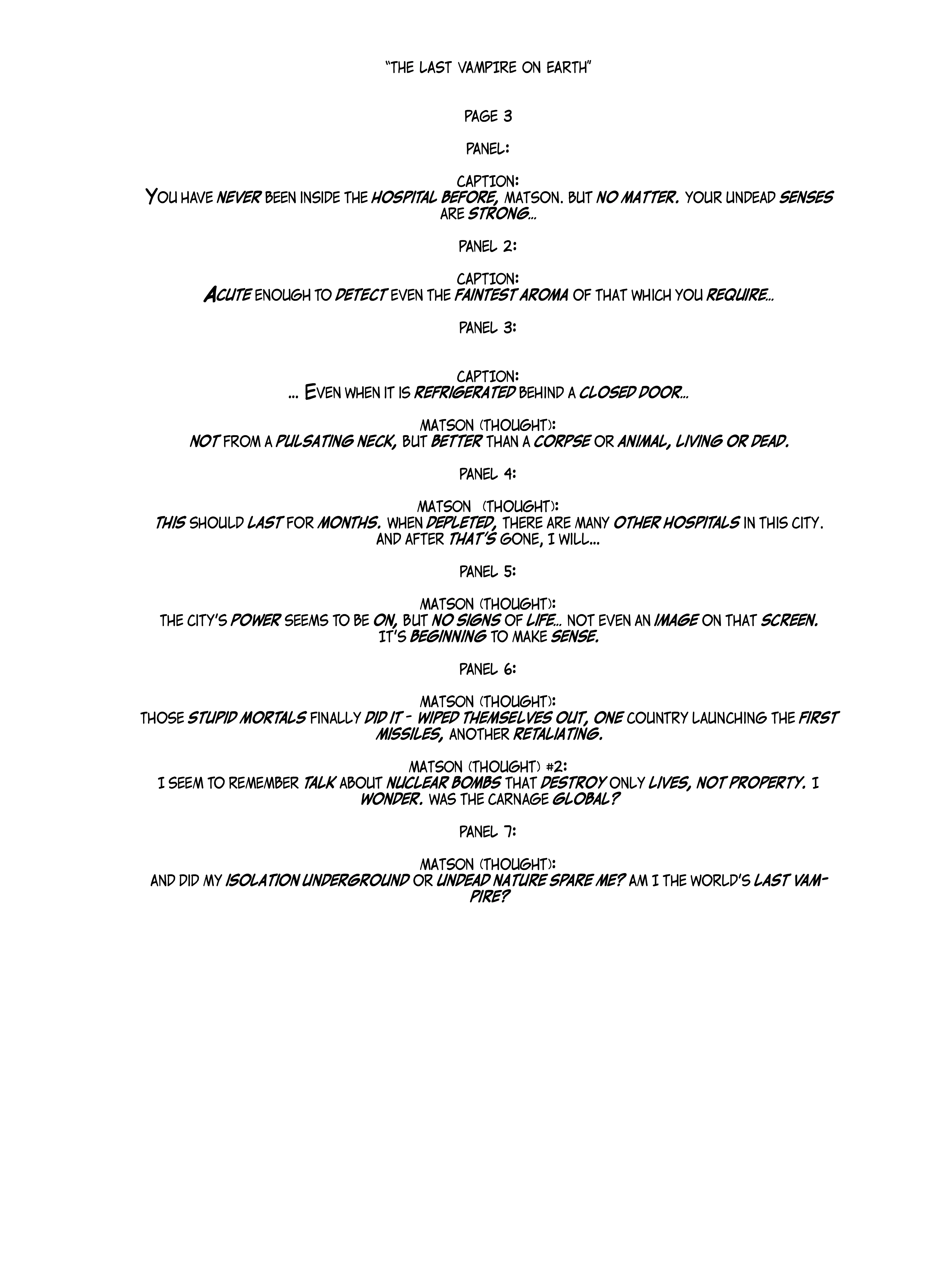


Also, adobe folks can you add this to the list of feature requests? 


795
Translate
Report
Community guidelines
Be kind and respectful, give credit to the original source of content, and search for duplicates before posting. Learn more
community guidelines
Adobe
Community Expert ,
Jul 17, 2020 Jul 17, 2020

You can record an action to apply the style and assign a keyboard shortcut to the action.


mine.png

Translate
Report
Community guidelines
Be kind and respectful, give credit to the original source of content, and search for duplicates before posting. Learn more
community guidelines
Community Beginner ,
Jul 18, 2020 Jul 18, 2020

Thanks for taking the time to help me. The action panel lets me add one character style to the entire text area. I need to apply 7 different character styles in multiple places in one text area. Photoshop doesn't seem to want to let me make action changes to selected bits of text.


example.jpg


Translate
Report
Community guidelines
Be kind and respectful, give credit to the original source of content, and search for duplicates before posting. Learn more
community guidelines
Community Expert ,
Jul 17, 2020 Jul 17, 2020

"Indesign wont handle tif files"


What do you mean InDesign won't handle tiff files?


Photoshop is not a replacement for InDesign and does not have the same typography controls. It should not be used for the page layout.


~ Jane


Translate
Report
Community guidelines
Be kind and respectful, give credit to the original source of content, and search for duplicates before posting. Learn more
community guidelines
Community Beginner ,
Jul 18, 2020 Jul 18, 2020

Agreed. However, Indesign allows users to create shortcuts for character styles. Photoshop does not. Hence my problem.
I mean, I could ask my client to switch to inDesign but I don't think that would go over so well.

Translate
Report
Community guidelines
Be kind and respectful, give credit to the original source of content, and search for duplicates before posting. Learn more
community guidelines
Community Expert ,
Jul 18, 2020 Jul 18, 2020

That you specifically mention 'Character Style' makes me think that you are aware of the Character Styles panel. I'm thinking that you can set up as many styles as you want.  Select a Type layer and click on the relevant style, and job done.  Am I missing something?   I can't think why you wouldn't be abole to apply those styles via an Action.

Trevor_Dennis_0-1595137816967.png


Translate
Report
Community guidelines
Be kind and respectful, give credit to the original source of content, and search for duplicates before posting. Learn more
community guidelines
Community Beginner ,
Jul 20, 2020 Jul 20, 2020
LATEST

I'm aware that I can click on a character style to apply them. I want them to have shortcuts so I can press a mouse button (see photo) Programmable ButtonsProgrammable Buttons


to apply them, that would save more time then selecting peices of text then moving the mouse to click apply. Actions were suggested because they come with the shortcuts that styles don't have. That would actually work if actions would let you apply them to small sections of the text rather than the whole body of text. I have 7 different character styles and one sentence could have as many as 20 style settings. 

Translate
Report
Community guidelines
Be kind and respectful, give credit to the original source of content, and search for duplicates before posting. Learn more
community guidelines
Community Expert ,
Jul 18, 2020 Jul 18, 2020

Why not output to PDF for printing so your text is not rasterised?

Translate
Report
Community guidelines
Be kind and respectful, give credit to the original source of content, and search for duplicates before posting. Learn more
community guidelines
Community Beginner ,
Jul 20, 2020 Jul 20, 2020

I would do that but my client needs a tif file. I would copy from a pdf into photoshop but photoshop loses the formatting. 

Translate
Report
Community guidelines
Be kind and respectful, give credit to the original source of content, and search for duplicates before posting. Learn more
community guidelines