


navidm33087169
New Participant
April 25, 2024
Question

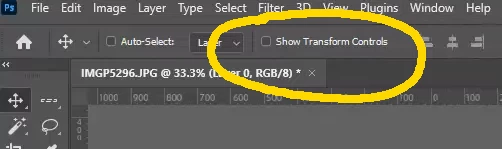
Show transform controls missing from top bar

  • April 25, 2024
  • 6 replies
  • 2525 views

I am on version 25.7.0 and the "show transform controls" option is missing from the top bar now and instead there is a gear icon that you have to open with 4 options and click it in there. Is there any way I can get that back in the top bar as shown in the image below?
6 replies

New Participant
August 21, 2025

Photoshop 26.9 doesn't have the option to "Show Transform Controls" as suggested. And the "Ctrl/Cmd+H" hides everything, which I don't want. 


The Move Tool seems to automatically Edit the layer as "Free Transform" and not able to exit from that mode when tyring to disable it from the Edit Menu or applying the keyboard shortcut.


Anyone have luck with fixing this in PS 26.9?

New Participant
June 15, 2025

i only have 3 options now and show transform controls is not one of them!!


Trevor.Dennis
Adobe Expert
June 15, 2025

Hi Leone.  You need the Move tool to be selected.  Some of these things have changed in recent years. so it is easy to miss things.


New Participant
August 21, 2025

Hi Leone,

I wish your suggestion worked. But that option doesn't appear in PS 26.9:

The Move Tool appears to trigger Free Transform from the Edit menu and I can't deactivate it while the Move Tool is selected.

Anyone have luck disabling Free Transform from the Move Tool? 

New Participant
August 1, 2024

i REALLY wish adobe gave us the option to organize this button how we like. No part of me cares about the UI looking clean or simplified. I toggle this button constantly, and hiding guides and grids at the same time is not ideal. 


Adobe once again choosing aesthetics over functionality. Once again ignoring experienced users, and focused on newcomers. 


For the amount i toggle this button, i've always wished it was bigger instead of a tiny checkbox. I work on a 32" Wacom touchscreen, so it's taken more focus than I'd like to go back n forth. THAT'S the update i wanted, not an extra, meticulous step. 

New Participant
August 9, 2024

+1 for this change... I hate it. Please bring it back... two clicks is so annoying. I use it all the time.

Ed Malaga
New Participant
May 31, 2024

Of course I can use CTRL+H to hide / show them, but it's a Hide Everything command, so I also lose things like ruler lines. This is a huge step back in user experience, using 2 clicks for something you use to make in a single click and forcing a behaviour of hiding things you may not need to be hidden. Not a wise move, Adobe. Bring it back!

Jeff Arola
Adobe Expert
April 26, 2024

Cmd+H (toggle View>Extras) will hide the Transform Controls temporarily.


Added:

Ctrl+H on the Windows side

navidm33087169
New Participant
April 29, 2024

Thank you. I'm on Windows so ctrl+H seems to do the same thing and it helps a lot. Appreciate the help.

Jeff Arola
Adobe Expert
April 25, 2024

Yes now you have to click on the Gear icon in the Tool Options Bar


navidm33087169
New Participant
April 26, 2024

Thank you but that was what I was trying to avoid and wanted to rather have it show by itself in the top bar same as before the update and avoid opening the gear every single time. I probably have to check it on/off more than 40 times a day and it gets tiresome having an extra step added.