nikunj.m
Legend
October 14, 2024
Frage

Show us your skills with Photoshop's new Distraction Removal tool!

  • October 14, 2024
  • 54 Antworten
  • 11510 Ansichten


Hello Everyone,


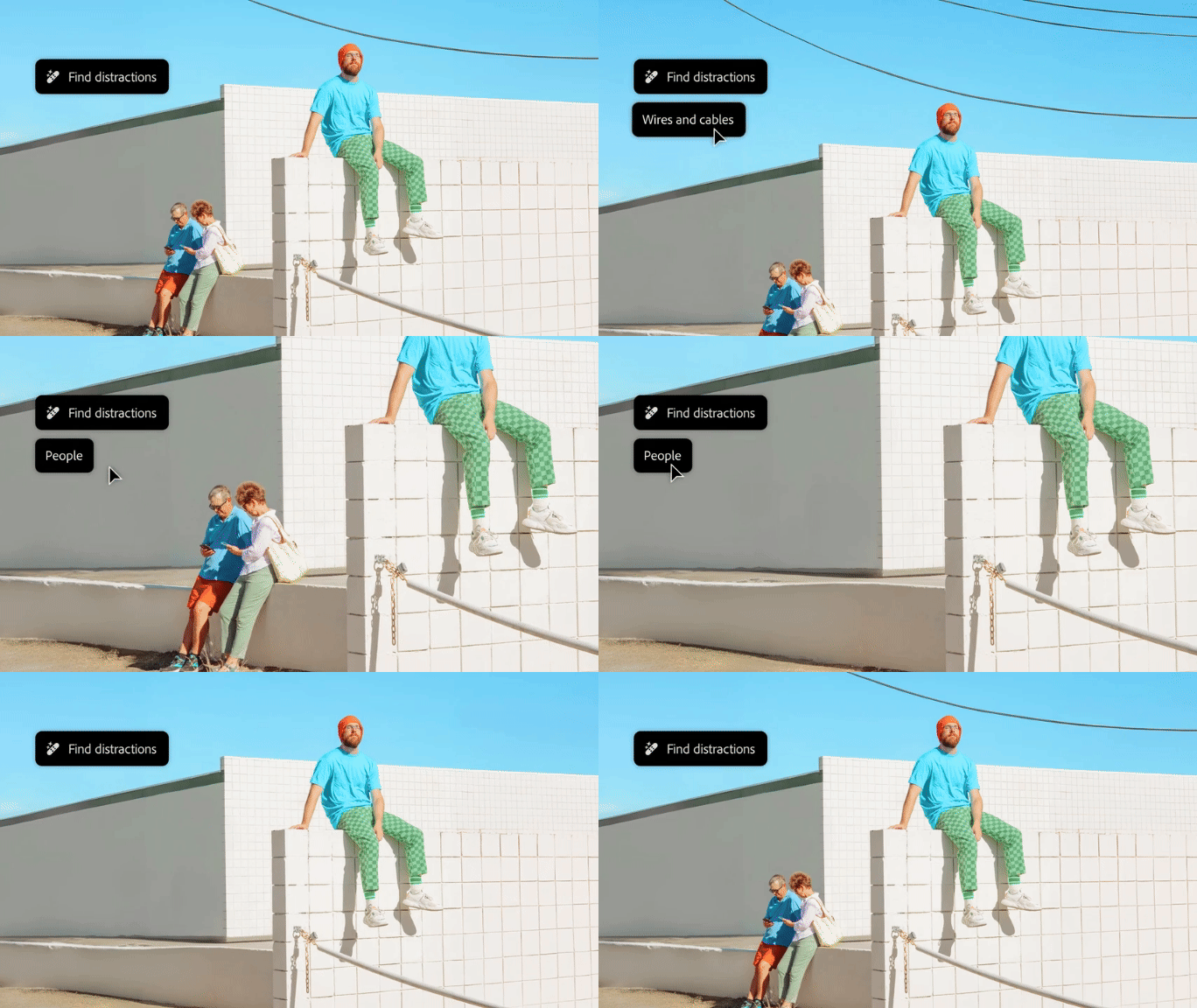
We’re thrilled to introduce the new Distraction Removal feature in Photoshop 26.0! With just a few clicks, you can effortlessly enhance your images by automatically removing unwanted elements like people, wires, cables, and imperfections. Let the Remove tool take care of the details so your subjects can truly shine.


Try it in the App

Distraction Removal with Remove Tool

To learn how to use the Remove tool and the new Remove Distractions, click here.


Simply select the Remove tool (nested with the Spot Healing tool), then choose Find Distractions from the Options menu. Pick either Wires and Cables or People based on your image.


Photoshop will automatically remove wires or let you edit people as needed.


You can select the Mode for how you want Photoshop to process the image: with Generative AI, Without AI, or leave it on Auto.


Give it a go and show us your Before & After magic! We can’t wait to see the incredible transformations you achieve with the Distraction Removal Tool!



If this was helpful, please click the  Upvote icon in the top left corner of this post. Your feedback helps us improve the experience. Thank you!

Submit your creation? Click 'Reply' below to post.

Click 'Follow' below to bookmark this post for easy reference.


54 Antworten

Cheizer
Participating Frequently
October 31, 2024

@mj
Community Expert
Community Expert
October 31, 2024

Impressive!

lambiloon
Community Expert
Community Expert
October 31, 2024

Ali Sajjad / Graphic Design Trainer / Freelancer / Adobe Certified Professional
didiermazier
Community Expert
Community Expert
October 30, 2024

Works fine. Look how the chairs were placed in the background

fbeaume
Community Expert
Community Expert
November 4, 2024

Impressionant!

Jeff Arola
Community Expert
Community Expert
October 30, 2024


fbeaume
Community Expert
Community Expert
November 4, 2024

well done!

Participant
October 30, 2024

Request for this feature to be more developed on the web application. I only have the option to remove people, not wires - thanks!

GeekyGirlRex7295714
Community Expert
Community Expert
October 29, 2024


Writer | Developer | Facilitator | Geek!
@mj
Community Expert
Community Expert
October 30, 2024

It's got a photobomb removal button? Cool 🤣

Greg_S.
Community Expert
Community Expert
October 28, 2024

It has saved me from rising at 5 a.m. to get this view of the Spanish Steps:


@mj
Community Expert
Community Expert
October 28, 2024

Pesky tourists!

JR Boulay
Community Expert
Community Expert
October 27, 2024

Ljubljana


Acrobate du PDF, InDesigner et Photoshopographe
fbeaume
Community Expert
Community Expert
October 28, 2024

Remove distraction is on the point here! Great job!

@mj
Community Expert
Community Expert
October 30, 2024

Agreed!

Christelle RD
Community Expert
Community Expert
October 24, 2024


Sk. Arif Hossain
Participating Frequently
October 24, 2024

Nicely done 🙂

Sk. Arif Hossain
Christelle RD
Community Expert
Community Expert
October 24, 2024

Thank you Sk. Arif Hossain!
Glad you like 🙂

Amybeth M. ACI G7
Community Expert
Community Expert
October 24, 2024

Amybeth MACI G7 Certified Expert
fbeaume
Community Expert
Community Expert
October 28, 2024

generative added a selfie arm on the left background... Still a bit distractive but how to don't focus on Master Draplin's Face 😉
Well done!