


Inspiring
December 11, 2018
Question

Smooth stroke not working

  • December 11, 2018
  • 4 replies
  • 1168 views

About half the time or more the new smooth stroke feature doesn't work for me when I'm in brush mode. It's grayed out. It comes back on again when I switch the tool to pencil though.
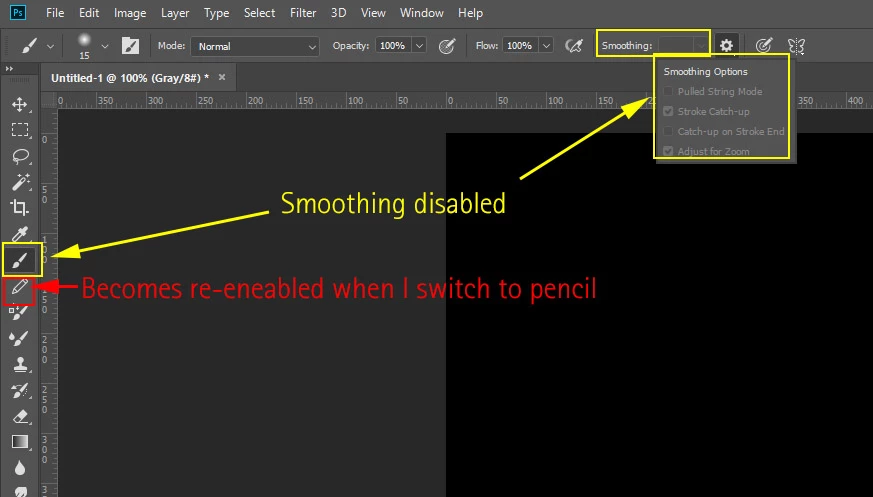
Also, why isn't this feature available at all for tools such as Dodge and Burn?

This topic has been closed for replies.

4 replies

New Participant
July 21, 2023

New Participant
July 21, 2023

New Participant
July 21, 2023

You haven't selected this function yet.

Sebastian Bleak
Community Expert
December 11, 2018

Hi Geoff

I had the same issue earlier today and this is how I fixed it in a couple minutes.

Anytime my Adobe apps start acting funny, I go through this process and it fixes it most of the time.

Uninstall photoshop BUT make sure to choose the option “Yes, remove app preference”.

Once that process finishes, start the installation process. If you have multiple versions installed, look into the “Advanced Options”, uncheck “Import previous settings and preferences” and choose to “Remove old versions”.

Hope you find this helpful!

Sebastian

December 11, 2018

Well said.

Bojan Živković11378569
Community Expert
December 11, 2018

Are you on Windows? Photoshop version 20.0.1? It works fine with options available for Brush and for Pencil. Try to reset tool or even preferences if still does not work.

Inspiring
December 11, 2018

It came back after switching back and forth a few times between pencil and brush. Weird. I'm on Windows.