


Inspiring
July 12, 2023
Answered

Start Adobe Actions via JSX Script (without interruption)

  • July 12, 2023
  • 1 reply
  • 1090 views

Hey guys,


I am new to the Photoshop scripting (did some JSX scripts for Illustrator/InDesign) and have read some guides:

ActionReference / charIDToTypeID / stringIDToTypeID 

- What ActionManager is (series) / Github abstraction

- Script(ing)Listener plugin / YouTube on it (by another member from here)

- Photoshop Docs Github / Github (somewhat official)


Ah... my question 😅 - I am trying to start an Action (not from ActionManager or using Application.executeAction), but from Application.doAction.


I am using this (very basic and sample code) to start an action from an .atn file:


// loading the action file into Photoshop
var actionFile = new File("/path/to/action/MyActionSet.atn");
app.load(actionFile);

// using doAction to start it
app.doAction("MyAction", "MyActionSet");


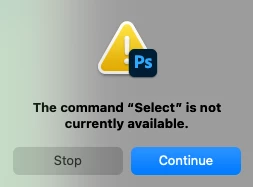
The issue which I am facing is that "MyAction" might fail due to missing files or any other reason (I am not certain what all cases for failure are here). When such a failure occurs Photoshop displays a pop-up, usually with the error/s:

- "The command “Select” is not currently available."
- "Could not place the document because actions that reference files can only be played on the same platform on which they were recorded."
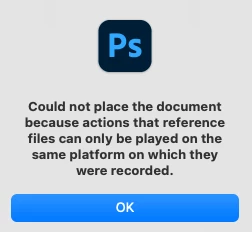
Those errors seem to be explanatory, but the fact that a pop-up appears and user interaction is required to proceed makes the process unusable to me.


I would like to start the action and if anything fails:
- either to receive feedback for it and stop the execution (exception in JSX maybe?)

- or if receiving feedback is not possible to not have to deal with the pop-up and my JSX script to continue executing

Is this possible? I was thinking that it was maybe possible using Application.executeAction, but my assumption are on the basis of forum posts which do not do this specifically and it's hard (as I imagine it is for everyone as there are no official docs on this) to connect the dots on its usage.


Finally, I've tried using ChatGPT but it doesn't produce any meaning answers on this:


// Specify the action name and set name
var actionName = "MyAction";
var setName = "MyActionSet";

// Check if the action set is already loaded, and load it if necessary
if (!app.actions.getByName(setName)) {
  var actionFile = new File("/path/to/your/action.atn");
  app.load(actionFile);
}

// Find the action reference
var actionReference = new ActionReference();
actionReference.putName(charIDToTypeID("ASet"), setName);
actionReference.putName(charIDToTypeID("Actn"), actionName);

// Execute the action
var actionDescriptor = new ActionDescriptor();
actionDescriptor.putReference(charIDToTypeID("null"), actionReference);
executeAction(charIDToTypeID("Dcmn"), actionDescriptor, DialogModes.NO);


Which does not work. My thoughts are that specifically this "DialogModes.NO" does the trick of not popping any User Required Pop-Ups.


** Edit 1:
I pieced JSX code to run the script using executeAction instead of doAction.

However, I am still getting pop-ups even with the option DialogModes.NO:


function runActionHere(action, actionSet) {
  var actionRef = new ActionReference();
  actionRef.putName(charIDToTypeID("Actn"), action);
  actionRef.putName(charIDToTypeID("ASet"), actionSet);
   
  var actionDesc = new ActionDescriptor();
  actionDesc.putReference(charIDToTypeID("null"), actionRef);

  app.executeAction(
    charIDToTypeID("Ply "),
    actionDesc,
    DialogModes.NO
  );    
}

  // disable here
  app.displayDialogs = DialogModes.NO;

  try {
    runActionHere("MyAction", "MyActionSet");
  } catch(e) {
    $.writeln("Error occurred:\n" + e);
  }


** Edit 2:
Managed to do this after a reboot of my machine. For me, the issue seems to be related with the initial Photoshop installation and that it didn't considered some settings set by the script. Answer contains the code

This topic has been closed for replies.
Correct answer JSuX

Hey @c.pfaffenbichler, thanks for taking the time to check my issue!


I found out that this script does what I need:

app.displayDialogs = DialogModes.NO;
app.playbackDisplayDialogs = DialogModes.NO;

function runActionHere(action, actionSet) {
  var actionRef = new ActionReference();
  actionRef.putName(charIDToTypeID("Actn"), action);
  actionRef.putName(charIDToTypeID("ASet"), actionSet);

  var actionDesc = new ActionDescriptor();
  actionDesc.putReference(charIDToTypeID("null"), actionRef);

  try {
    app.executeAction(
      charIDToTypeID("Ply "),
      actionDesc,
      DialogModes.NO
    );
    return true;
  } catch (e) {
    $.writeln("Error " + e);
    return false;
  }
}

When I was running this for the first time after a fresh Photoshop installation on macOs Monterey (12.6) I was getting errors.

After I restarted the machine and started trying the script again on the next day no errors or pop-ups were shown.


My guess is that some settings from the script are not considered on the first install due to some 'unknown' mechanism (to me). I know that Illustrator has a settings file globally stored and read on each opening (which reads user preferences, etc...) so I think that Photoshop also has something similar which takes prevalence in the initial load after installation.


To further on my reply I also played with the ScriptListener plugin and built a logic for running actions.

It first cleans any actionset with the same name that we'll try to load, then loads the action and finally runs an action from the set.

The code for deleting an action set is here (as recorded by ScriptingListener plugin and slightly refactored for readibility)

function deleteActionSet(actionSetName) {
    var actionSetRef = new ActionReference();
    actionSetRef.putName(stringIDToTypeID("actionSet"), actionSetName);

    var actionSetDesc = new ActionDescriptor();
    actionSetDesc.putReference(stringIDToTypeID("null"), actionSetRef);

    try {
        app.executeAction(
            stringIDToTypeID("delete"),
            actionSetDesc,
            DialogModes.NO
        );
        return true;
    } catch (e) {
        $.writeln("Error while deleting action set " + actionSetName + "\n" + e);
        return false;
    }
}


1 reply

c.pfaffenbichler
Community Expert
Community Expert
July 12, 2023

Please provide meaningful information, please post screenshots with the pertinent Panels (Toolbar, Layers, Actions with the fully expanded Action, Channels. Options Bar, …) visible taken at the point of failure.


Are you using Actions created on Mac/Windows on a computer running the respectively different OS?

Are the images that are to be placed actually available at the exact same positions on the different machines (so on a server volume for example)? 

Have you considered doing the placing via a Script (which should be able to distinguish between the two platforms)? 


In any case I doubt it is feasible to hide the failure-alerts of an Action by starting the Action from a Script, so a full Script-approach might be preferable. 

JSuXAuthorCorrect answer
Inspiring
July 14, 2023

Hey @c.pfaffenbichler, thanks for taking the time to check my issue!


I found out that this script does what I need:

app.displayDialogs = DialogModes.NO;
app.playbackDisplayDialogs = DialogModes.NO;

function runActionHere(action, actionSet) {
  var actionRef = new ActionReference();
  actionRef.putName(charIDToTypeID("Actn"), action);
  actionRef.putName(charIDToTypeID("ASet"), actionSet);

  var actionDesc = new ActionDescriptor();
  actionDesc.putReference(charIDToTypeID("null"), actionRef);

  try {
    app.executeAction(
      charIDToTypeID("Ply "),
      actionDesc,
      DialogModes.NO
    );
    return true;
  } catch (e) {
    $.writeln("Error " + e);
    return false;
  }
}

When I was running this for the first time after a fresh Photoshop installation on macOs Monterey (12.6) I was getting errors.

After I restarted the machine and started trying the script again on the next day no errors or pop-ups were shown.


My guess is that some settings from the script are not considered on the first install due to some 'unknown' mechanism (to me). I know that Illustrator has a settings file globally stored and read on each opening (which reads user preferences, etc...) so I think that Photoshop also has something similar which takes prevalence in the initial load after installation.


To further on my reply I also played with the ScriptListener plugin and built a logic for running actions.

It first cleans any actionset with the same name that we'll try to load, then loads the action and finally runs an action from the set.

The code for deleting an action set is here (as recorded by ScriptingListener plugin and slightly refactored for readibility)

function deleteActionSet(actionSetName) {
    var actionSetRef = new ActionReference();
    actionSetRef.putName(stringIDToTypeID("actionSet"), actionSetName);

    var actionSetDesc = new ActionDescriptor();
    actionSetDesc.putReference(stringIDToTypeID("null"), actionSetRef);

    try {
        app.executeAction(
            stringIDToTypeID("delete"),
            actionSetDesc,
            DialogModes.NO
        );
        return true;
    } catch (e) {
        $.writeln("Error while deleting action set " + actionSetName + "\n" + e);
        return false;
    }
}


c.pfaffenbichler
Community Expert
Community Expert
July 14, 2023

Good to read you got it working. 


But »The command »Select« is not currently available« sounds to me like an Action is trying to address an object (Layer, Channel, …) via its name when no such element exists in the active Document. 

Which may be irrelevant in some cases, but in some it might lead to unintended results. 


Have you made progress with regard to »Could not place the document because actions that reference files can only be played on the same platform on which they were recorded.«?