

Participant
August 18, 2017
Answered

Straighten distorted text in an image file

  • August 18, 2017
  • 3 replies
  • 15794 views

I have a jpeg file where the texts in it are distorted due to scanning issues,

How can I use photoshop to straighten the text on the left side of the image?

This topic has been closed for replies.
Correct answer Trevor.Dennis

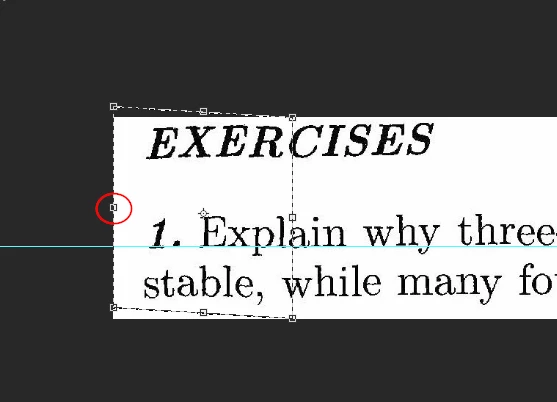
Drag down a guide to align with the good text.

Select just the problem area.

Use Free Transform, and hold down the Ctrl key while dragging up the centre left handle until that part of the text aligns with the guide.
3 replies

Participant
July 2, 2023

how to fix distorted text in an image


davescm
Community Expert
Community Expert
August 18, 2017

Hi

You could :

1. Make a selection of the left part of the text with the issue

2. Use Ctrl+J to copy it to a new layer

3. Right click and make that copy into a smart object

4. Use Transform Warp to bend it into shape

Dave

davescm
Community Expert
Community Expert
August 18, 2017

Having posted the Photoshop answer , as did Trevor, in reality  I wouldn't do either of the above.

I would drop it into Acrobat DC and use OCR to turn it into editable text and reformat slightly. Screenshot below:

Dave

Participant
August 18, 2017

So I need to do an OCR in Acrobat DC then reformat but what do you mean here by reformat?

Trevor.Dennis
Community Expert
Trevor.DennisCommunity ExpertCorrect answer
Community Expert
August 18, 2017

Drag down a guide to align with the good text.

Select just the problem area.

Use Free Transform, and hold down the Ctrl key while dragging up the centre left handle until that part of the text aligns with the guide.

Participant
August 14, 2023

I am editing some older scanned magazine articles, so redoing all of the text in them would not have made it look authentic. This was the perfect, easy solution for me. Thank you!