


Known Participant
September 18, 2025
Question

Strict Theoretical Color Separation in Photoshop – Is It Possible?

  • September 18, 2025
  • 3 replies
  • 772 views

I have not come across any option in Photoshop that can separate colors strictly according to theoretical principles.


Here’s the basic theory that should ideally be followed:

1. Tertiary colors: These are created by mixing primary and secondary colors, as shown in image (A). For example, orange is a mix of red and yellow. If red is completely removed, as in image (B), it should also be removed from orange, leaving only a shade of yellow.

2. Complete removal of primaries: If red, green, and blue are entirely removed from an image, as in image (C), the affected areas should appear gray. The luminance values should follow the correct order: blue (lowest), red, then green.


According to the standard grayscale conversion formula Y = 0.299R + 0.587G + 0.114B, the expected luminance values are:
 -Blue: 29
 -Red: 76
 -Green: 150
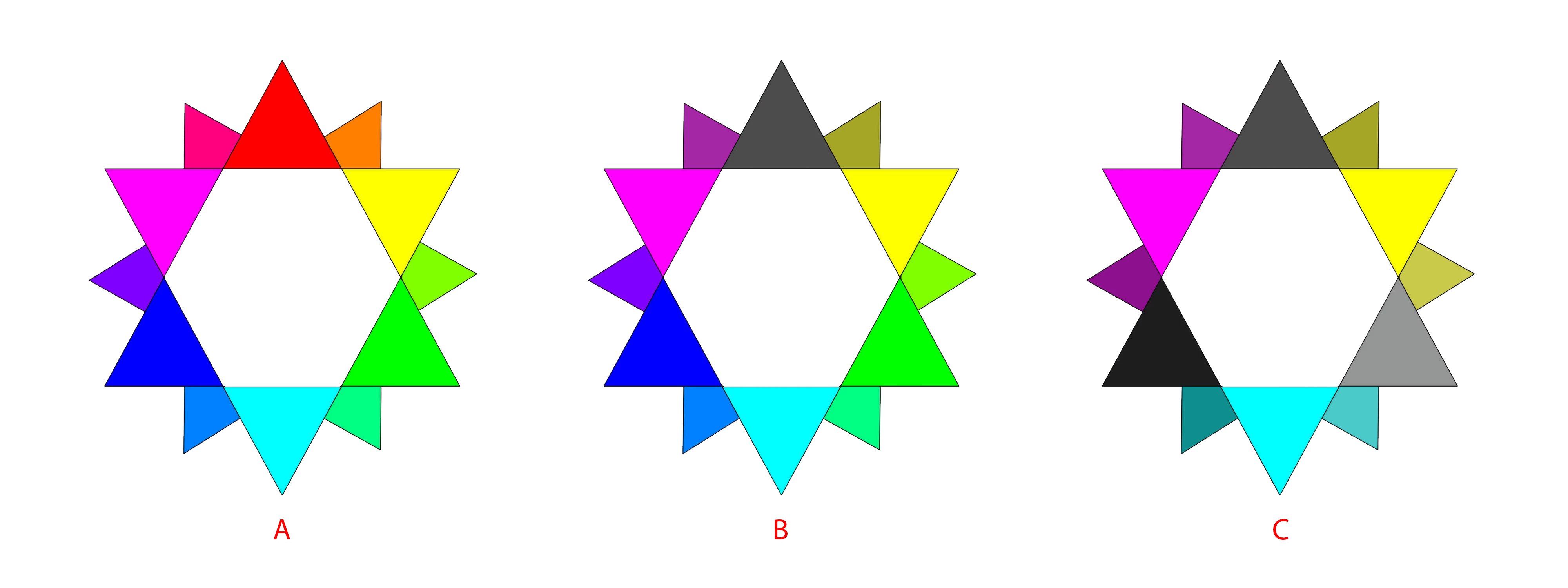
So far, I haven’t found any option in Photoshop that truly separates colors according to theory. Is there a recommended approach, workaround, or third-party solution that achieves this?

3 replies

c.pfaffenbichler
Community Expert
Community Expert
September 20, 2025

Known Participant
September 20, 2025

Thank you for your effort, sir — it's a very good attempt. However, I still notice a slight red and green tint in the gray gradation, which you can verify using a color picker tool. Additionally, the remaining gray areas don’t fully align with the standard grayscale conversion formula.

c.pfaffenbichler
Community Expert
Community Expert
September 19, 2025

Probably not exactly what you need, but still. 

Known Participant
September 19, 2025

Thank you for your reply. I have already tested a similar approach in Photoshop. The result looks close to what we want, but only because the example uses solid colors that are easy to identify. In practice, this method isn’t reliable—especially when applied to gradients, as shown in the example below—and it becomes even more challenging when the colors are less defined or difficult to identify.

I expected someone to point out an option in Photoshop for this, but am I asking for something that’s too difficult to achieve?

Legend
September 19, 2025

Colors are subjective. In theory, you could remove red by setting the R component of every RGB pixel to zero. In practice, that's going to be a mess, especially when you factor in different colorspaces.

Trevor.Dennis
Community Expert
Community Expert
September 18, 2025

I wonder if any of the Luminosity Masks would come close.


I only have Sven Stork's Luminosity Mask, but the Tony Kuper extension is supposed to be the goto tool.  You can contact Tony here


Known Participant
September 19, 2025

Thank you for your response. I don’t think a Luminosity Mask would solve the issue. Even with a proper mask, it doesn’t address the core requirement: separating colors accurately—for example, removing red from orange so that only a shade of yellow remains—while still maintaining the correct luminance value for red (76, based on the standard grayscale conversion formula).

I’m sure there must be an option in Photoshop that can achieve this, as it’s a very basic feature. So far, I’ve tested Hue/Saturation, Selective Color, and HSL in Camera Raw, but none achieve the expected result.