
June 12, 2021
Answered

Suggestion for additional toolbar feature

  • June 12, 2021
  • 2 replies
  • 582 views

To Whom This May Concern: Hopefullt, I am writing in the correct forum- if not, I'd like to know where I should drop this suggestion.

With my work I find that I need to switch color often and would like to suggest nore than the present two colors (foreground/background) available on the toolbar. This feature would certainly be supported by many, I would think.

That's it. Thank you and comments welcome. Take care all.
This topic has been closed for replies.
Correct answer Trevor.Dennis

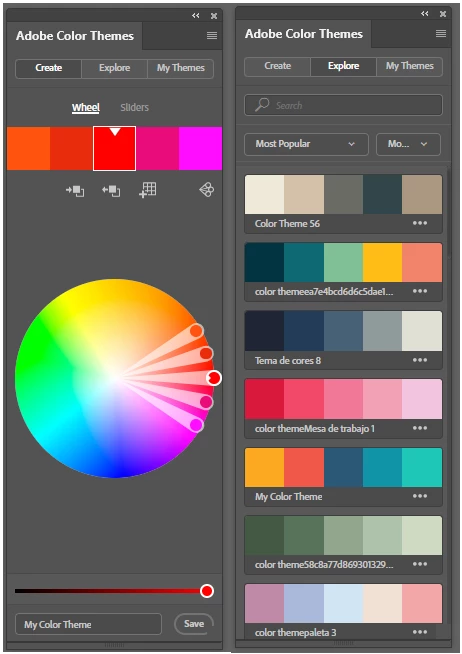
What a lot of illustrators do is create a palette inside the document window, and sample from it.  Or you could keep the Adobe Color Themes extension open and sample from that.  This has the very cool feature that you can save your palettes/themes to CC libraries and bring them up in the My Themes tab.


There are waaaay too many Photoshop art creating a color palette videos to choose from, so I'll let you do the choosing.

Some of these videos are essential viewing for digital artists and illustrators.

2 replies

Trevor.Dennis
Community Expert
Trevor.DennisCommunity ExpertCorrect answer
Community Expert
June 13, 2021

What a lot of illustrators do is create a palette inside the document window, and sample from it.  Or you could keep the Adobe Color Themes extension open and sample from that.  This has the very cool feature that you can save your palettes/themes to CC libraries and bring them up in the My Themes tab.


There are waaaay too many Photoshop art creating a color palette videos to choose from, so I'll let you do the choosing.

Some of these videos are essential viewing for digital artists and illustrators.

July 5, 2021

Hi, Trevor.Dennis-

Forgive the lateness of this reply. Thank you for the suggestions. It is amazing the number of things I still have to learn about Photoshop. Your answers seem to solve my problem and I will have to look into the Adobe Color themes thing.

Thank you again.

Sincerely,

Raziel Kainne

jane-e
Community Expert
Community Expert
June 13, 2021

Hi @18814189 


Suggestions can be made to Adobe here : https://feedback.photoshop.com/


Have you tried the adding Swatches to the Swatches panel? The foreground and background colors have many uses such a painting on a mask, creating a gradient that goes from the foreground to background, filters, the color that the eraser uses, etc. 


Most folks will use Swatches, the Color panel, the Color Picker, or CC Libraries for easy access to more colors.

https://helpx.adobe.com/photoshop/using/customizing-color-pickers-swatches.html


~ Jane

July 5, 2021

Thank you for answering my suggestion and I apologize for the lateness of this reply. I do leave the Swatches panel open but as I am always trying to vie for window space and the fewest number of clicks to open things, I was wondering if there were and easier way. Still, thank you again and I think I might have an answer to follow from @Trevor.Dennis.

Thanks again, Raziel Kainne