


Robaina Photography
Participating Frequently
November 12, 2019
Question

The new Photoshop 21.0.1 does not show the complete interface - Windows 10

  • November 12, 2019
  • 3 replies
  • 2260 views

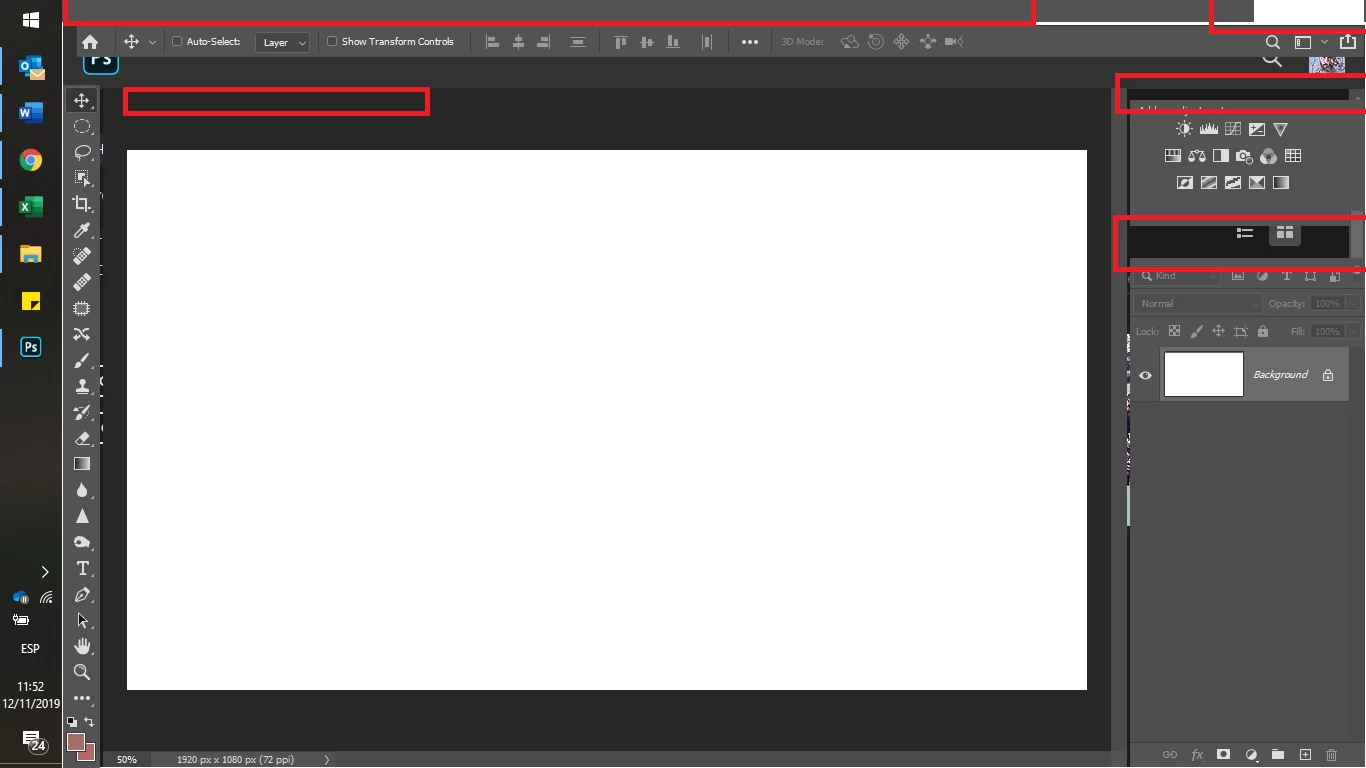
The new Photoshop v 21.0.1 does not show the complete interface. I have uninstalled everything even by removing my preferences on my Windows laptop. Also, I have updated Windows too. I reinstalled and still can't see the new Photoshop correctly. Please could someone help me...
 

{Thread renamed by moderator}

This topic has been closed for replies.

3 replies

JJMack
Community Expert
Community Expert
November 12, 2019

Others have this problem also. To me it looks like your workspace is all messed up the Tool option bar, Tool bar and palettes are undocked. The Tool option Bar is covering most of Photoshop menu bar.  Try  moving the tool option bar then use Photoshop menu window to reset the workspace

JJMack
Robaina Photography
Participating Frequently
November 13, 2019

Sorry, That was not the case. Thank for your help

Semaphoric
Community Expert
Community Expert
November 12, 2019

Something that's helped others with this issue is hecking if you have two video drivers active, and, if so, deactivating one of them (usually the one for the motherboard's built-in video).

Robaina Photography
Participating Frequently
November 13, 2019

Yes! Thank you. It works 

Sahil.Chawla
Adobe Employee
Adobe Employee
November 12, 2019

Hi there,

That does not sound right, as it shouldn't be happening, let's fix this


Could you please try deselecting "Use Graphics Processor" located in Photoshop's Preferences > Performance, then relaunch Photoshop and let us know if it helps?

Also, try updating the Graphics drivers from the manufacturer's website and see if it helps.

Regards,
Sahil

Robaina Photography
Participating Frequently
November 13, 2019

OK. Thank you. It is now fixed. Thank you. 

1- Update windows

2- Update drivers

3- Turn off motherboard drivers. 

Thank you for your help. 


Robaina Photography
Participating Frequently
November 15, 2019

Well. The reaction to disable one of the Video cards has produced some bad things:
1- The Video Card fan is always running fast. It seen the video card is now making more effort
2- The Sleep option is gone.

When I enable again the 2 video card at the same time. Problems 1 and 2 disappear. But the main problem (Hided Photoshop Interface) reappear. 😞 


Any solution?