


Time Clock Script for time spent editing per file
Hey! I have a clock script that I developed(creatively copied and pasted) with the help of some code snippets from other threads in this forum. As of now the clock script generates a CSV displaying each file along with a start and end time. The times are generated when the script is ran. I would like to share the script for starter's because I think it could be useful to others, but I also would like some insight on potentail script triggering options.
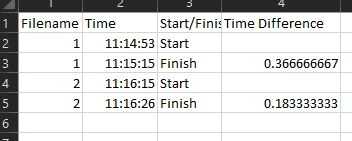
Here is an example of the CSV created. (Note that the spreadsheet is using RC notation, not Alphabetical and Numerical)
Here is the script
//Clock Script
//Get Date
var doc = app.activeDocument
var fileName = doc.name.split(".")[0]
var csvHeader = ["Filename","Time","Start/Finish,Time Difference \n"]
//Create a folder
    var path = ('~/Desktop/EditTimeSheet')
        var aFolder= Folder ("~/Desktop/EditTimeSheet/")
        if (!aFolder.exists) {
        Folder(('~/Desktop/EditTimeSheet')).create()
        }
        else {}
// Read the CSV for Existing Data
var textFile = new File('~/Desktop/EditTimeSheet/' + 'TimeEditing.csv');
    textFile.open('r')
    textfileContent = textFile.read();
    textFile.close();
//Write to CSV Time
// r for read mode - w for write mode - a for append - e for edit
var myDate = new Date();
    myDate.toLocaleString('en-US');
    var myDateString = myDate.toString();
    var time = myDateString.replace(/(.+\d{4} )(.+)( .+)/, '$2');
//Header
    if(textfileContent.indexOf("Filename") == -1){
        textFile.open('a');
        textFile.encoding = 'UTF-8';
        textFile.write(csvHeader);
        textFile.close();
    }
if(textfileContent.indexOf(fileName) != -1){
    var count = (textfileContent.split(fileName) || []).length - 1;
    }
else {
    var startOrFinish = "Start"
}
if(count % 2 == 0 || count == null ){
    var startOrFinish = "Start"
}
else {
    var startOrFinish = "Finish"
}
var timeSKUArray = [ fileName, time + "," +startOrFinish, '"=IF(AND(RC[-3]=R[-1]C[-3],RC[-1] = ""Finish""),(RC[-2]-R[-1]C[-2])*1440,"""")" '+"\n" ];
// Time to list and CSV
var list = timeSKUArray.toString();
var csv = timeSKUArray;
// Copy Time list to clipboard
var d = new ActionDescriptor();
d.putString(stringIDToTypeID('textData'), list);
executeAction(stringIDToTypeID('textToClipboard'), d, DialogModes.NO);
textFile.open('a');
textFile.encoding = 'UTF-8';
textFile.write(csv);
textFile.close();
Essentailly I would like to make the running of this script automatic based on when the document is active, and when there is actually tasks being performed. I do a lot of batch processing to start my images (without save and close), so a lot of images are opened and processed and then left open till I work my way to them. Therefore in order to get an accurate time frame, I need to run this script once I start editing each individual file.
My questions are:
Does anyone have an idea of what to add to scripts events manager to fix this?
Can this script be modified to be ran when activity is happening in the active document? Like when the mouse is moving, keystrokes are happening, progress bar is active, etc..
If so, could there be a standard downtime of activity for when the script runs again, similar to changing sleep settings in a computer's Power settings? (EX. After 15 seconds of inactivity run the script)
Any insight would be appreciated!
If anyone does implement this script, it does not work with times around midnight. I do not edit at this time so it was irrelevant for me to fix this.
 AdChoices