


Known Participant
February 3, 2025
Answered

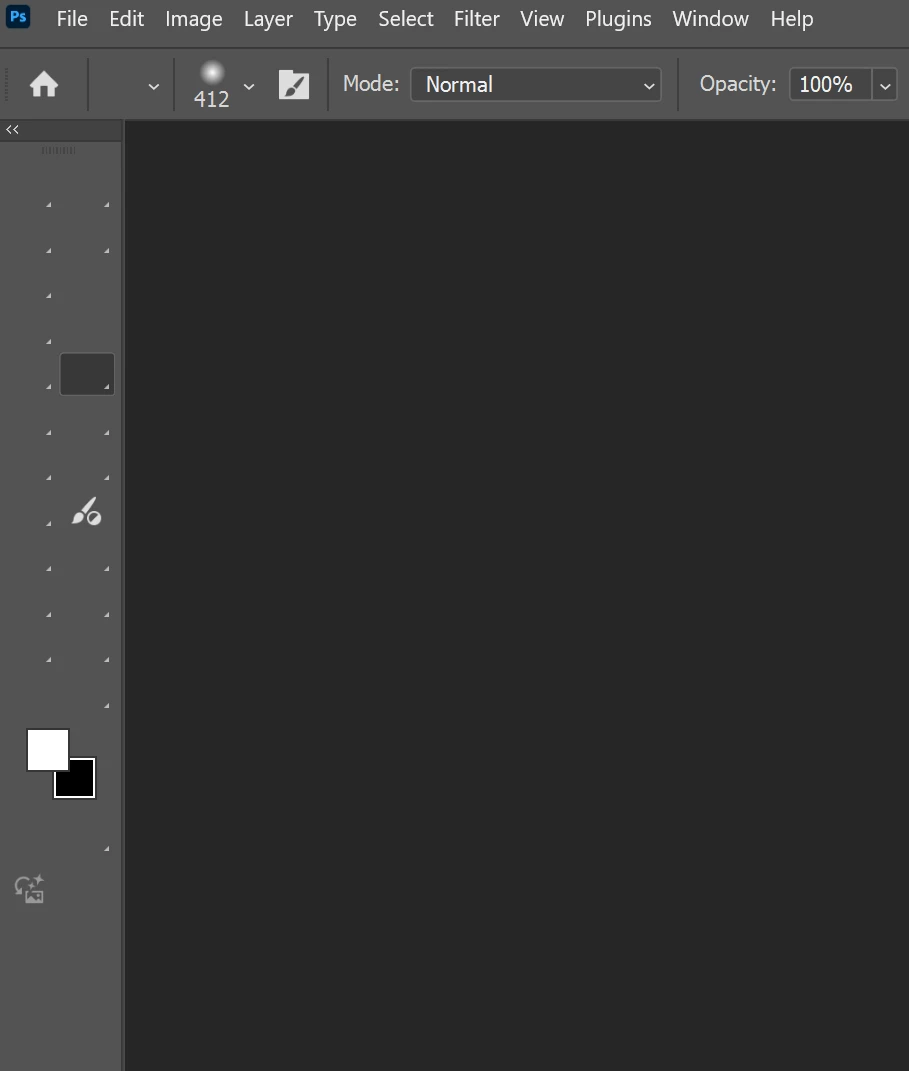
Tools icons not visible
  • February 3, 2025
  • 3 replies
  • 1612 views

All the icons are not visible but the tools are still working. It happened 2 updates ago, I was able to get them back by a restart. However, after today's update, I can't get them back even after a system restart.
Windows 11
Adobe Photoshop Version: 26.3.0 20250122.r.156 bfca642 x64

Correct answer Chuck Uebele

Have you reset your preferences? 

3 replies

Chuck Uebele
Community Expert
Community Expert
February 3, 2025

Fantastic! Glad that worked, for you.

magicdowAuthor
Known Participant
February 8, 2025

After resetting, it happened again. 3 times. I had to reset the preference every time. There has got to be a permanent solution to this. 

Chuck Uebele
Community Expert
Community Expert
February 8, 2025

Have you tried reinstalling PS?

magicdowAuthor
Known Participant
February 3, 2025

Thank you. That did the trick.

Chuck Uebele
Community Expert
Chuck UebeleCommunity ExpertCorrect answer
Community Expert
February 3, 2025

Have you reset your preferences? 

magicdowAuthor
Known Participant
February 8, 2025

Only a temporary fix. It happened again and again.