

Participant
June 23, 2021
Question

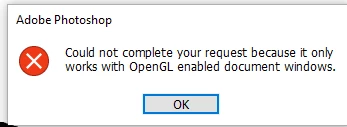
Tools not responding & OpenCL error in Photoshop on Windows
  • June 23, 2021
  • 2 replies
  • 1772 views

 tools are not responding and when opting to this dialogue box appears. like rotate and zoom and 3d and any view or display thing. please help


{Thread title edited by moderator}

This topic has been closed for replies.

2 replies

Mylenium
Legend
June 23, 2021

It pretty much means what it says - either your system does not support the necessary hardware acceleration functions or your graphics driver is misconfigured. Impossible to know without actual system info at hand. Start by checking the relevant preferences and update your system's graphics driver if necessary.


Mylenium

nikunj.m
Community Manager
Community Manager
June 23, 2021

Hi,


We're sorry about the trouble with Photoshop due to the error regarding OpenCL. Would you mind telling us the version of Photoshop you are using?


Please ensure you have a supported graphics card on the computer & you have the latest drivers for the graphics card installed from the manufacturers website. You can check the details here: https://helpx.adobe.com/photoshop/kb/photoshop-cc-gpu-card-faq.html


If you have a supported graphics card, you can go to the Preferences of Photoshop, then Performance & ensure that the option to Use graphics processor is enabled. Also, click on Advanced Settings & ensure that you have Use OpenCL enabled.


Regards,

Nikunj