

Known Participant
November 27, 2020
Answered

Tracking V/A not working

  • November 27, 2020
  • 5 replies
  • 2108 views

Hi,


My tracking or V/A is not working, when I select text and click on V/A all the options are greyed out. I have the issue in both 22 and 22.1.


What am I doing wrong?



This topic has been closed for replies.
Correct answer Bojan Živković11378569

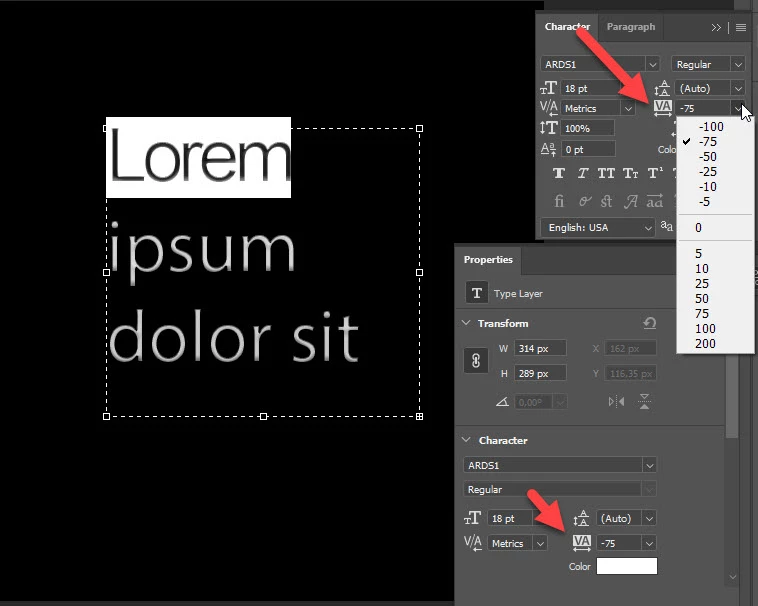
For tracking of selected word use VA on opposite side of what you are trying. See screenshot below. By the way, if you hold mouse over option it should display pop-up with explanation what that option is doing (I think this is default behavior, you can also change it from Preferences).
5 replies

Bojan Živković11378569
Community Expert
November 27, 2020

For tracking of selected word use VA on opposite side of what you are trying. See screenshot below. By the way, if you hold mouse over option it should display pop-up with explanation what that option is doing (I think this is default behavior, you can also change it from Preferences).

Known Participant
November 27, 2020

Thanks so much, I can't believe I missed that one.

Bojan Živković11378569
Community Expert
November 27, 2020

It seems you are trying to use kerning between two characters V/A. For this option to be able to use numeric values from the list just place cursor between two characters then choose numeric value from the list.

Known Participant
November 27, 2020

Thanks so much for your reply. If V/A is only used for kerning between two charcters,  how do I change the tracking in the entire word at once? I know I have done it before but I can't seem to work out how.

Known Participant
November 27, 2020


Known Participant
November 27, 2020


Bojan Živković11378569
Community Expert
November 27, 2020

Can you post screenshot with problem visible including Character/Properties and Layers panel visible?