


Participating Frequently
January 1, 2017
Answered

Trying to reinstall PS6 on new computer need help

  • January 1, 2017
  • 2 replies
  • 639 views

I have the serial number to reinstall PS6 but when I click on the download it pops up with a screen with just a bunch if symbols and letters. Need help to just reinstall the PS6 on new computer
    This topic has been closed for replies.
    Correct answer Jeff Arola

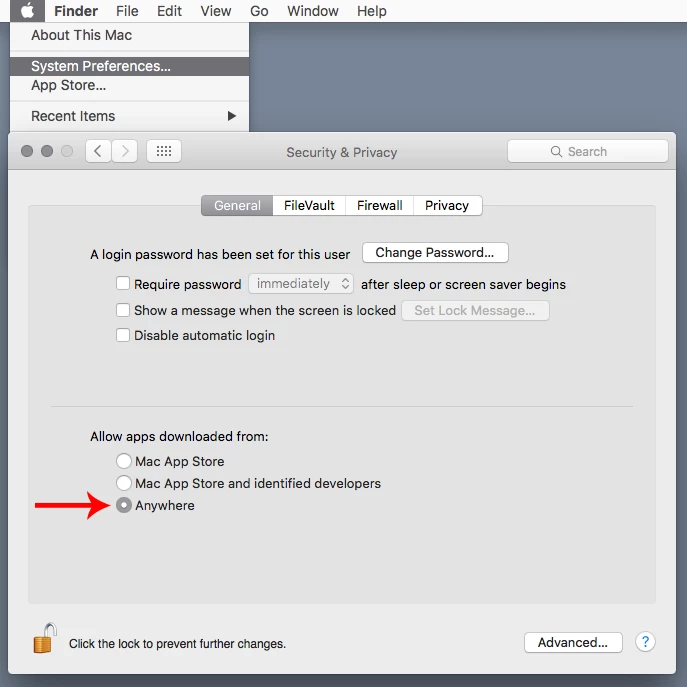
    Yes the installer will not run once downloaded


    Try going to Apple>System Preferences>Security & Privacy>General and checking Anywhere under Allow Apps downloaded from

    Then retry the installer.

    You might have to download photoshop cs6 again and then try the installer.

    2 replies

    Trevor.Dennis
    Community Expert
    Community Expert
    January 1, 2017

    There are alternative downloads on ProDesignTools

    Download Adobe CS6 Trials: Direct Links (no Assistant or Manager) | ProDesignTools

    I just checked the Adobe download page, and it appears to be working for me

    Download Adobe Creative Suite 6 applications

    Is this what you are seeing?

    Participating Frequently
    January 3, 2017

    I did the download link you provided for the Mac but once it said that it was finished downloading I wasn't able to open anything no app icon appeared or anything

    Jeff Arola
    Community Expert
    Community Expert
    January 3, 2017

    Which version of mac os x do you have?

    Apple menu>About This Mac

    So you complete the download but you can't get the installer to run?

    If you have macOS Sierra 10.12 follow these directions under Creative Suite 6

    https://helpx.adobe.com/creative-cloud/kb/install-creative-suite-mac-os-sierra.html

    Jeff Arola
    Community Expert
    Community Expert
    January 1, 2017

    What operating system?

    Is that photoshop cs6?

    Participating Frequently
    January 3, 2017

    It is for the Mac and it is Photoshop 6.0 Whenever I download it it will say that it is complete but doesn't open up to start running.