


martink15467522
Inspiring
February 1, 2022
Answered

Updating/relinking linked vector smart object changes object location.

  • February 1, 2022
  • 4 replies
  • 3092 views

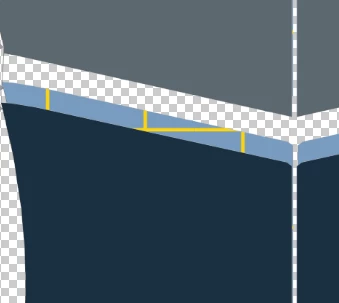
I have an illustrator file with several artboards linked to PS file. On some occasions, when updating the smart object (Update Modified Content), the location changes. What could cause this? What i have noticed is that when i hit ctrl + T, the object appears bigger in transform mode. But this is always not the case.


Smart object after updating modified content ( yellow lines is copy of original placement):


This topic has been closed for replies.
Correct answer martink15467522

yes, you need to update to the latest and try again. Bugs get patched all the time and if you're a year behind, there's a good chance it's been fixed already.


Yes. Thanks! 23.1.1 works. Although one detail still moves a few mm, but i guess we can call this answered. 

4 replies

Earth Oliver
Brainiac
February 1, 2022

This is an old bug that's been around for years. Which version of Ps are you using?

martink15467522
Inspiring
February 2, 2022

I am using 22.5.1

PECourtejoie
Adobe Expert
February 4, 2022

If it works for Christoph P. in the latest version, shouldn't you try it as well in 23.1.1?

c.pfaffenbichler
Adobe Expert
February 1, 2022

By providing a frame of reference that does not depend on the visible objects and their position (Trim Box) one should be able to maintain the position of objects in the linked Vector Smart Object that have not been moved. 

martink15467522
Inspiring
February 1, 2022

I tried all 5 crop options, but the same issue is still there.


c.pfaffenbichler
Adobe Expert
February 2, 2022

What if you delete the background layer?


Makes no difference here. 

c.pfaffenbichler
Adobe Expert
February 1, 2022

Did you crop to »Trim« when placing the linked Smart Object or something like »Bounds«? 

martink15467522
Inspiring
February 1, 2022

Always crop to bounding box

c.pfaffenbichler
Adobe Expert
February 1, 2022

That seems imprudent. 

If you add or remove or move elements in Illustrator the Bounding Box can naturally change (if the affected elements include the leftmost, topmost, rightmost or lowermost). 


Edit: Try Trim Box. 

PECourtejoie
Adobe Expert
February 1, 2022

Does it occur if there is only one artboard.

martink15467522
Inspiring
February 1, 2022

Yes. Deleted all artboards, and it still does it.