- Inicio
- Photoshop ecosystem
- Hilos de conversación
- Re: upgraded Photoshop to 2023
- Re: upgraded Photoshop to 2023
upgraded Photoshop to 2023

Copiar vínculo al Portapapeles
Copiado
Hi, I have the version of Nik collection Anyway, I've upgraded my Photoshop to 2023 and cannot get the Nik Collection into the menu "filter" Has anyone else experienced this?



Examinar y buscar tutoriales y artículos relacionados
 18
réplicas
18
18
réplicas
18




Copiar vínculo al Portapapeles
Copiado
Hi
Is this the original Nik collection from Google and do you still have the previous version of Photoshop installed
For me the Google folder from the previous version was found here C:\Program Files\Adobe\Adobe Photoshop 2022\Plug-ins
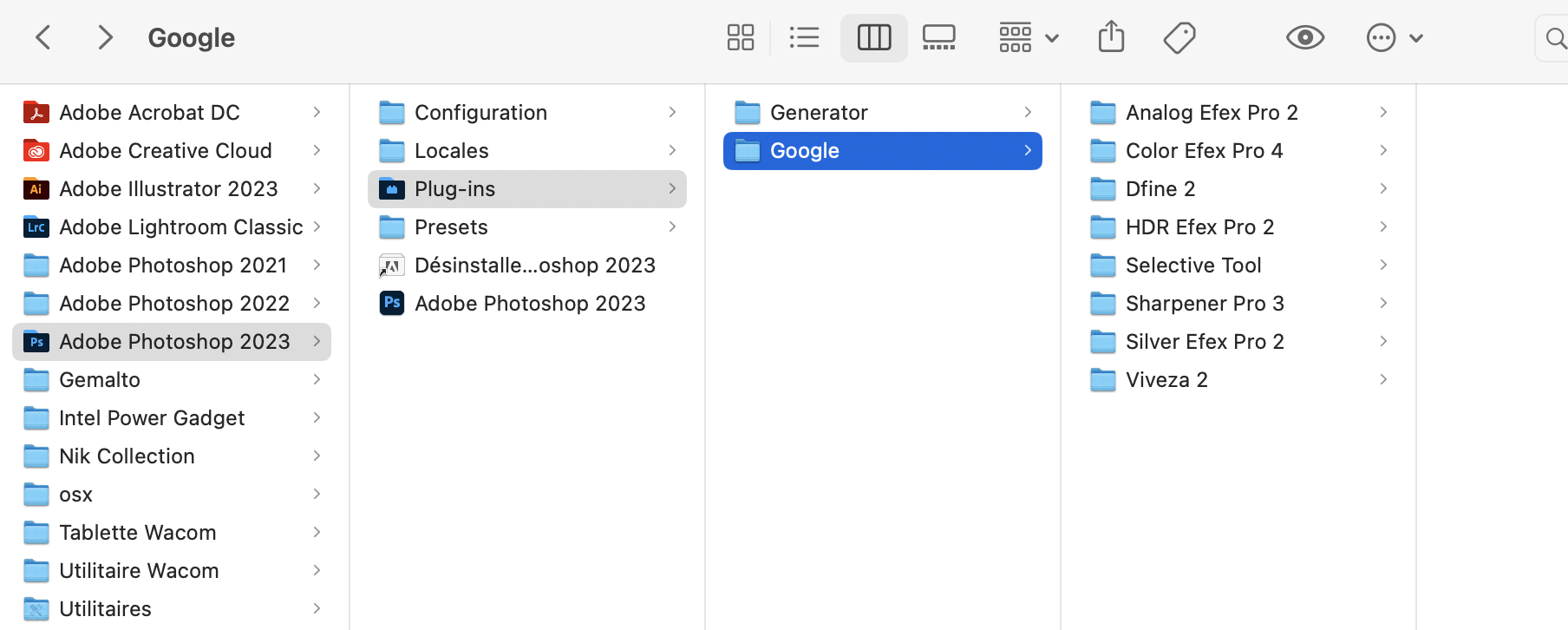
I was able to copy the Google folder from the above location and paste it into C:\Program Files\Adobe\Adobe Photoshop 2023\Plug-ins
The Nik filters showed up in the filter menu for 2023
Copiar vínculo al Portapapeles
Copiado
If @Ged_Traynor's solution doesn't work for you, then copy the Nik Collection folder from your old adobe version and paste it into C\Program Files\Common Files\Adobe\Plug-Ins\CC
I had the same problem as you, and I moved my Nik Collection to the above location 2 PS versions ago and not had a problem.

Copiar vínculo al Portapapeles
Copiado
Same problem here but I have an M1 imac. Can't get it to work even though I moved the Nik folder into the 2023 Photoshop folder
Copiar vínculo al Portapapeles
Copiado
Copiar vínculo al Portapapeles
Copiado
Copiar vínculo al Portapapeles
Copiado
What operating system do you have?
I'm on Windows and my Common Files folder is here;
C\Program Files\Common Files\Adobe\Plug-Ins\CC
If you are on Windows and can't see this folder then you need to show hidden files. You can do this following this. . .
Open File Explorer from the taskbar.
Select the View tab. Go to Options, and select the Change folder and search options.
Select the View tab. In Advanced settings, select Show hidden files, folders, and drives.
Select Ok.
Hope this helps.
Copiar vínculo al Portapapeles
Copiado
Thanks for your help, but I have a Mac, and no matter where I put the folder it doesnt work
Copiar vínculo al Portapapeles
Copiado
@CapeSusan
For Mac:
macOS: Hard Drive/Library/Application Support/Adobe/Plug-Ins/(Photoshop Version number)/file Formats
Copiar vínculo al Portapapeles
Copiado
thx will try

Copiar vínculo al Portapapeles
Copiado
Hello, got a mac and after trying all this I found a solution,
Go to application, I still have adobe Adobe photoshop 2021, Adobe photoshop 2022 and now Adobe photoshop 2023. I just open the Adobe photoshop 2022 only one file plug-ins and inside only one google file. just copy it and put it in Adobe photoshop 2023/plug-ins and it works.
I think this is the only file I've got from old version because when you install the new photoshop, it delate files from adobe but not this plug-ins.
Copiar vínculo al Portapapeles
Copiado
the should be google and not nik collection
Copiar vínculo al Portapapeles
Copiado
the name
Copiar vínculo al Portapapeles
Copiado

Copiar vínculo al Portapapeles
Copiado
I have the same problem with Nik not opening up in photoshop. It doesn't show up in the automate button. Yet, there is the full folder in the plug ins section in photoshop in my c drive. It just won't open in photoshop. I am on windows 10.
Copiar vínculo al Portapapeles
Copiado
Copiar vínculo al Portapapeles
Copiado
Funny thing, Rosa. Yesterday, the only indication that it was there, were the "about plug-ins" that simply showed the icons for Nik. It was not in (the usual place) Filters. Also, under help/settings, it listed all the Nik software as being there, as not being there and as failed. It just wasn't opening in photoshop. I saw your note and I thought well, I will check again. Voila! There they are. It isn't opening with photoshop, but they are now running at least available through filters. So, thanks for the note to check them again!
Copiar vínculo al Portapapeles
Copiado
@rascalphoto So glad I could be of some help 🙂

Copiar vínculo al Portapapeles
Copiado
I copied the NIK filter files inside each NIK Collection filter folder into Plugin folder in adobe PS 2023, and then they all appeared in Filters later in PS.


Encuentra más inspiración, eventos y recursos en la nueva comunidad de Adobe
Explorar ahora
 AdChoices