Inspiring
February 27, 2025
Answered

Use a script to check if a layer with a layer mask applied has visible content.

  • February 27, 2025
  • 3 replies
  • 1034 views

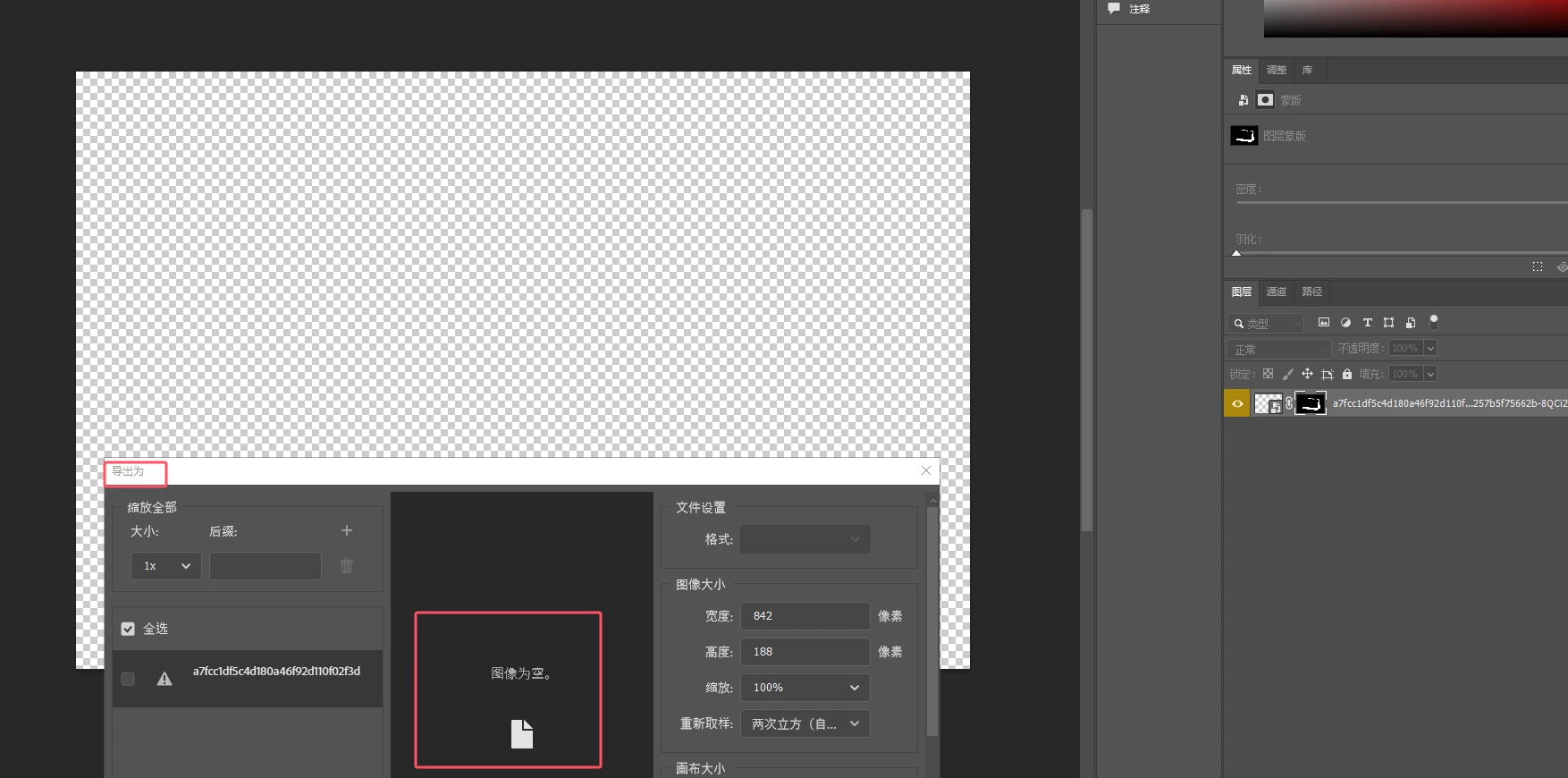
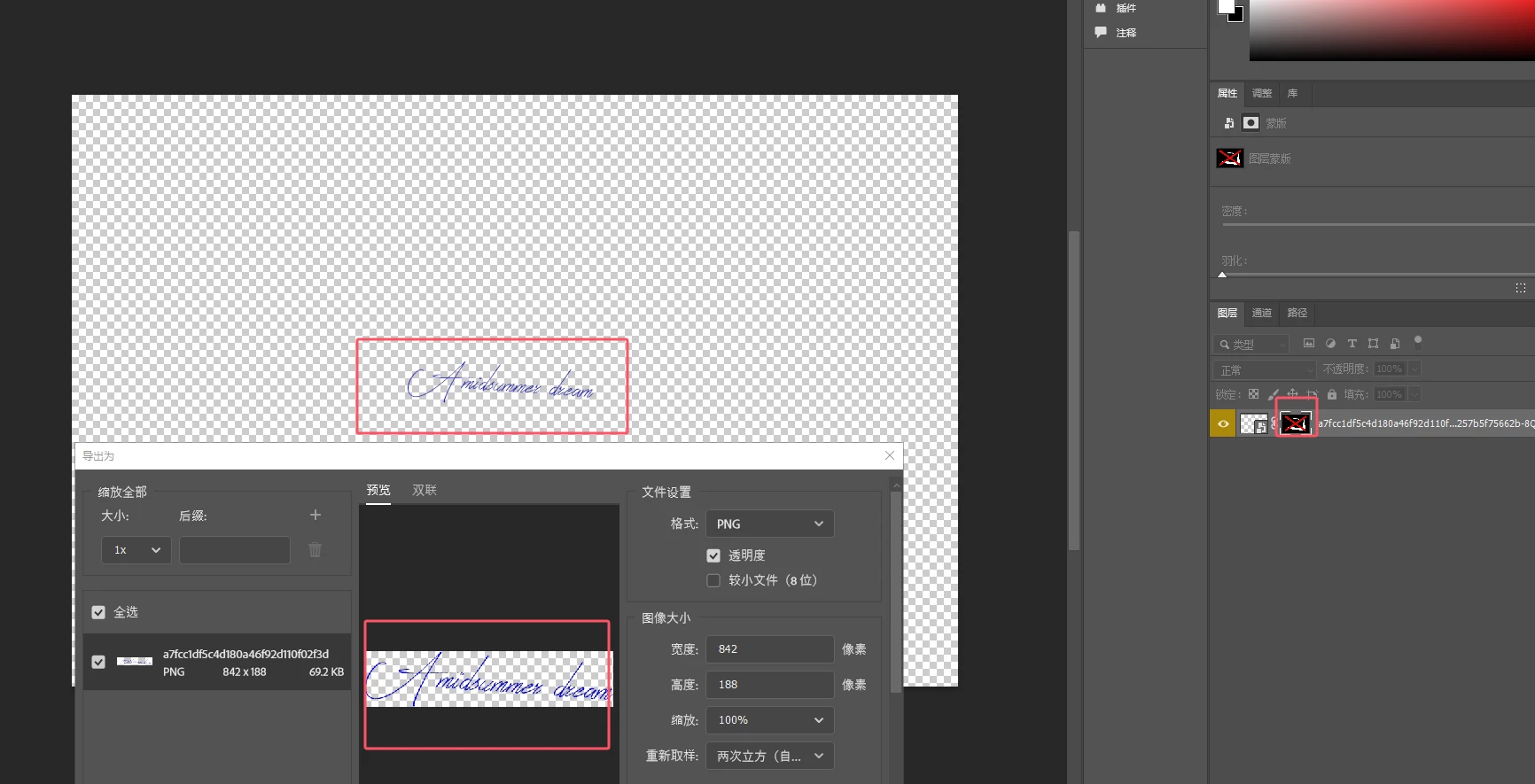
When the mask is enabled, the layer has no visible content. When the right-click menu "Export As" is selected, a pop-up box shows that there is no image. When the mask is disabled, there is visible content. When the right-click menu "Export As" is selected, a pop-up box shows that there is an image. How to write a script to determine whether there is visible content after applying a layer mask


enable layer mask

disable layer mask


Correct answer c.pfaffenbichler

What is layered image? The psd I uploaded is just for testing.


I do apologize, I had overlooked the psd in the original post. 


// 2025, use it at your own risk;
if (app.documents.length > 0) {
if (hasLayerMask () == true) {
var desc = new ActionDescriptor();
var ref = new ActionReference();
ref.putEnumerated(charIDToTypeID("Chnl"), charIDToTypeID("Chnl"), charIDToTypeID("Msk "));
desc.putReference(charIDToTypeID("null"), ref);
desc.putBoolean(charIDToTypeID("MkVs"), false );
executeAction(charIDToTypeID("slct"), desc, DialogModes.NO );
// load transparency;
var desc5 = new ActionDescriptor();
var ref1 = new ActionReference();
var idchannel = stringIDToTypeID( "channel" );
var idselection = stringIDToTypeID( "selection" );
ref1.putProperty( idchannel, idselection );
desc5.putReference( stringIDToTypeID( "null" ), ref1 );
var ref2 = new ActionReference();
ref2.putEnumerated( idchannel, idchannel, stringIDToTypeID( "transparencyEnum" ) );
desc5.putReference( stringIDToTypeID( "to" ), ref2 );
executeAction( stringIDToTypeID( "set" ), desc5, DialogModes.NO );
// load layer mask;
var desc7 = new ActionDescriptor();
var ref3 = new ActionReference();
ref3.putEnumerated( idchannel, stringIDToTypeID( "ordinal" ), stringIDToTypeID( "targetEnum" ) );
desc7.putReference( stringIDToTypeID( "null" ), ref3 );
var ref4 = new ActionReference();
ref4.putProperty( idchannel, idselection );
desc7.putReference( stringIDToTypeID( "with" ), ref4 );
executeAction( stringIDToTypeID( "interfaceIconFrameDimmed" ), desc7, DialogModes.NO );
// check selection;
try {activeDocument.selection.bounds;
alert ("pixels")
}
catch (e) {alert ("empty")}
}
};
////// has layer mask //////
function hasLayerMask () {  
var m_Dsc01, m_Ref01;
m_Ref01 = new ActionReference();
m_Ref01.putEnumerated(stringIDToTypeID("layer"), charIDToTypeID("Ordn"), charIDToTypeID("Trgt"));
m_Dsc01 = executeActionGet(m_Ref01);
return m_Dsc01.hasKey(charIDToTypeID("Usrs"));
};


3 replies

javaerAuthor
Inspiring
March 4, 2025

I use a roundabout way to achieve this: 1. Convert the layer to a smart object 2. Check whether the layer bounds width and height are 0

c.pfaffenbichler
Community Expert
Community Expert
March 4, 2025

Please provide the layered image for testing. 

javaerAuthor
Inspiring
March 6, 2025

What is layered image? The psd I uploaded is just for testing.

c.pfaffenbichler
Community Expert
Community Expert
February 27, 2025

One could load the Transparency and intersect with the Layer Mask … 

// 2025, use it at your own risk;
if (app.documents.length > 0) {
if (hasLayerMask () == true) {
// load transparency;
var desc5 = new ActionDescriptor();
var ref1 = new ActionReference();
var idchannel = stringIDToTypeID( "channel" );
var idselection = stringIDToTypeID( "selection" );
ref1.putProperty( idchannel, idselection );
desc5.putReference( stringIDToTypeID( "null" ), ref1 );
var ref2 = new ActionReference();
ref2.putEnumerated( idchannel, idchannel, stringIDToTypeID( "transparencyEnum" ) );
desc5.putReference( stringIDToTypeID( "to" ), ref2 );
executeAction( stringIDToTypeID( "set" ), desc5, DialogModes.NO );
// load layer mask;
var desc7 = new ActionDescriptor();
var ref3 = new ActionReference();
ref3.putEnumerated( idchannel, stringIDToTypeID( "ordinal" ), stringIDToTypeID( "targetEnum" ) );
desc7.putReference( stringIDToTypeID( "null" ), ref3 );
var ref4 = new ActionReference();
ref4.putProperty( idchannel, idselection );
desc7.putReference( stringIDToTypeID( "with" ), ref4 );
executeAction( stringIDToTypeID( "interfaceIconFrameDimmed" ), desc7, DialogModes.NO );
// check selection;
try {activeDocument.selection.bounds;
alert ("pixels")
}
catch (e) {alert ("empty")}
}
};
////// has layer mask //////
function hasLayerMask () {  
var m_Dsc01, m_Ref01;
m_Ref01 = new ActionReference();
m_Ref01.putEnumerated(stringIDToTypeID("layer"), charIDToTypeID("Ordn"), charIDToTypeID("Trgt"));
m_Dsc01 = executeActionGet(m_Ref01);
return m_Dsc01.hasKey(charIDToTypeID("Usrs"));
};

 

javaerAuthor
Inspiring
February 28, 2025

Not prompted as expected: empty


Stephen Marsh
Community Expert
Community Expert
February 28, 2025
quote

Not prompted as expected: empty


By @javaer


While you are waiting for @c.pfaffenbichler you can try the script that I posted.

Stephen Marsh
Community Expert
Community Expert
February 27, 2025

You should be able to automate the check for no pixels using histogram evaluation for standard deviation = 0, however, automating Export As may be harder (unless something has changed that I missed).


javaerAuthor
Inspiring
February 27, 2025

I looked at the code in the link, that is for the entire document, I hope to check a certain layer

Stephen Marsh
Community Expert
Community Expert
February 27, 2025
quote

I looked at the code in the link, that is for the entire document, I hope to check a certain layer


By @javaer


Too bad that it's impossible to duplicate the active layer to a new document, check the histo and then close the temp doc without saving. :]


EDIT: Joking aside, here is what I was referring to, I ended up using mean rather than std. dev.


/*
Alert Visible Pixels In The Active Layer.jsx
Stephen Marsh
v1.0 - 27th February 2025
https://community.adobe.com/t5/photoshop-ecosystem-discussions/use-a-script-to-check-if-a-layer-with-a-layer-mask-applied-has-visible-content/td-p/15180227
*/

#target photoshop

if (app.documents.length > 0) {

    if (isLayerMaskEnabled()) {

        // Set the active layer name
        var theLayerName = app.activeDocument.activeLayer.name;

        // Duplicate the active layer to a temporary document
        var s2t = function (s) {
            return app.stringIDToTypeID(s);
        };
        var descriptor = new ActionDescriptor();
        var reference = new ActionReference();
        var reference2 = new ActionReference();
        reference.putClass(s2t("document"));
        descriptor.putReference(s2t("null"), reference);
        descriptor.putString(s2t("name"), "tempDoc");
        reference2.putEnumerated(s2t("layer"), s2t("ordinal"), s2t("targetEnum"));
        descriptor.putReference(s2t("using"), reference2);
        descriptor.putString(s2t("layerName"), theLayerName);
        descriptor.putInteger(s2t("version"), 5);
        executeAction(s2t("make"), descriptor, DialogModes.NO);

        // Select the mask channel
        var s2t = function (s) {
            return app.stringIDToTypeID(s);
        };
        var descriptor = new ActionDescriptor();
        var reference = new ActionReference();
        reference.putEnumerated(s2t("channel"), s2t("channel"), s2t("mask")); // or "RGB"
        descriptor.putReference(s2t("null"), reference);
        descriptor.putBoolean(s2t("makeVisible"), false);
        executeAction(s2t("select"), descriptor, DialogModes.NO);

        // Apply the layer mask
        var s2t = function (s) {
            return app.stringIDToTypeID(s);
        };
        var descriptor = new ActionDescriptor();
        var reference = new ActionReference();
        reference.putEnumerated(s2t("channel"), s2t("ordinal"), s2t("targetEnum"));
        descriptor.putReference(s2t("null"), reference);
        descriptor.putBoolean(s2t("apply"), true); // or false
        executeAction(s2t("delete"), descriptor, DialogModes.NO);

        /*
        Based on:
        https://community.adobe.com/t5/photoshop/how-to-get-the-histogram-s-std-dev/td-p/9875041
        */
        if (app.documents.length > 0 && activeDocument.mode == DocumentMode.RGB) {
            var theR = histogramMeanStandardDeviation(activeDocument.channels[0].histogram);
            var theG = histogramMeanStandardDeviation(activeDocument.channels[1].histogram);
            var theB = histogramMeanStandardDeviation(activeDocument.channels[2].histogram);
            // theMean = [0] | theMedian = [1] | theStandDev = [2]
            var theMean = Number(((theR[0] + theG[0] + theB[0]) / 3));

            // Alert the results!
            if (theMean === 255) {
                app.activeDocument.close(SaveOptions.DONOTSAVECHANGES);
                alert("There are no visible pixels in the active layer!");
                // Do something here...
            } else {
                app.activeDocument.close(SaveOptions.DONOTSAVECHANGES);
                alert("There are visible pixels in the active layer!");
                // Do something else here...
            }
        }
        ////// get mean of histogram //////
        function histogramMeanStandardDeviation(theHist) {
            // get total number;
            var thePixels = 0;
            for (var m = 0; m < theHist.length; m++) {
                thePixels = thePixels + theHist[m];
            }
            // get mean and median;
            var theMean = 0;
            var aTotal = 0;
            var check = false;
            for (var n = 0; n < theHist.length; n++) {
                theMean = theMean + (n * theHist[n] / thePixels);
                aTotal = aTotal + theHist[n];
                if (aTotal >= thePixels / 2 && check === false) {
                    theMedian = n;
                    check = true;
                }
            }
            // get standard deviation;
            var theStandDev = 0;
            for (var o = 0; o < theHist.length; o++) {
                theStandDev = theStandDev + (Math.pow((o - theMean), 2) * theHist[o]);
            }
            theStandDev = Math.sqrt(theStandDev / thePixels);
            // theMean = [0] | theMedian = [1] | theStandDev = [2]
            return ([theMean, theMedian, theStandDev]);
        }
    } else {
        alert("The active layer mask is not enabled... Script aborted!");
    }
} else {
    alert("No document is open.");
}

function isLayerMaskEnabled() {
    var s2t = function (s) {
        return app.stringIDToTypeID(s);
    };

    var ref = new ActionReference();
    ref.putEnumerated(s2t("layer"), s2t("ordinal"), s2t("targetEnum"));

    var desc = executeActionGet(ref);
    return desc.hasKey(s2t("userMaskEnabled")) && desc.getBoolean(s2t("userMaskEnabled"));
}