


Using Apply Image to remove a background gradient not working as it once did
Hello,
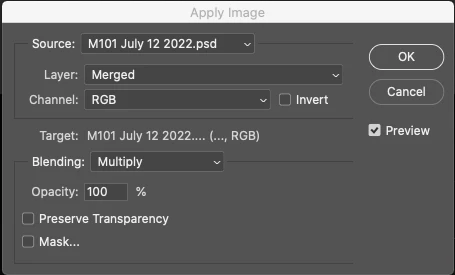
Recently when I have been trying to do a process of gradient removal from my image in Photoshop 2022, I have found that I cannot select the background removal layer I created in PS. It should be selectable in the Source pull down, the only file in the source pull down is my M101 July 12 2022.psd.
I have tried this on three different astroimage.psd files in the last several weeks and have the same result, no background removed choice in the Source pulldown.
I have used this workflow many times through the last year and I think the problem has occured since my last Photoshop update to 23.4.1 26 days ago.
Here is the screen shot of the Apply Image feature I refer to. Please let me know if somehting has changed in this PS workflow to remove a background gradient.
 AdChoices