


Inspiring
May 24, 2018
Answered

Using Intuos Pro as a trackpad with Photoshop?

  • May 24, 2018
  • 1 reply
  • 1067 views

Hello community,

In Corel Painter, it is possible to set options to use the Intuos Pro as a trackpad (including tough gestures for zooming and panning) as shown in Aaron Rutten's video  here: Wacom INTUOS PRO Tutorial - Features & Specs [Part 1/4] - YouTube. Thank you Aaron.

Does anyone know if it is possible to do the same in Photoshop CC?

Thank you.

Chris
    This topic has been closed for replies.
    Correct answer JJMack

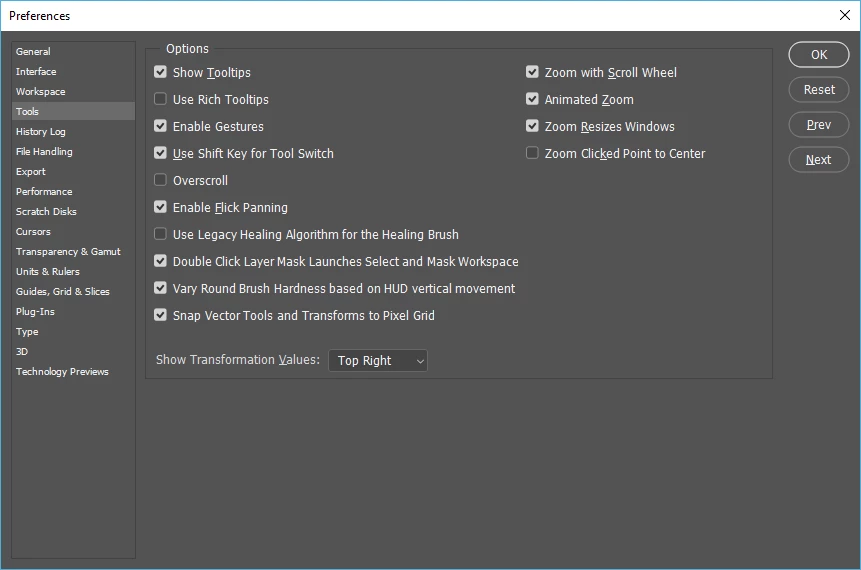
    Photoshop Supports touch gestures there a Photoshop Preference in the tool section that enables touch gestures  and you can customize Wacom touch for Photoshop.  However, Photoshop does not support Touch Finger Painting.

    There is also a modifier key touch palette possible in Photoshop.

    1 reply

    JJMack
    Community Expert
    JJMackCommunity ExpertCorrect answer
    Community Expert
    May 24, 2018

    Photoshop Supports touch gestures there a Photoshop Preference in the tool section that enables touch gestures  and you can customize Wacom touch for Photoshop.  However, Photoshop does not support Touch Finger Painting.

    There is also a modifier key touch palette possible in Photoshop.

    JJMack
    Inspiring
    May 24, 2018

    Good enough for me. Thank you very much JJMack.

    JJMack
    Community Expert
    Community Expert
    May 24, 2018

    Trackpad painting is more like painting with a mouse  why would you want to do that when you have an intuos Pen.

    JJMack