


New Participant
April 9, 2017
Answered

VulcanMessage5.dll is missing from you computer

  • April 9, 2017
  • 1 reply
  • 4073 views

Hi hope you can be of some assistance.

I foolishly clicked on the Photoshop cc2017 update button and it gets to 90% then "fails". Now when I go to use photoshop I get a message saying "...VulcanMessage5.dll is missing from you computer...".

Having used photoshop for some time this is a real pain in the butt, how do I get the program working again - mind, I have no technical skills at all (not joking) i.e. I turn computer on and it works, fine. It doesn't, then I'm stuffed, hence being here.

Thanks in advance.

Ian
    This topic has been closed for replies.
    Correct answer JJMack

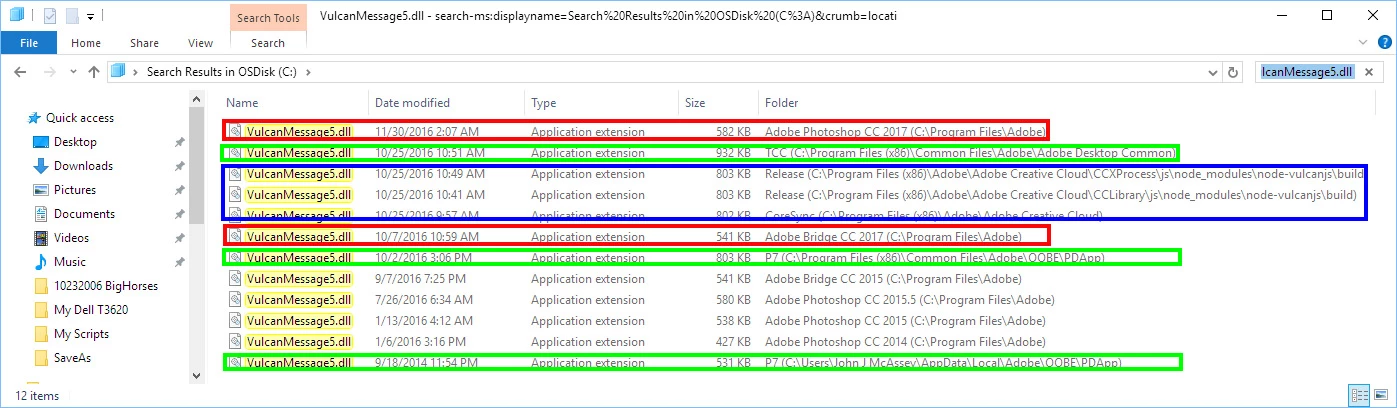
    When I search for that dll on my Windows 10 system which has all Creative cloud version of Photoshop installed I see that library module has been installed in a dozen location. In CC 2014, cc 2015, CC 2015.5, CC 2017, Adobe bridge 2017 and in Common areas.  You may want to uninstall, use Adobe Cleaner than re-install to see if that fixes your install.

    1 reply

    JJMack
    JJMackCorrect answer
    Community Expert
    April 9, 2017

    When I search for that dll on my Windows 10 system which has all Creative cloud version of Photoshop installed I see that library module has been installed in a dozen location. In CC 2014, cc 2015, CC 2015.5, CC 2017, Adobe bridge 2017 and in Common areas.  You may want to uninstall, use Adobe Cleaner than re-install to see if that fixes your install.

    JJMack
    New Participant
    April 9, 2017

    Thank you for your assistance. It took three attempts at re-installing but I got there in the end.