


New Participant
February 20, 2013
Question

Wacom pen pressure issue, possible solution.

  • February 20, 2013
  • 20 replies
  • 123128 views

In reference to this thread someone had posted, I had has the EXACT same issue, and have gone through long hours of my own troubleshooting.

The problem:

Whilst drawing in either photshop or SAI, the pen pressure sensitivity would just randomly fail and draw solid thick lines as if drawn with the mouse.

See image:
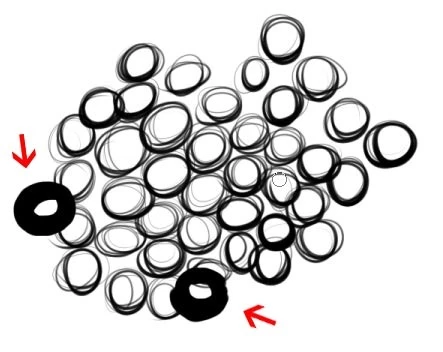
What I also learned, is that once the pressure sensitivity falls out, it doesnt recover until I lift the pen away from the tablet, and then back again, as seen in the following pic:
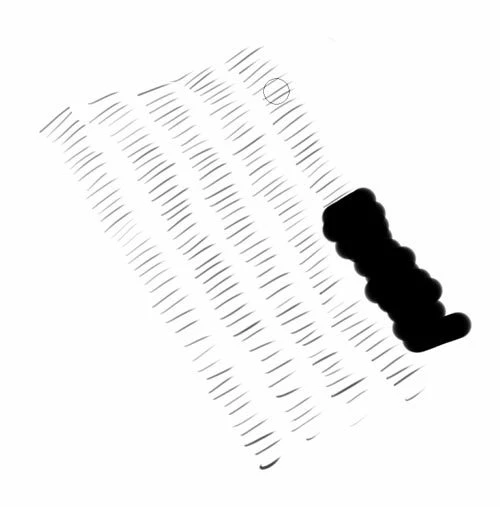
Sometimes it would fail on the 2nd brush stroke, others on the 100th. It's completely random.

What I have tried to fix the problem:

Complete removal of drivers and Bamboo dock, then fresh install from the bundled disc.

Complete removal of drivers and Bamboo dock, then fresh installation from the lates driver download (PenTablet_532-1)

Updated nVidia drivers.

Updated motherboard drivers.

Tried differnet USB ports.

Remove ALL existing USB devices from PC except the tablet.

Tried various tablet driver revisions from the download page.

Disabled press and hold right click.

Disabled buttons on the stylus.

Disabled buttons on the tablet.

I always have the touch feature disabled.

Changed nibs.

Even then, no luck. Lastly I decided to start ending proccesses in task manager one by one to see if there was perhaps a conflict.

The pressure sensistivity would fail ALWAYS within 30 seconds of drawing. So my method was as follows:

End a proccess. Draw a pic. One by one. I have an IT backround so I have knowledge of which proccesses are safe to close etc.

Each attempt the pressure sensitivity would fail well within 60 seconds. Until I hit a proccess called "ouc.exe".

After ending this proccess I have now gone a full day of drawing without this issue. I Googled said proccess and leanred it is an online updater for my USB 3G Modem.

My only guess here is since both the 3G modem and my tablet both use USB there is some sort of driver conflict. May there are intervals in which ouc.exe attempts to check for updates which then might just kick the tablet at that moment.

I will repost a report back here after a full week of testing.

Hope all those people with this issue just all happened to have 3G modems, and this this post somewhat helped.

I am now running the latest driver for the tablet, and latest display driver for my gcard. Bamboo dock is also up to date.

So for me, this was NOT a driver related problem.

My device is a Wacom Bamboo Create.

Please excuse any typos, I always try to type too fast.

    20 replies

    Spideyinf
    New Participant
    February 16, 2016

    Dear all,

    This is happening the same as my case above. But I dont have any kind of 3G model/driver in use. I recently use the tablet and this happened for a couple of days, really annoying when it repeated each 30-60s. Please help me to fix this problem with all your experience.

    Wacom Bamboo Pen and definite it is not driver problem!.

    Thanks and best regards.

    New Participant
    December 17, 2015

    None of the suggestions here are working for me.  The problem started randomly and now seems to be permanent.  This makes photoshop practically useless for me.  Very frustrating!!!  I have an Intuos4 medium tablet with the latest driver and the latest version of photoshop.

    Trevor.Dennis
    Community Expert
    December 17, 2015

    clintd19345331 wrote:

    None of the suggestions here are working for me.  The problem started randomly and now seems to be permanent.  This makes photoshop practically useless for me.  Very frustrating!!!  I have an Intuos4 medium tablet with the latest driver and the latest version of photoshop.

    Operating system?

    New Participant
    December 18, 2015

    I found old stylus,which is falling apart, and  it works just fine.  If I try to use the newer stylus, I lose the brush sensitivity settings again.  I guess the stylus isn't working correctly.


    Well, now the same thing is happening with the old stylus.

    j_c_k31896017
    New Participant
    October 21, 2015

    Thank you! Tip for Windows pen-tablet-settings is also working for my Aiptek tablet in Windows 10

    New Participant
    August 14, 2015

    I have tried every possible solution listed in these forums and nothing has worked. I have an Wacom Intuos 5 using with Photoshop CC 2015, it is literally becoming so bad that I can barely paint!

    Does anyone know of a definitive solution to what is going on?! Please help!

    ajw-art
    New Participant
    August 20, 2015

    Update to the latest Intuos driver. Open Wacom Tablet Properties, then switch to the "Mapping" tab. Uncheck the box in the bottom left that says "Use Windows Ink." If you're on Windows 8 or 10, this may be the solution to your issues.

    Inspiring
    July 22, 2015

    I tried everything suggested here but unfortunately nothing worked.

    However I solved the problem by disabling the right click in the Wacom tablet setting UNDER "Application: Photoshop."

    I posted this in a new thread here at the Adobe forum:

    CS6 and Wacom IntuosPro: during brush stroke input randomly fat, full lines appear.

    7/22/2015 edit. Additional information:

    To make it easier for anybody with a similar problem and for not having to jump to another thread,

    here are the settings that helped me get rid of the problem of fat lines or odd line creations

    Wacom IntuosPro Windows7 64 bit CS6 Photoshop

    mestudent123
    New Participant
    December 4, 2015

    This solved my issue!!! I had tried everything above your comment and it did not work. Why in the world would Wacom add this option and set it to default!!! So much pain!!!!!

    boulderdash34
    New Participant
    July 19, 2015

    Thank you! So THAT was the problem. Months i had this strange issue, searched through internet, no success. I was a little desperate, almost wanted to reinstall the complete systems. Thje ouc.exe was the problem for me! You solved it! Many thanks.

    New Participant
    October 13, 2014

    Hi Guys,

    I have a Cintiq 21 UX 2010 on windows 8.1 64bit, and have had some issues with jittery lines in PScs6 myself. The jittery lines could be solved by simply installing older drivers. pro636-3 worked fine.

    Now I have just had a new problem, not unlike yours. When I draw a line it sometimes jumps to max pessure at the start and then stays at max level for the whole line. I did many strokes to test. Sometimes pressure worked normally, sometimes not. I tested with different drawing speeds and happened to notice that, only if I hesitated at the start of the stroke, or tried to draw very carefully, it jumped to max. I checked everything, reinstalled drivers, etc. Here is what worked for me:

    The problem must have been some odd interactions between tablet, photoshop and windows-native pen/touch settings. Tablet and PScs6 both worked fine. It was the windows pen/touch that distorted the dynamics. Go to these Options and check both Boxes below here:

    PressAndHold01.png

    Then go to "PRESS AND HOLD" and Disable everything! (I think this is the most important part, where the tablet freaks out).

    Double-Tap-Settings.jpg

    Then go to the Double-Tap Settings. What works for me is setting the first slider to the max-right; the second slider to the max-left.

    I think I got the problem in the first place, because I meddled with the settings here to try something and forgot about it. Never had that problem before. I'll update if anything goes wrong again.

    New Participant
    July 14, 2015

    Thanks hannesayayay‌ - that's definitely helped. I'd originally disabled everything with regard to the press and hold window on first install, but the Spatial Tolerance setting has almost entirely fixed the problem. I'd been painting lots of thin lines and would have full thickness lines appearing that would be two or three steps back in the brush's History - the one time a heavy line has appeared since changing those settings it was the last item in the history, thankfully. If the problem returns will try to find the time to follow ThePeachGuy‌'s procedure - I don't have the ouc.exe process running on the problem machine. (Intuos 5)

    EDIT 22/7/15: OK, it helped for about a minute. Unfortunately the problem returned, but was definitely occurring less often, and only one step previous. Solution that does work, and also makes sense that it does is, is Martin Sch‌'s solution here: Re: CS6 and Wacom IntuosPro: during brush stroke input randomly fat, full lines appear.

    New Participant
    February 16, 2014

    I don't know if you guys found solutions to your problems but I discovered that turning Tip Double Click Distance off in my pen settings got rid of this problem for me.  I just turned it off for drawing programs, I never used the pen for double clicking in them anyway.

    Hope this helps!

    torzmom
    New Participant
    August 23, 2015

    This worked!

    New Participant
    May 1, 2013

    Thanks, I've been having the same problem....

    I looked in my Task Manager, but couldn't find "ouc.exe". 

    I'm drawing on a Cintiq with a Windows 8 machine...Any ideas?

    Cheers, Mark

    February 20, 2013

    Thanks for reporting a possible solution for the pressure problem.  If this indeed turns out to be the ouc.exe conflict I urge you to drop a note to Wacom and outline the problem and your findings.  They will most likely look into it and see if it is an isolated incident or a problem to fix.