Micke Hirsch
Known Participant
October 18, 2018
Answered

Weird Color blocks bug.

  • October 18, 2018
  • 2 replies
  • 5105 views

Hej!

Efter den senast uppdateringen har jag märkt att det dyker upp lite färgblock på mina bilder, speciellt när jag använder solid color fill. De är borta när jag exporterar ut bilderna men ändå irriterande när man sitter och jobbar. Någon annan som har dessa problem eller hört något om att en buggfix är på gång?

This topic has been closed for replies.
Correct answer

Hi

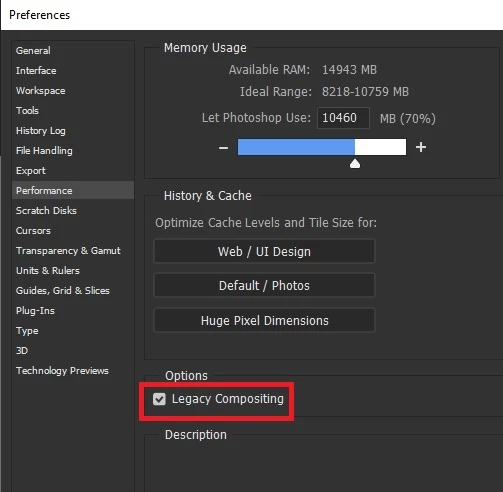
This is a known issue in CC2019, enable this option in preferences and restart Photoshop

2 replies

Correct answer
October 18, 2018

Hi

This is a known issue in CC2019, enable this option in preferences and restart Photoshop

c.pfaffenbichler
Community Expert
October 18, 2018

I’m getting quite curious what the non-legacy compositing engine does and is good for … so far it seems to be causing problems for quite a few Photoshop users.

October 18, 2018

Me too, I was having issues with the blending modes originally with that option disabled and enabling it fixed it.

davescm​ was the first one to highlight what was causing it.

You would think somebody from Adobe would enlighten us as to the purpose of the new engine and why it's causing so much grief

c.pfaffenbichler
Community Expert
October 18, 2018

Does turning off »Use Graphics Processor« in the Performance Preferences (Photoshop > Preferences > Performance > Graphic Processor Settings) and restarting Photoshop have any bearing on the issue?

Micke Hirsch
Known Participant
October 18, 2018

It seems to work for now thanks