Hi monoboy,
"Where is the essential transform tool?"
There is no Transform Tool in Photoshop, Tools are represented in the Toolbar. Do you mean Edit > Free Transform?
By @c.pfaffenbichler
Please select the Layer you want to transform, uncheck »Show Transform Controls« for the Move Tool and transform properly (Edit > Free Transform) – does the Options Bar show the Transformation-entry fields?
By @c.pfaffenbichler
You used to be able to select anything in the layers panel and change the angle or size via the top bar menu.
As I've just realised, this issue is that those details aren't visible unless you use the Free-Transform tool via the menu system. They used to be available permanently and conveniently.
By @Will Price
The "top bar" has a name and is called the options bar — the options in the bar change depending on which tool you have or what you are trying to do. Your screenshot of the options for the Move tool, for instance, shows options that only apply to the Move tool. You will only see the options for Transform when you go to Edit > Free Transform (Cmd+T). This has not changed, but I glad you realize it now after c.p. told you earlier in the thread.
Free transform does not reside in the Tools panel and is not a "tool". It's in the Edit menu, as c.p. said earlier.
The thing that is new-ish (not new) is the "Show Transform Controls", which is on the options bar for the Move tool and c.p. asked you to uncheck it. It is not on by default and does not do everything Free Transform does. As c.p. said, leave it off.
You have a screenshot for the Shape Properties (see the top of the panel). If you used this to transform, it will, of course, only transform shapes. That's what it's designed to do. Shapes and Shape Properties are "new-ish", but both have been around for a number of versions now.
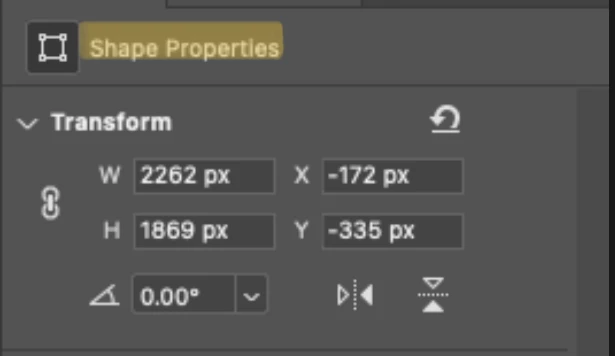
What c.p. was asking you for was one screenshot that included the necessary panels and tools instead of bits and pieces. It's really the only way we can see the entire picture.
"You are both patronising and unhelpful"
I read through this thread and don't see anything either patronizing or unhelpful. English is not his native language, so it's possible that you interpreted something that was not intended. He is a very kind, helpful volunteer.
Were you able to rotate everything yet, or do you still need help?
Jane


 AdChoices