…even though I have it visible in PS, on the screen. My question is: Why isn't there a way to see where the file is located?
By @tuomasvirtanen.fi
The answer to your question is, when a document is open in Photoshop, there already is a way to see where the file is located.
On your Mac, Control-click the document’s tab and choose Reveal in Finder. (Or right-click, if you have enabled right-click on your Mac.)
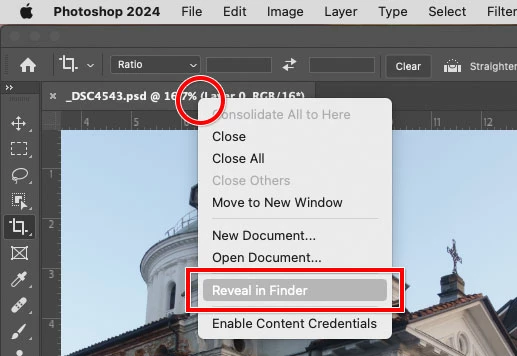
Reveal in Finder does several helpful things at once, including:
- Switches to the Finder desktop
- Pops open the folder containing the Photoshop document
- Selects the Photoshop document in the folder
Many Mac applications have the Reveal in Finder command, although the exact menu changes depending on the application. In Windows, it’s typically named Reveal in Explorer.
If the Photoshop document is not tabbed (an undocked floating window), then you can simply use the standard macOS file location reveal shortcut that works in almost any Mac application: In the document title bar, Control-click/right-click the filename to pop open a menu representing the folder path to the document, and choose the first folder in the menu because that’s the folder containing the document. Again, that will switch to the Finder desktop and open that folder for you. (In some applications including the macOS Finder, Command-clicking the filename also opens this menu.)
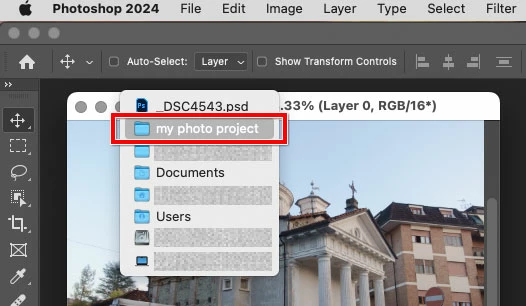
Edit: One problem with Photoshop is that other applications make Reveal in Finder visible on a normal menu bar command, so that you can find it by looking around. But in Photoshop, Reveal in Finder is not discoverable unless someone already right-clicks everything, but right-click is not enabled by default on macOS.




 AdChoices