


White borders on images cropped from Droplet
I have been having sizing issues for 5 months. I need to crop large amounts of files to very specific sizes. Lightroom rounds things to incorrect sizes. So I was directed to use droplets. Se the last thread here: forums.adobe.com/thread/2424560
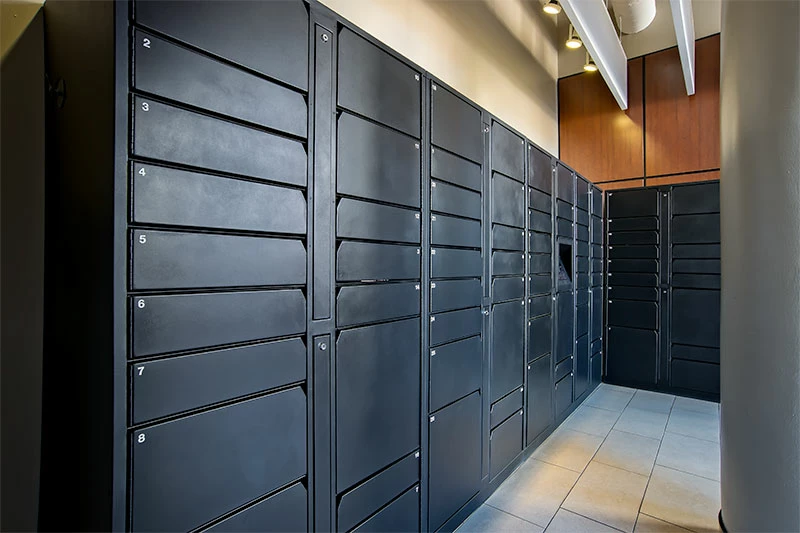
When I create a droplet to crop to one size, 800x533 (client required size) the action works fine. See the image here: https://www.michaelalbany.com/riverloft-package_lockers-02-800x533b/ Click the image to view in light box
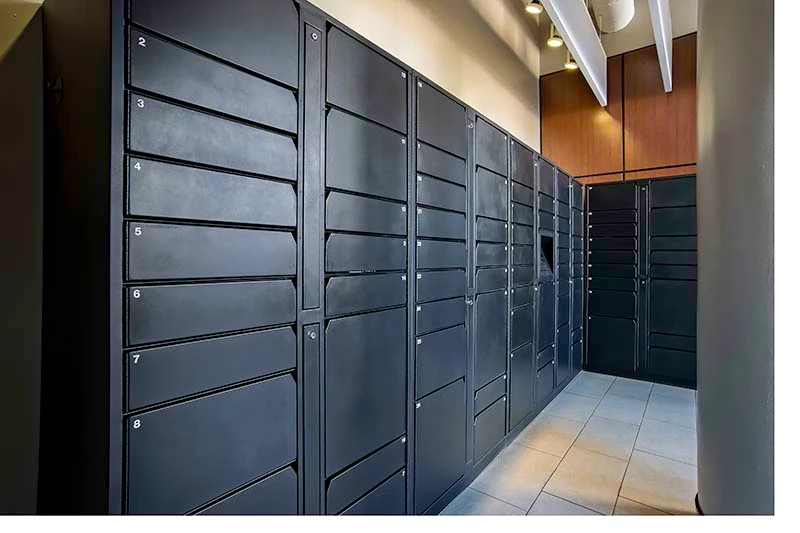
But if I drop the exact same image onto the droplet I get white edges to the image. Click here: https://www.michaelalbany.com/riverloft-package_lockers-01-800x533/ Click the image to view in light box to better see the white border. Copies of both images are attached at the end.
I have tried this with the original PSD and an exported TIF to see if that made a difference. It doesn't not. I need spot on crops of hundreds of images and Lightroom rounds, Photoshop is seemingly in capable of consistent and accurate results. I am open to suggestions. I have to size 438 images to deliver to the client on Friday. These images have to be 800x533 and 1920x1121 exactly, with no white edges.
Am I correct that the white edges have something to do with the lens corrections and or cropping that is done in Lightroom edits?
The same image. First was create while making the action that would be used in the droplet that made the second image.
@Rikk Flohr Give this one a shot.
 AdChoices