


Participant
October 17, 2025
Answered

Why is my adjustment/mask layers won't export properly in Photoshop?

  • October 17, 2025
  • 2 replies
  • 143 views

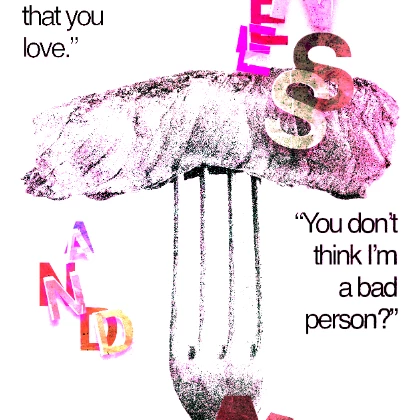
hello, i'm using photoshop 2024 for my college projects and i don't understand why my artboards won't export properly. i also put a "texture layer" on top all my layers in 'vivid light' mode and i can't seem to merged it all because the color from my mask and adjustment layers won't show. 


here's how it supposed to look like in photoshop:
 

and here after i export it into pdf/png:
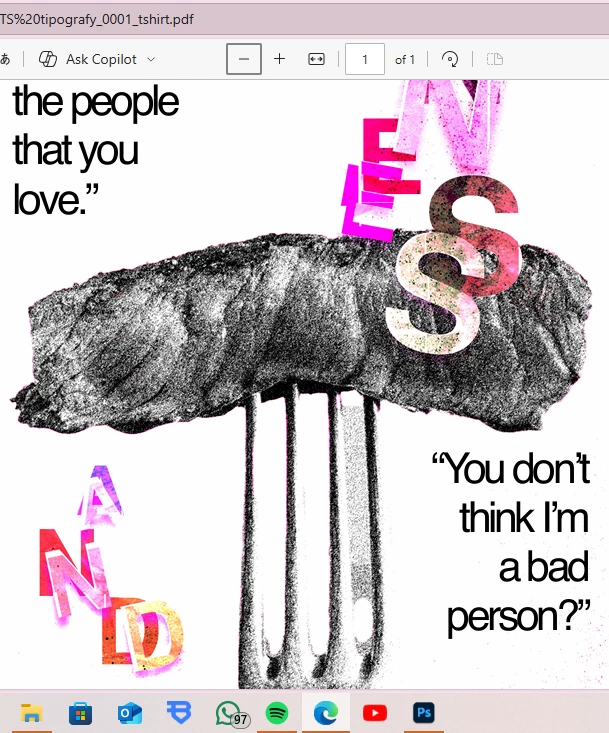
 

i tried layer comps, restarting my laptop, and others tutorial i found but still won't work. i don't know what to do, please help!

    Correct answer D Fosse

    Short version: it's the noise.


    Long version: Whenever something seems to change when merging layers - as in this case when exporting - it's because you are not viewing at 100%. The merged result is correct. The preview is misleading and incorrect.

    100% has nothing to do with size. It means one image pixel is represented by exactly one physical screen pixel.

    For performance reasons, all blending and adjustment previews are calculated on the on-screen version of the image. When you are zoomed out, that means a resampled and softened version of the image. Pixel levels are averaged out. You get a lot of intermediate values that aren't there in the full original data.

    When you merge, commit an adjustment etc, the numbers are re-calculated on the full original data, pixel for pixel.

    Viewing at 100% avoids all this. You see every pixel before and after, and so nothing changes.

    2 replies

    D Fosse
    Community Expert
    D FosseCommunity ExpertCorrect answer
    Community Expert
    October 17, 2025

    Short version: it's the noise.


    Long version: Whenever something seems to change when merging layers - as in this case when exporting - it's because you are not viewing at 100%. The merged result is correct. The preview is misleading and incorrect.

    100% has nothing to do with size. It means one image pixel is represented by exactly one physical screen pixel.

    For performance reasons, all blending and adjustment previews are calculated on the on-screen version of the image. When you are zoomed out, that means a resampled and softened version of the image. Pixel levels are averaged out. You get a lot of intermediate values that aren't there in the full original data.

    When you merge, commit an adjustment etc, the numbers are re-calculated on the full original data, pixel for pixel.

    Viewing at 100% avoids all this. You see every pixel before and after, and so nothing changes.

    linn_2129Author
    Participant
    October 18, 2025

    it works!!! thank you SO MUCH!!! 

    Kevin Stohlmeyer
    Community Expert
    Community Expert
    October 17, 2025

    @linn_2129 what color space/preset are you using when saving as a PDF?

    If this is converting to CMYK - colors outside the gamut may not appear properly.