


Exit
  • Global community
    • Language:
      • Deutsch
      • English
      • Español
      • Français
      • Português
  • 日本語コミュニティ
  • 한국 커뮤니티
0

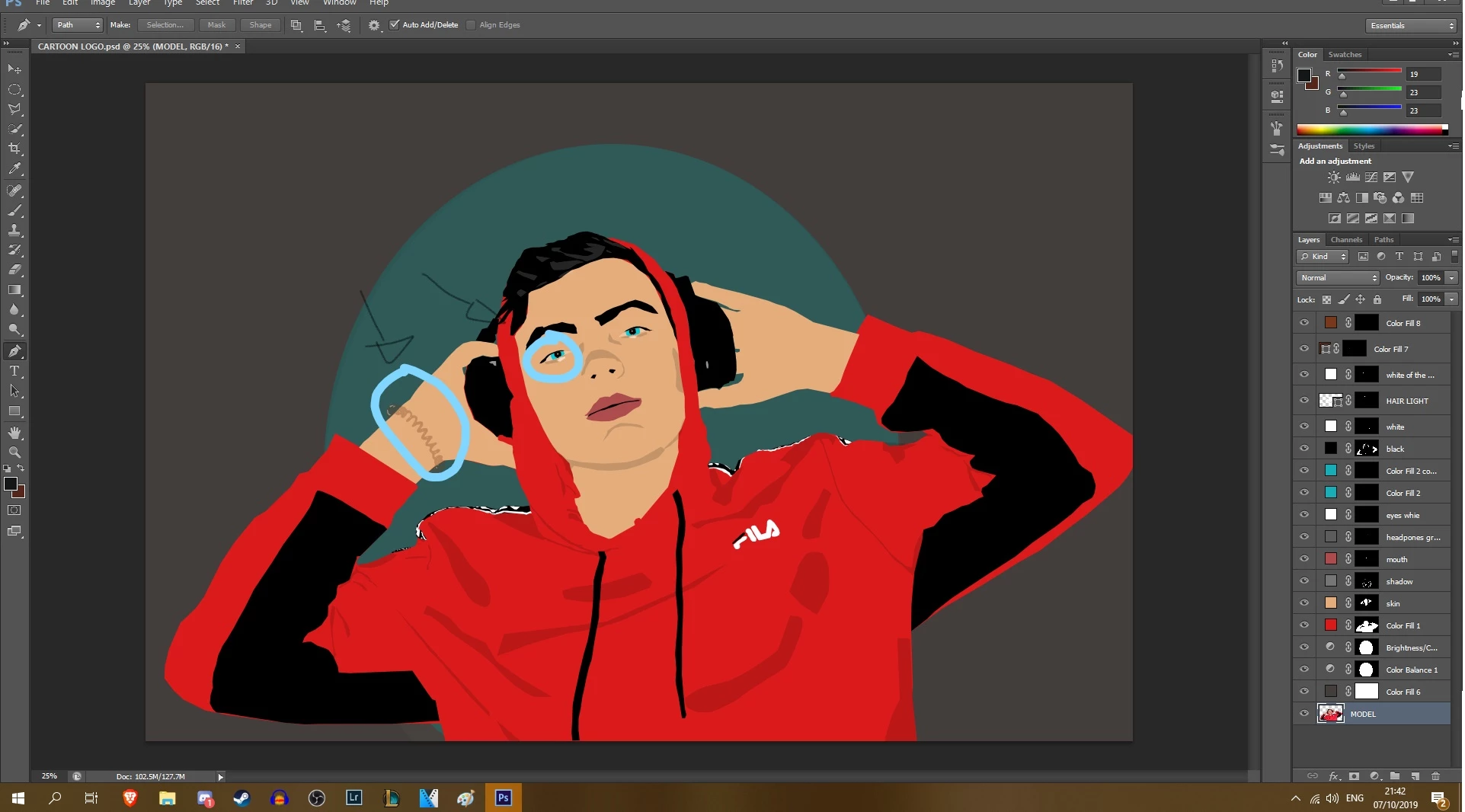
Why is this happening to my colours(sorry im not too good)

New Here ,
Oct 07, 2019 Oct 07, 2019

Idk why this hapenned, but my colors started getting rly light like that, ik for most of u this looks easy, but i really dont know how to fix it (The white part of the eye and the bracelet on my arm) I HAVE ATTACHED A VIDEO SHOWING THE COLORS DIFFERENCE
Inkeddada_LI.jpg


1.1K
Translate
Report
Community guidelines
Be kind and respectful, give credit to the original source of content, and search for duplicates before posting. Learn more
community guidelines

correct answers 1 Correct answer

Enthusiast , Oct 08, 2019 Oct 08, 2019
Adobe
Enthusiast ,
Oct 07, 2019 Oct 07, 2019

This is difficult to answer, as you did not mention


on which of the several layers you are working

what tool you did use

if a blend mode was activ

Maybe you painted in a mask instead on the layer?


Translate
Report
Community guidelines
Be kind and respectful, give credit to the original source of content, and search for duplicates before posting. Learn more
community guidelines
New Here ,
Oct 07, 2019 Oct 07, 2019
I used the pen tool, and sorry but what do you mean by which of the layers, also i dont know if i a blend mode was active or not, where can i see that?
Translate
Report
Community guidelines
Be kind and respectful, give credit to the original source of content, and search for duplicates before posting. Learn more
community guidelines
New Here ,
Oct 07, 2019 Oct 07, 2019
And well i used some blendings for the blue of the eyes for example, i used the light one, but for the brown bracelet and for the white of the eyes theres nothing on
Translate
Report
Community guidelines
Be kind and respectful, give credit to the original source of content, and search for duplicates before posting. Learn more
community guidelines
New Here ,
Oct 07, 2019 Oct 07, 2019
Also if i do smthg in a new project, it works good, so it has to do with that project
Translate
Report
Community guidelines
Be kind and respectful, give credit to the original source of content, and search for duplicates before posting. Learn more
community guidelines
New Here ,
Oct 07, 2019 Oct 07, 2019
Never mind it does the same thing, so i guess it has to do with photoshop?
Translate
Report
Community guidelines
Be kind and respectful, give credit to the original source of content, and search for duplicates before posting. Learn more
community guidelines
New Here ,
Oct 07, 2019 Oct 07, 2019
I posted a video, maybe u can understand the problem from there
Translate
Report
Community guidelines
Be kind and respectful, give credit to the original source of content, and search for duplicates before posting. Learn more
community guidelines
Enthusiast ,
Oct 08, 2019 Oct 08, 2019
In the video it is visible: instead of drawing on the layer you are drawing on the layer mask.
Translate
Report
Community guidelines
Be kind and respectful, give credit to the original source of content, and search for duplicates before posting. Learn more
community guidelines
Enthusiast ,
Oct 08, 2019 Oct 08, 2019
LATEST
Translate
Report
Community guidelines
Be kind and respectful, give credit to the original source of content, and search for duplicates before posting. Learn more
community guidelines