


Participating Frequently
June 21, 2012
Question

Why OpenCL is grayed out in supported and updated graphics card?

  • June 21, 2012
  • 9 replies
  • 43632 views

Hi,

I have NVIDIA GeForce 520 which does support open CL and is officially tested by Adobe.

I have the most updated driver installed from Nvidia.

I have win 7 64bit

I use Photoshop CS6 64bit

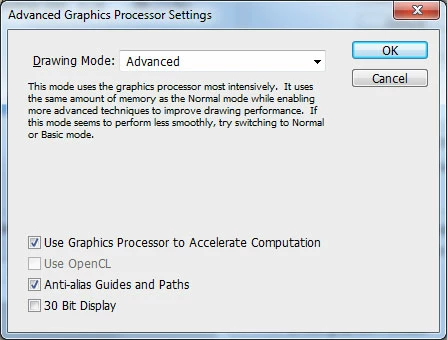
and still in preferences->performance->advanced settings

I see "Use OpenCL" grayed out.

Can anyone explain this?
This topic has been closed for replies.

9 replies

çağlad36613448
Participant
October 1, 2019

lan oil paint aktif değil 

October 1, 2019

Hi

You need to provide more detailed information, what version of Photoshop and OS do you have, perhaps you could post your Photoshop system info, in Photoshop go to Help > System Info and copy and paste the entire thing into this thread

Participant
April 6, 2017

having the same issue and did exactly the same as spadeGFX and it worked temperately one time then disappeared. The issue cannot be just to buy a new graphics card surely.

davidc1815
Legend
April 6, 2017

Do you have 'use Nvidia' selected for Photoshop.exe and Sniffer.exe in the Nvidia Control Panel/ Manage 3D settings/Program Settings?

Sorry if this has been raised earlier in this thread...

David

Participant
April 6, 2017

I am using an Interl HD 530

Participant
February 4, 2017

I found a temporary fix for intel graphics.
So, I have an Intel HD Graphics 520, which does support openCL, however I still come across this problem (PS CC 2017 on 64 bit system)
However, by installing intel sdk for openCL and restarting my Laptop, it works temporarily ONCE. Open photoshop and bam, it works, even Oil Paint. But then, upon closing photoshop and reopening, it fails yet again...
So im yet to figure out why this happens...

vibushv19221337
Participant
December 18, 2016

I am using Intel HD graphics in windows 8 with 64bit laptop the opencl is greyed out please tell me the solution...with an up to date driver..help me please

jamesm76380651
Participant
August 3, 2016

I have the same problem bt my graphic card is Nvdia Geforce GT 610

Participant
May 23, 2013

In case anybody is still stuck with this issue I have found than when running PS CS6 on Win 7 64bit I need to run the 64bit version for the "Use OpenCL" option to become available. If I run the 32bit version then the "Use OpenCL" option is greyed out.

BTW I think that even though the Use OpenCL option is greyed out when running the 32 bit version of PS CS6 on a 64bit system I suspect openCL is still working if you have enabled it in the 64bit version.

Noel Carboni
Legend
May 23, 2013

Covertcop wrote:

I need to run the 64bit version for the "Use OpenCL" option to become available. If I run the 32bit version then the "Use OpenCL" option is greyed out.

That's by design.  OpenCL is simply not supported in the 32 bit build.

We can only guess that this made programming at the interface easier.

-Noel

Participant
June 21, 2012

Same problem, but I have ATI HD5450 running on Win7 64 bit/Web Premium CS6 with latest catalyst drivers (previous 2 versions also failed). Anybody managed to find the solution?

Known Participant
June 21, 2012

Does it grey out every single time you check preferences having launched PS? Might sound like an odd question, but I've found on my own system (running an ATI 5850 Radeon with Catalyst 12.3) that it usually does have OpenCL checked, but occasionally it becomes greyed out. I just can't understand what's causing OpenCL to randomly become unavailable on an officially supported card with an up to date driver (but not quite the very latest version, because as Noel says, this is broken). Anyway, this may be of no help to you directly, but at least it shows that you’re not alone in experiencing OpenCL issues… I’m hoping future driver updates will make things more stable.

M

Participating Frequently
June 21, 2012

Mollysnoot - It is a helpful answer.

I made a restart to the system after installing the newest dirvers. Restarted photoshop serveral times and it was still gray.

Then after few hours after I gave up - I checked that again and now its not grayed out. You have the same issue like me. It is mysterious indeed.

Inspiring
June 21, 2012

>>  what causes PS to sometimes find fault with the driver/graphics card and grey it out, and yetnot find fault at other times?

Some bug in the driver.  If the driver returns errors when it shouldn't, or crashes, then Photoshop will remember that the driver is bad and disable the related features.


For AMD/ATI graphics cards, my Radeon 6870 showed the OpenCL in driver version 12.2 but not 12.3 or 12.4. The current beta driver set 12.6 makes it active again, so try the beta drivers if it is avalable for your card.

Noel Carboni
Legend
June 21, 2012

I couldn't get a straight answer to why OpenCL might be unavailable, but it's clear that the setting depends on capabilities of the display driver.

http://forums.adobe.com/message/4414146

The general advice is to seek out and install a better version of the display driver for your video card.  In the case of ATI, their latest release broke OpenCL functionality.  That could be the same story with your nVidia drivers.  OpenCL is still so new and volatile that apparently the normal "latest is greatest" philosophy with drivers is not true.

-Noel