


Utskiboo
Participant
July 10, 2018
Answered

Window staying same size on alt zoom

  • July 10, 2018
  • 2 replies
  • 619 views

Hi there.

Been looking for an answer to this question but couldn't seem to find it.

In previous versions of Photoshop you had the ability to hold the Alt-option key when zooming (Command +/-) and the window would stay the same size, and only the content inside would zoom, where did that feature go?

I know you can uncheck "Zoom resizes windows" in preferences, but doing so, would result in the window always being the same size.

Thanks in advance

Jannick

    This topic has been closed for replies.
    Correct answer Utskiboo
    Could it have something to do with macOS High Sierra??

    I use Mac OS 10.12.6, so it might be but I if it was a general behaviour with that OS I would expect more threads on this.

    Does the alt key behave as expected for other functions within Photoshop?


    Solved

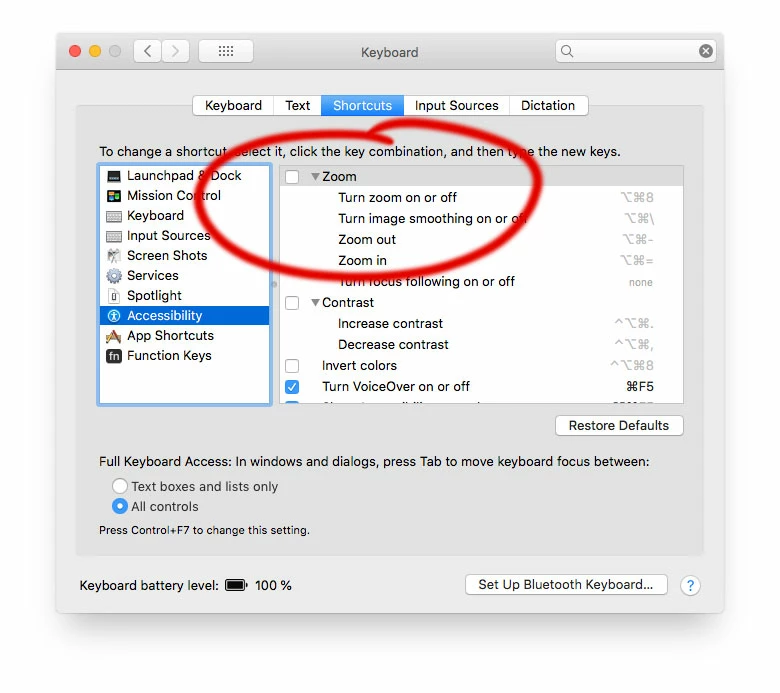
    Turned out it was a checkbox in the keyboard preferences that need to be unchecked, thanks for all of your help anyway
    2 replies

    Participant
    December 15, 2023

    Unchecking this box in preferences for keyboard didn't work for me. Still having the same problem when I hit alt _/+ the window shrinks to the size of the page.

    c.pfaffenbichler
    Community Expert
    Community Expert
    July 10, 2018

    If I understand correctly when »Zoom Resizes Windows« is active alt-zooming causes the window to stay the same size, If »Zoom Resizes Windows« is turned off lt-zooming causes the window to in-/decrease in size accordingly. (edit: zooming by cmd-+ and -, that is, not when using the Zoom Tool itself.)

    So I am not quite sure what exactly you want to behave differently.

    Utskiboo
    UtskibooAuthor
    Participant
    July 10, 2018

    What i want to achieve is both being able to zoom (command +/-) with the window zooming in size accordingly, and (as it used to be) holding down alt command +/- making the window keep the same size, and only the content inside zooming.

    As it is now i can't have both, either the window stays in size (zoom resizes window unchecked) or the window zooms with content (zoom resizes window checked). the alt key doesn't have a function anymore.

    c.pfaffenbichler
    Community Expert
    Community Expert
    July 10, 2018
    What i want to achieve is both being able to zoom (command +/-) with the window zooming in size accordingly, and (as it used to be) holding down alt command +/- making the window keep the same size, and only the content inside zooming.

    For me that’s not a problem. (edit. meaning the alt-key does make the difference)

    What have you done for trouble-shooting so far?

    Restoring Preferences after making sure all customized presets like Actions, Patterns, Brushes etc. have been saved might be a good starting point:

    https://helpx.adobe.com/photoshop/kb/basic-trouble-shooting-steps.html