


Participant
October 15, 2024
Question

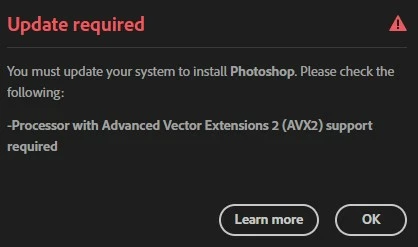
Windows 10 / unable to update Photoshop 26.0 / AVX 2 error

  • October 15, 2024
  • 8 replies
  • 10231 views

Hello,

I need help. I am currently unable to update Photoshop 26.0, Beta 26.1, Bridge 15.0, when an error message appears when updating, processor AVX2 support is needed. My desktop has an AMD A10 7890 and has standard AVX support but no AVX2 support.
8 replies

Wurstkrapfen
Inspiring
February 24, 2025

Adobe loves a good joke:


AxelMatt
Community Expert
Community Expert
November 12, 2024

If you want to see it that way, that's yours. But you won't change anything.
I respect your opinion, but I don't accept it.


My System: Intel i7-8700K - 64GB RAM - NVidia Geforce RTX 3060 - Windows 11 Pro 25H2 -- LR-Classic 15 - Photoshop 27 - Nik Collection 8 - PureRAW 5 - Topaz Photo
AxelMatt
Community Expert
Community Expert
November 12, 2024
quote

That is part of the fear campaign that corporations use to pressure you to consume things you don't need, ...

By @DexterGordon


If you think this is all scaremongering, that's your business.


But my experience is completely different. There are a lot of criminals on the Internet who look for every possible vulnerability in systems, find it and then exploit it.


I worked for years as a system administrator in a global company. Years ago we were attacked and hacked because colleagues in a branch were sloppy when it came to installing security updates.


And if there is no longer any support for old, incompatible hardware, then it just has to be replaced. It is not economical for companies and sometimes it isn't even technically feasible to support even the oldest hardware.


My System: Intel i7-8700K - 64GB RAM - NVidia Geforce RTX 3060 - Windows 11 Pro 25H2 -- LR-Classic 15 - Photoshop 27 - Nik Collection 8 - PureRAW 5 - Topaz Photo
Participant
November 11, 2024

error avx2 update required to install adobe

AxelMatt
Community Expert
Community Expert
November 11, 2024

As mentioned in the former answers in this thread your system (especially your CPU) isn't compatible with the new Photoshop version 26.  You have to update your hardware or leave on an former version. 


My System: Intel i7-8700K - 64GB RAM - NVidia Geforce RTX 3060 - Windows 11 Pro 25H2 -- LR-Classic 15 - Photoshop 27 - Nik Collection 8 - PureRAW 5 - Topaz Photo
Ex-photo printer
Inspiring
December 5, 2024

I have to ask you. How much did you pay for your cell phone? How often do you replace it? People don't mind paying $1000 to $1500 for a phone that they replace every 3-5 years. But having to change a desktop computer that will cost the same or less every 8 to 15 years? We get responses like yours. Sorry, your computer, like mine has reached the end of its usefull life. Mine is close to 15 years old. It's time to let it go.

AxelMatt
Community Expert
Community Expert
October 22, 2024
quote

@Lumigraphics 
Not entire true. You can run Win 11


By @DexterGordon


But that's only half the truth.
Full Windows 11 support is only available with current hardware.
It's also questionable how long the security updates will be able to be installed. Microsoft will certainly put a stop to it at some point. Connecting to the Internet with an unpatched system is highly risky.


My System: Intel i7-8700K - 64GB RAM - NVidia Geforce RTX 3060 - Windows 11 Pro 25H2 -- LR-Classic 15 - Photoshop 27 - Nik Collection 8 - PureRAW 5 - Topaz Photo
D Fosse
Community Expert
Community Expert
October 15, 2024

This is apparently a new system requirement with version 26. Several people have reported getting this message.


My guess is that this applies to CPUs older than, say, 2016 or so - that's about  the same support horizon they advise for GPUs.


Looks like you'll need to stay on v 25 until you can get newer hardware.

Participant
October 16, 2024

Hello,

Thanks all for the answers. The desktop update is probably coming 2025, although I found an instruction on YouTube (photoshop AVX2 error) that tried to fix the issue, but I couldn't find the folder in photoshop according to the instructions. Fortunately, I have a newer laptop where I can download new versions of photoshop. I'm still trying to figure out if I can fix the desktop problem.

D Fosse
Community Expert
Community Expert
October 16, 2024

Not unless you can replace the CPU, which is rarely worth the effort (if you can even find a modern CPU using that socket). This is hardware, not software.

Legend
October 15, 2024

Unless you buy a new computer or replace the processor, you cannot use the latest versions of Adobe apps. You also won't be able to use Windows 11 when Win 10 support ends in a year.

martaca
Known Participant
October 15, 2024

Hello Klaus, The same thing happens to me


Participant
October 22, 2024

Hallo, das Thema betrifft mich auch. So geht es nicht. Ich protestiere, wie Adobe mit Abonnenten umgeht. Gibt es eine Alternative?