


Participating Frequently
August 9, 2016
Question

Windows taskbar don`t hide in the full screen mode!

  • August 9, 2016
  • 21 replies
  • 34180 views

Hi, friends. After Windows anniversary update (1607) I see a problem with the Photoshop full screen mode. Windows taskbar always stay on the top, and never

disappears. Here, how it looks:
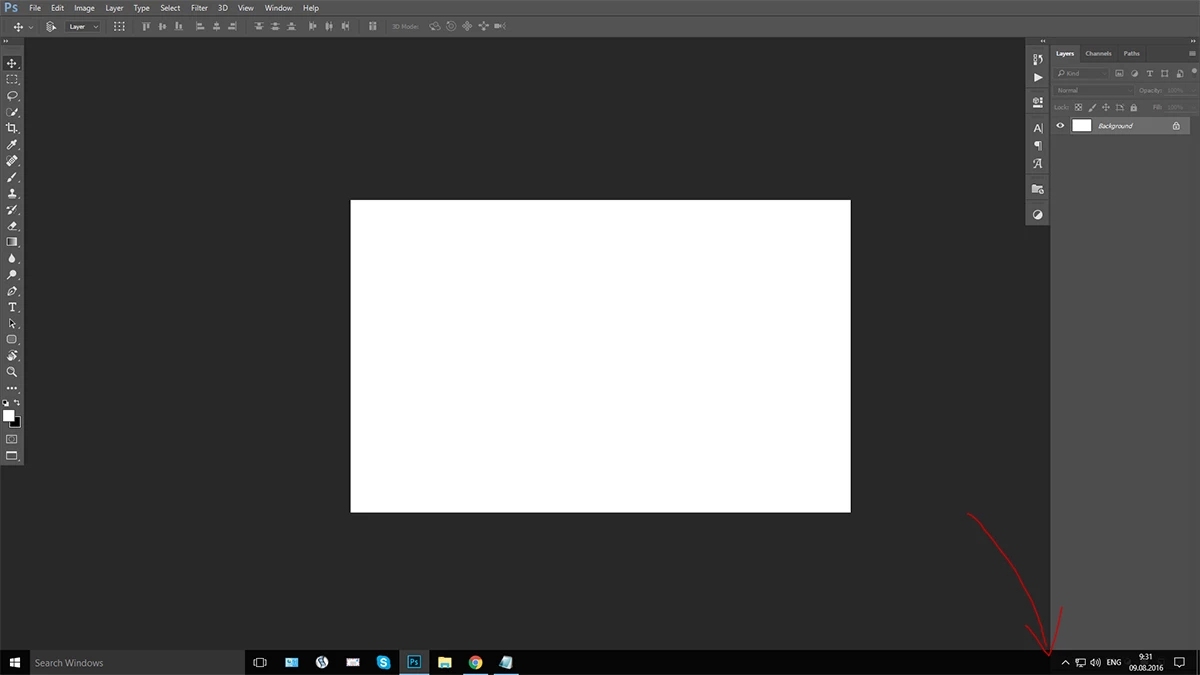
No matter, what full screen mode is chosen, the windows taskbar is always on, after any click. It disappeared after first pressing "F", and then appeared after any click.
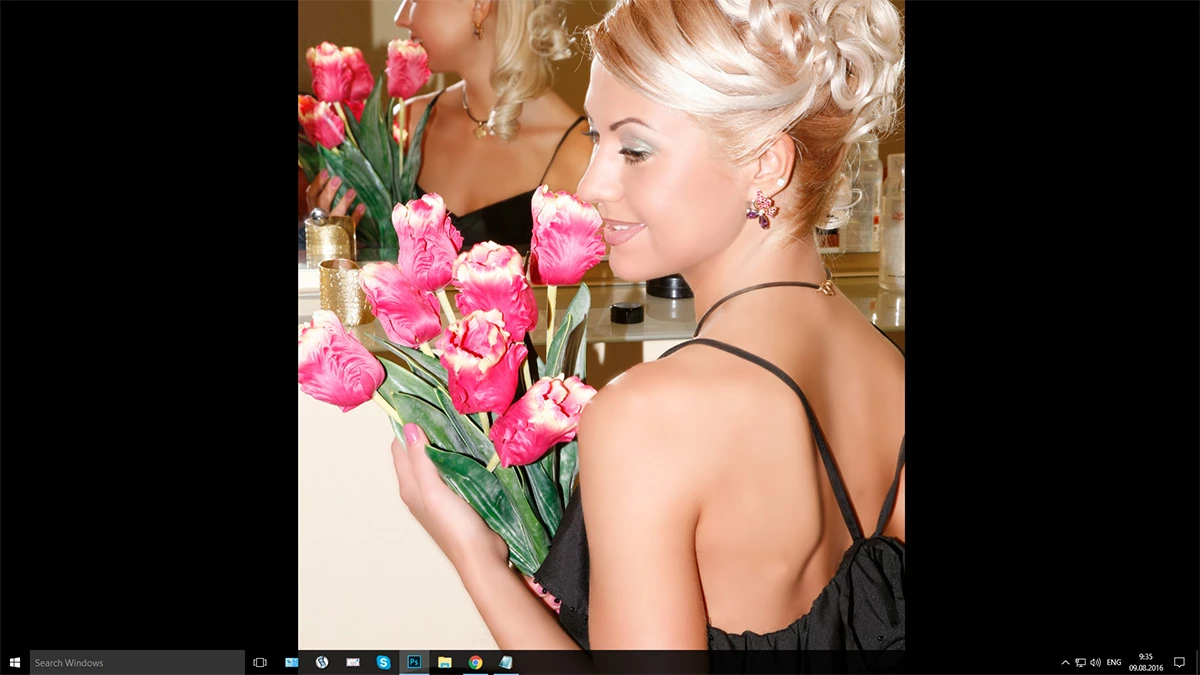

Please, help!

    This topic has been closed for replies.

    21 replies

    JohnVo
    Inspiring
    October 16, 2016

    hi

    insane

    i still wait , seems only install preview insider update on w10 does it fix it

    sweetdonAuthor
    Participating Frequently
    October 15, 2016

    Theme starts 08.08.2016 , today 15.10.2016. Two months and two updates come out since that time. The last is: 2015.5.1 (17.0.1.156)

    The problem is still here... "Great" job, Adobe! (((

    Participant
    October 15, 2016

    I'm bumping the post, same issue since the Anniversary update.

    Inspiring
    October 10, 2016

    I have the same issue with the windows taskbar. However I am not running the anniversary update for windows 10 and it occurs randomly. Am on version 2015.5.1

    Branagh12
    Participant
    September 26, 2016

    Same problem here with CS6 on Win10 64bit. Not being able to work in fullscreen mode is really awkward for me. I would be grateful for a solution.

    davescm
    Community Expert
    Community Expert
    September 26, 2016

    Not a solution but, for anyone using dual/triple monitors, don't forget you don't have to have the taskbar on the main screen.

    I put the taskbar on the left, Photoshop in the middle and palettes on the right.

    Like I said, not a solution for all, but may help some

    Dave

    Participating Frequently
    September 26, 2016

    Same Here!
    I am workins this way...

    Jeff Arola
    Community Expert
    Community Expert
    September 20, 2016

    Has anyone noticed that this is partially fixed now?

    This is on a windows x64 bit version 1607 os build 14393.187

    (one can check the version and build by using Run (window key+R and typing winver)

    By partially, it seems photoshop cc thru cc 2015.5.1 work in photoshop proper and camera raw hiding the windows 10 task bar.

    Photoshop cs6 works in photoshop proper but not in camera raw.

    Older versions of photopshop before cs6 still don't auto hide the winndows 10 task bar in photoshop proper full screen or camera raw full screen.

    Photoshop elements 14 camera raw 9.5 in Full Screen mode doesn't hide the win 10 task bar.

    (older versions of photoshop elements and camera raw are the same as pse 14)

    If adobe didn't partially fix it the new camera raw 9.7 updates, it must have been the windows 10 KB3189866 cumulative update that just came out.

    Trevor.Dennis
    Community Expert
    Community Expert
    September 20, 2016

    Still happening with me.  It's annoying, but it helps to know it is a bug, so I have stopped looking for which other window is looking for input, turned off Auto Hide Task Bar and resized Photoshop's main window. So appart from losing a tiny part of my big monitor, I can at least access those icons that were being hidden.  What is also nice, is that plug-in windows (Alien Skin, Topaz) comply to the new Photoshop size, so I can now see ​OK ​ and ​Apply​ buttons without having to drag the window onto another monitor!

    Jeff Arola
    Community Expert
    Community Expert
    September 24, 2016

    I think i discovered why it's working for me, even though there was a time it didn't work.

    I have the windows taskbar at the top of the screen.

    Also works with the taskbar on the left hand side of screen.

    Doesn't hide the taskbar if on the bottom or right hand side of screen.

    morris.c
    Participating Frequently
    August 23, 2016

    Same issue here.

    I tried this and it worked for me.

    1. Open Photoshop

    2. Unmaximize PS window (Windows + down arrow)

    3. Press F for the Full Screen mode.

    Windows Taskbar should disappear now in full screen.

    sweetdonAuthor
    Participating Frequently
    August 23, 2016

    Unfortunately taskbar will appear after any new click on the tool, or on the explorer window. Any way, this could not be named "conveniently work".

    sweetdonAuthor
    Participating Frequently
    August 15, 2016

    Last update of Adobe Photoshop Version: 2015.5.1 20160722.r.156 2016/07/22:23:00:00 CL 1083377  x64 - Problem is on.

    Inspiring
    August 15, 2016

    Im having the same issue and I receieved the exact same response from microsoft, word for word

    Jesper Storm Bache
    Adobe Employee
    Adobe Employee
    August 15, 2016

    We are able to reproduce and have started working with Microsoft on resolving this issue.

    Thanks for the report.

    Jesper

    JohnVo
    Inspiring
    September 24, 2016

    hi

    but do we need an adobe update or a microsoft update to fix it?

    thanks

    Jesper Storm Bache
    Adobe Employee
    Adobe Employee
    August 9, 2016

    Hi Sergei,

    Which version of Photoshop are you using?

    Thank you,

    Jesper

    sweetdonAuthor
    Participating Frequently
    August 9, 2016

    Hi, Jesper. My version is: 2015.5 (17.0.0.88)