
Inspiring
December 11, 2022
Open for Voting

Layers and masks that rasterizes chosen layercomp on the fly

  • December 11, 2022
  • 4 replies
  • 345 views

As a replacement to often cryptic and undecipherable clipping groups  . A way to simplify layer stack and ability to get a dynamic live masks from a separate stack of layers .    Those layers could be put somewhere in the bottom and just marked as a certain layer comp. 


It would be working  same as  linked smart object.     The only difference is that the subject would be linked to the same documents group of layers and thus  working live.  Without necessity to open and edit outside files to make changes.


4 replies

davescm
Community Expert
Community Expert
December 11, 2022

OK got it.

Let's see if it gets any upvotes


Dave

kirkr5689Author
Inspiring
December 11, 2022

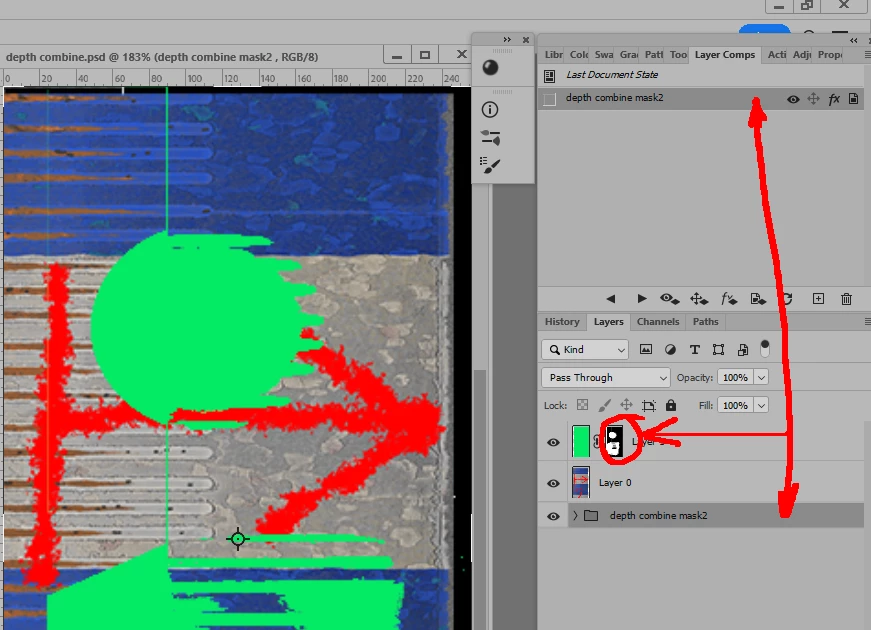
I added a psd file and a screen of what I mean .   A dynamic mask  or just layer  would be a rasterisation of chosen layer comp.    I believe it's what happens when you  select a layercomp within a smart object to show.


So my idea is to rasterize  same way a layercomp in current document .

jane-e
Community Expert
Community Expert
December 11, 2022

@kirkr5689 wrote:

As a replacement to often cryptic and  undecipherable  clipping groups  . A way to simplify layer stack and ability to  get dynamic live masks  from  their  own  stack of layers  put somewhere in the bottom and marked as a certain layer comp. 


Sort of linked smart object that links to the same document group of layers and thus  working live.  Without necessety to open and edit  other files.


Your "sentences" are missing subjects and verbs, which makes me wonder if English is not your native language. You can write in your native language if that's easier for you, and we can click the "Translate" button. 


Jane


davescm
Community Expert
Community Expert
December 11, 2022

Sorry, I don't understand what exactly you are trying to achieve or what dynamic masks have to do with layer comps in your explanation.


Maybe it would be better to show an example screenshot of what it takes now to achieve something and a mock up layer stack showing how your idea would achieve the same but in a simplified way.


Dave