


Inspiring
December 8, 2014
Under Review

P: Preview shape color change while color picker dialog is still open

  • December 8, 2014
  • 20 replies
  • 2782 views

Shape color is applied only after clicking on "OK" button in Color Picker dialog.

It is better if the color changes immediately to preview the result.
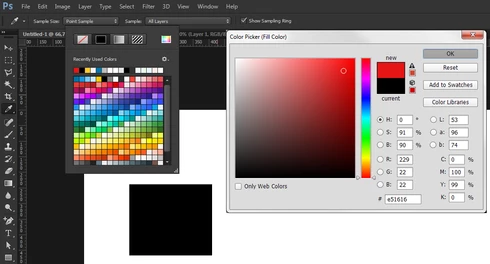
\

Best regards,
Stephan

20 replies

Inspiring
May 31, 2019
This would be very helpful to have. I've held on to photoshop over sketch
obsessivetype
Inspiring
October 30, 2018
This lack of functionality is embarrassing. Please do something about it.
Inspiring
November 21, 2017
@17306601, when Adobe will fix it? 🙂
alexb43653115
Participant
November 10, 2016
This bug still exists. Fix it please.
Inspiring
November 9, 2016
This has always seemed like a surprising oversight to me. Not being able to preview the effects of a modal dialogue is a big workflow roadblock. It discourages experimentation and generally makes the feature feel half-baked.
zarrdave
Known Participant
November 9, 2016


Using the traditional method of applying a stroke to a shape (i.e. using the fx button in the layers panel to add a layer effect) the stroke color picker shows a real time update on your working document as the picker color is selected. In the new stroke properties bar at the top (the one with new features like gradients to a stroke, dotted lines etc) the color picker doesnt have re-time previews (on my version anyway).

Anyone know why? Is there a setting to activate? Surely both color pickers should show real time updates without having to click on OK to see changes each time. A small but annoying waste of time when repeated multiple times.
alexb87302875
Participating Frequently
December 9, 2014
If you select a few text layers and try to change their color in Color Picker dialog, the preview also does not work
Foster Brereton
Adobe Employee
Adobe Employee
December 8, 2014
Yes, in that case we'll have to do some work on our side.
Inspiring
December 8, 2014
"As a temporary workaround, you can get the behavior you are looking for by double-clicking the shape thumbnail in the layers panel. This should open the same color picker dialog and changes there will be reflected live on the canvas."

But if I want to change the stroke color (not fill)?
Foster Brereton
Adobe Employee
Adobe Employee
December 8, 2014
Yeah, it would be better if this workflow gave a live preview of its changes.

As a temporary workaround, you can get the behavior you are looking for by double-clicking the shape thumbnail in the layers panel. This should open the same color picker dialog and changes there will be reflected live on the canvas.