

hemag nova grafik
Inspiring
October 13, 2021
Open for Voting

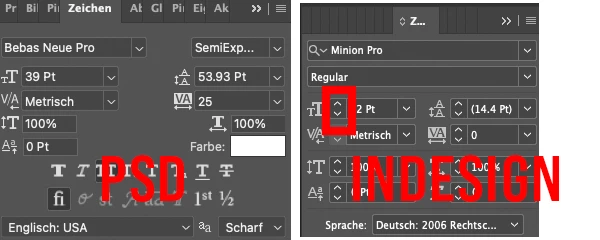
Up and Down buttons on edit fields to increment and decrement values in edit fields like InDesign

  • October 13, 2021
  • 2 replies
  • 343 views

would be nice to have those small arrows next to some text-fields like in indesign or illustrator.

thanks and good bye
2 replies

hemag nova grafik
Inspiring
October 14, 2021

hi, thank you, i did not know that you can use your mouswheel, thats very handy. i did know you can use arrows keys and math. still, i would like to have those little arrows to click. if you just want to make a few steps its easier just to klick them 🙂

PECourtejoie
Community Expert
Community Expert
October 13, 2021

Hello, I know that it is not exactly what you are asking for, but did you know that Photoshop has something that Illustrator does not have: scrubby sliders: hold CTRL(PC)/CMD(Mac) as you hover the numerical field, and you can drag to change the numbers.

Hold Shift for larger and Alt for finer increments. 

You can also hover the title of the numerical field, and the mouse cursor changes, indicating that you can scrub left and right.


Also, if you click on the numerical field, you can use the up or down arrow on your KB to change the numbers, Shift for larger increments.


As an alternative, you can also use the mouse wheel to change the value after clicking. Again shift for larger changes.


If you enter a value with the keyboard, you can also Shift+enter to apply, but keep the field active, in order to experiment.


You can also use basic math on the numerical fields.


I hope this helps...
