
Inspiring
February 26, 2012
해결됨

How can I Bulk add file name to picture

  • February 26, 2012
  • 4 답변들
  • 46963 조회

I want to add the file name to the picture, so that when people look at the picture the file name is embedded into the picture.

I have done some research on this top and have found some mention of tools that people have build to do this and indeed many different things I suppose.

Im using PSE 10. Windows 7 Prof.  From what I understand, I cant build tools because my version eg Elements is not full blown. But if people have build something to do this I can then add it to my software and it will function for me.

While in full, quick or even guided there appears to be an option under File/Automation Tools. This appears to be what I need.

Can anyone tell me where this add on is and how to use it, I cant seem to find it and I really dont know if it will work with PSE 10. Many of the refrences I have seen seem to be for earlier version.

Perhaps there is an easier way ??

Thanks
이 주제는 답변이 닫혔습니다.
최고의 답변: Barbara_B_

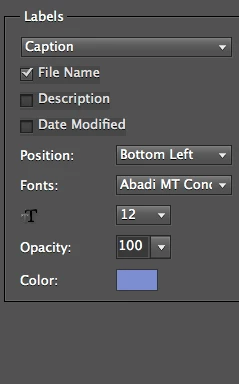
I'm not sure why process multiple files>captions>file name won't work? Sorry if I'm missing something here:

4 답변

Greg_S.
Community Expert
Community Expert
May 6, 2023

. . .  Never mind.  This is an old thread and I viewed Barbara's old post which has been marked as correct rather than the latest post.  I should have recognized that Barbara_B_ is the author of the bible on older versions of Photoshop Elements and I owe much of my knowledge of the program to her.

Greg_S.
Community Expert
Community Expert
May 6, 2023

@Barbara_B_ when you say the process doesn't work, do you mean that you can't see the caption?  I'm guessing that the problem is the size of your text which is so small that it can't be seen even on a fairly low resolution image.  In the following screenshot, I have created an image with a resolution of 4000x3000 pixels and 72 ppi.  I have added text at various sizes of 12 pts, 72 pts, 150 pts and 300 pts.   You will see that even when I magnify the image, the 12 pt type that you are using is barely visible.  So, my guess is that the process is working but your type size is way too small.


The maximum size for the caption font in the dialog is 72 points.  So try using that.

Participant
May 5, 2023

You can use faststone Image viewer (https://www.faststone.org/FSViewerDetail.htm)

hatstead
Inspiring
February 26, 2012

It is not clear to me what "add file name" means.

Do you want to provide a different caption on each picture, e.g. Picture A would have United State, Picture B would have Canada, Picture C would have Mexico, etc.?

Or, do you want the same caption on a group of pictures, e.g. Pictures A,B,C,  would all have United States?

ccm288작성자
Inspiring
February 26, 2012

Good question.

Basically what I want is the name of the photo name actually in the photo.  I have 400 pictues, I want to put them into a digital picture frame, and I want each picture to be display with the name of the pictures eg. Florida 2012.jpg and Grand Canyon.jpg. Of course I dont need the .jpg extention. But If it is there I can live with it. Im not sure if the Caption option in photoshop elements  can be exported so that the caption is hard wired into the picture. maybe it is. HOWEVER, what I dont want to do is go through 400 pictures and type in the caption for each pictures, if this option is available. It would be nice if the utility copyed the fild name into the caption, if you  could save it with the caption name, but I think Im asking too much.

Anyway basically I want the file name build into the  photo how ever this could be done in a bulk mode.

Is that  a lttle clearer. Here is an examle worth a 1000 words.

BTW I did an experiment and if you put the name in the caption line of the photo. It does not get exported with the file name in the picture. ( which I would asume since not many want the name in the photo, ) Although maybe there is some option that can be turned on to do this ??

Regards

hatstead
Inspiring
February 26, 2012

Thanks for the additional information

I am not aware of a program that will accomplish what you seek.

Perhaps others will come along with suggestions.