



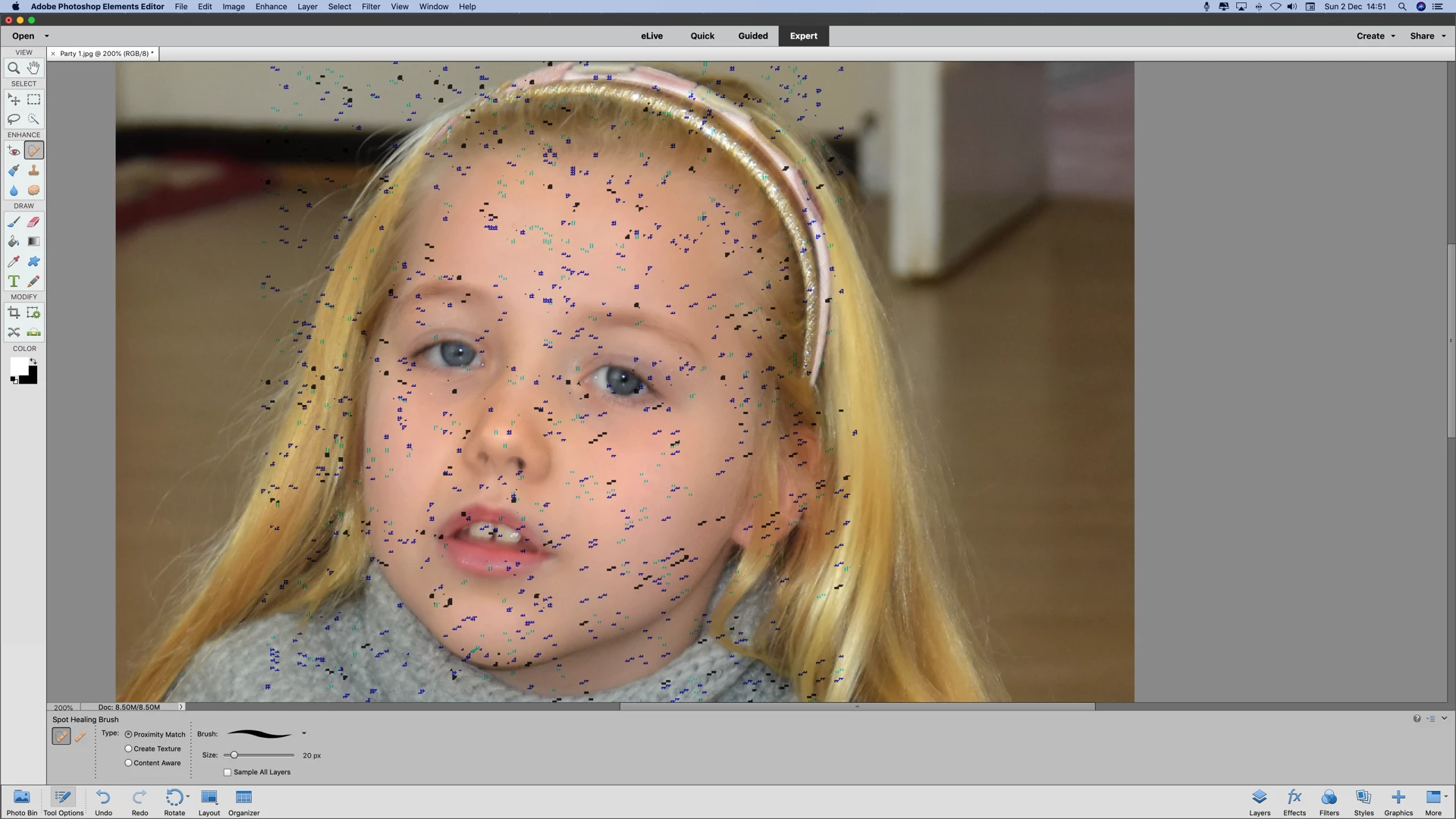
In photo elements 15, adjust facial features . After adjusting click Ok and the result is photo full of spots and wiggles in colours blue and green
Hi Please help is edit adjust facial features worked until I upgraded to Mac OS Mojave
Here is an example of the photo after adjusting the facial features . I tried to put a smile on this little girls face clicked ok below is the result . I have tried this numerous times . Tried the Delete the Adobe Photoshop Elements Settings File? still not successful.
Then got hold of Adobe Chat.They were not prepared to help me all the should do is refer me to this forum. See full chat transcript below. So if any one of you can help i would really appreciate it.
Regards
Des
Chat Transcript
info: Thanks for contacting us. We’ll find a representative for you to chat with and keep you posted on your wait time.
This chat will become active once a representative responds.
Did you know you can get answers to most of your Adobe-related questions at help.adobe.com? Find helpful video tutorials, tips for troubleshooting, and user guides for all our products. You can even get answers from members of our vibrant forums community. Visit help.adobe.com. Please hold for the next available agent.
info: You are now chatting with Deepak.
Please don’t close the chat window or browser tab since it will end our chat session.
Deepak: Hello. Welcome to Adobe Technical Support.
Des Golach: Your file was successfully uploaded.
Des Golach: When I adjust facial features this is what happens
Des Golach: Did you receive my attachment ?
Deepak: Hi Des, I just reviewed your account and the issue description where you mentioned that you are not able to use Photoshop Elements 15 properly. Am I right?
Des Golach: What do I have to do?
Des Golach: Did you receive my file re what happens when i adjust facial feature :- spots and wiggles all over the photograph
Deepak: Yes. I just checked your account and the image also but I want to confirm if it's Photoshop Elements version 15?
Des Golach: Yes , Elements 15 is the only one that has the adjust facial feautres, other wise I would of tried 13,14, I have then as well
Deepak: I apologize but the support for this version of the application is only available through Adobe forums.
Deepak: I can help you with the link to visit the website.
Deepak: http://forums.adobe.com
Des Golach: Well if that is the case can you please refund me my money for purchasing this package . I have tried looking on the forum there is no information on my problem.
Deepak: I apologize but I am from the technical team of Elements 2019 application.
Deepak: I can connect you with the billing team.
Deepak: Let me connect you with the right team.
Des Golach: I will be writing to your MD. you are supposed to be customer support for the product that I have bought. There is no information on this problem if you google it. So what must I do, I have a problem with your soft ware and cannot resolve it. Please give me a statement that you cannot help me and I will put it on all multi media to let every one know that you are not prepared to back your product.
info: Please wait while we connect you to a representative.
info: You are now chatting with Sajal Singh.
Please don’t close the chat window or browser tab since it will end our chat session.
Sajal Singh: Hello. Welcome to Adobe Technical Support.
Des Golach: i am at work and cannot stay on this chat for much longer. You have my email number . i have sent you an example what happens , please contact me via email when yo have resolved the problem . Please have a look at the photograph that I sent you
Des Golach: Your file was successfully uploaded.
Sajal Singh: As per my understanding you are unable to add some features in Photoshop elements 15.
Sajal Singh: Des, as I have checked its a after launch issue.
Des Golach: No when i adjust facial features this ( the attachment is what happens after the adjustment , please read my transcript..
Des Golach: Can you email me this transcript , and the solution to my problem
Sajal Singh: Thanks for the confirmation.
Sajal Singh: You can save chat.
Des Golach: I have to go now. You have everything you need in this transcript to resolve my problem. please email me the solution to me problem.
info: Your chat transcript will be sent to desmondgolach@ymail.com at the end of your chat.
Sajal Singh: Des, I would like to inform you that its an older application, we have a different dedicated channel for the older application.
Sajal Singh: Please visit there and submit your issue.
Des Golach: Please forward my information on to them and let them resolve it , then they can email me back the solution. how to I contact the dedicated channel. Please help me and forward this on and tell them to email me the solution . I must end this chat now.
Sajal Singh: Des, I will send you the information, via mail please contact with them.
Des Golach: I am at work and cannot continue chatting. I arrive back home too late to chat as you are closed. Can you send me an email address that I can forward my problem to them.
Sajal Singh: https://forums.adobe.com/welcome
Sajal Singh: Please click on the above link and visit our different dedicated channel.
Des Golach: I have looked on the forums and there is no help available for this problem. I have also Googled it ,Why have you not read this script I have mentioned this before. I am not being rude. I really have to go , please you are product support , forward this on to the correct department and let them email me back the solution , If they cannot I will ask for a refund and buy the latest version with the refund. Thank you for your help. Please pass this on to the relevant department and tell them to email me . By
 AdChoices