

ObiRon
Known Participant
October 4, 2023
質問

MacOS Sonoma 14.0: PSE 2022 has several graphics bugs

  • October 4, 2023
  • 返信数 14.
  • 4357 ビュー

Hi All,

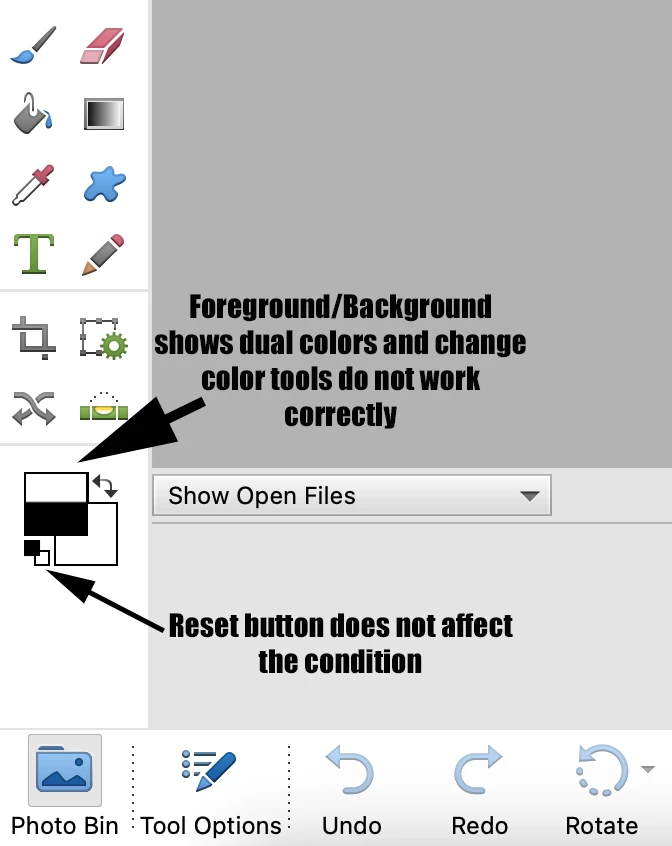
Just off a lengthy effort to identify why my background/foreground color selector tools went wonky (see image)--and I found out that PSE 2022 does not play nice with the newest iOS Sonoma 14.0 release. It also affects the graphics tools available--like backgrounds. No solution at this point, but it was escalated to Adobe's software engineers.


The temporary solution is to upgrade to PSE 2023, which is not great since 2024 should come out soon. But "maybe" a 30-day trial bridges the gap. My opinion: Adobe should comp 2023 to 2022 users if they can't fix this during that time period. It doesn't make sense that 2022 should become a brick this soon.
 

このトピックへの返信は締め切られました。

返信数 14

Jeff Arola
Community Expert
Community Expert
December 21, 2023

wmixstudios,


Thanks for the heads up.


The macOS Sonoma 14.2.1 update does indeed fix the graphical interface issues here with pse 2022.

Participating Frequently
December 21, 2023

That's good news, thanks

Participating Frequently
December 21, 2023

Updated to OS X 14.1.2 to 14.2.1 and resolved issue. No need to update from 2021 version at this time. By the way Adobe support had no solution for us when as for help several weeks ago.

Participating Frequently
December 6, 2023

desided to go back and do the learning curve for iffinity which i now iffinity 2 and fully support sonoma at lower cost.

Participant
November 22, 2023

I have an identical issue. Thanks for taking one for the team and looking into it.


Participant
November 14, 2023

This is such an annoying issue. I already had to upgrade from PSE 18 to 22 when I got an M1 MacBook Pro. To have to upgrade to 24 now is pretty unacceptable. I just downloaded the 30 day trial but I'm guessing this doesn't get resolved before that expires. 

ObiRon
ObiRon作成者
Known Participant
November 14, 2023

Or, if ever.

Participant
November 9, 2023

The problem also affects PSE 2021. Very frustrating. I have encountered a similar issue 2-3 years ago that forced me to upgrade to PSE 2021. It seems that it is not a priority for Adobe and Apple to resolving these issues. My sense is that Apple sends Adobe the new OS but Adobe concentrates their efforts in solving the issue for the newest or future releases.

Participant
October 27, 2023

I responded to this on another thread. All I can say is that Elements 2024 does appear to be compatible with the Sonoma OS (I was going to upgrade my version of elements anyway) but agree that the developers of both the operating systems and software shoukd do more to resolving legacy issues before release. 

Participant
October 27, 2023

I have found you can use the eyedropper to change colors, so if you open a color chart you may be able to use that to change to the color you want and then switch back to the project you are working on.  Not much help, but perhaps enough.


Greg_S.
Community Expert
Community Expert
October 19, 2023

@MettaPeace, please let us know if you run into any issues with Elements 2024 on a Mac, and whether the graphics issues are resolved for you.

ObiRon
ObiRon作成者
Known Participant
October 20, 2023

Hi Greg,


None of the previous PSE 2022 issues on a Mac with PSE 2024 for me, I'm happy to report.

Jeff Arola
Community Expert
Community Expert
October 7, 2023

For what it's worth i have pse 2023 on a 2022 Mac Studio running macOS Sonoma 14.0 and so far i see none of the graphical issues that are present in pse 2022.

Participant
October 7, 2023
Thank you so much for taking the time to let me know how it’s working. I
think I will try the 30 day thing and take it from there. Much
appreciated.