
Exit
  • Global community
    • Language:
      • Deutsch
      • English
      • Español
      • Français
      • Português
  • 日本語コミュニティ
  • 한국 커뮤니티
8

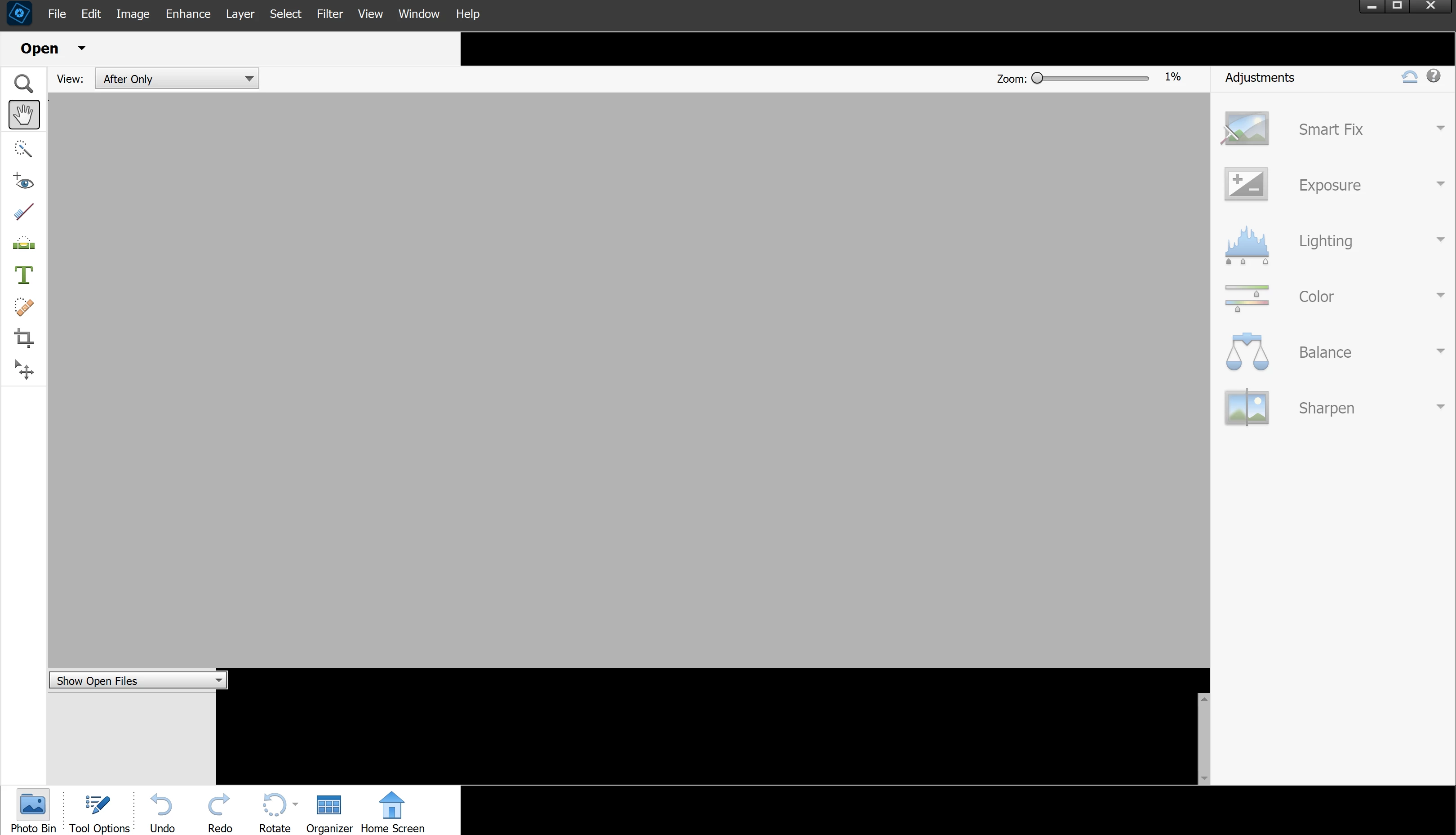
My PhotoShop Elements now only gives me the "quick" option

Community Beginner ,
Sep 24, 2023 Sep 24, 2023

I downloaded my PhotoShop V20.0 onto my new HP Envy All-In-One computer (windows 11 home). It no longer gives me either the "guided" or "expert" window tabs, only "quick". I've uninstalled and reinstalled. I've checked to make sure all my drivers are up to date. What do I do now? How do I get PhotoShop to open like it used to on my old computer? I'm used to using the "expert" window...Photoshop V20 screenshot.png
TOPICS
Actions , How to , Problem or error , Windows
227
Translate
Report
Community guidelines
Be kind and respectful, give credit to the original source of content, and search for duplicates before posting. Learn more
community guidelines
Community Expert ,
Sep 24, 2023 Sep 24, 2023

Hi Elizabeth.  See if the solution posted in this discussion works for you.

If not, please confirm that you have updated your graphics driver. 

Also, it is not clear from your screenshot whether you have your Windows task bar set to auto-hide.  If so, you need to turn that setting off. (Right-click on the taskbar and choose Taskbar Settings.  This will take you to the following dialog.  Mine is Windows 11, but it is similar in Windows 10 if that is what you have.)


Ashampoo_Snap_Sunday, September 24, 2023_11h15m29s.png

Translate
Report
Community guidelines
Be kind and respectful, give credit to the original source of content, and search for duplicates before posting. Learn more
community guidelines
Community Beginner ,
Sep 24, 2023 Sep 24, 2023
LATEST

I have no idea what happened, or what I did. I right clicked on the task bar to make sure the auto-hide was not clicked (it was not), but when I opened PhotoShop Elements again, all three options (Quick / Guided / Expert) now show up. A happy coincidence?

Translate
Report
Community guidelines
Be kind and respectful, give credit to the original source of content, and search for duplicates before posting. Learn more
community guidelines