

Participant
February 10, 2023
해결됨

Photos I open in Photoshop are turning black and white. I would like to be able to insert coloured p

  • February 10, 2023
  • 6 답변들
  • 11577 조회

Photos I open in Photoshop are turning black and white. I would like to be able to insert coloured photos in my projects.

이 주제는 답변이 닫혔습니다.
최고의 답변: Greg_S.

@Daniel23028816hqkt, I'm sorry but I'm having difficulty understanding what your problem is.  I have asked you some questions and you have not answered all of them.  So, if you did not understand my suggestion to reset the preferences, here is a screenshot of the menu item you need to select and the button you need to press when the dialog opens:
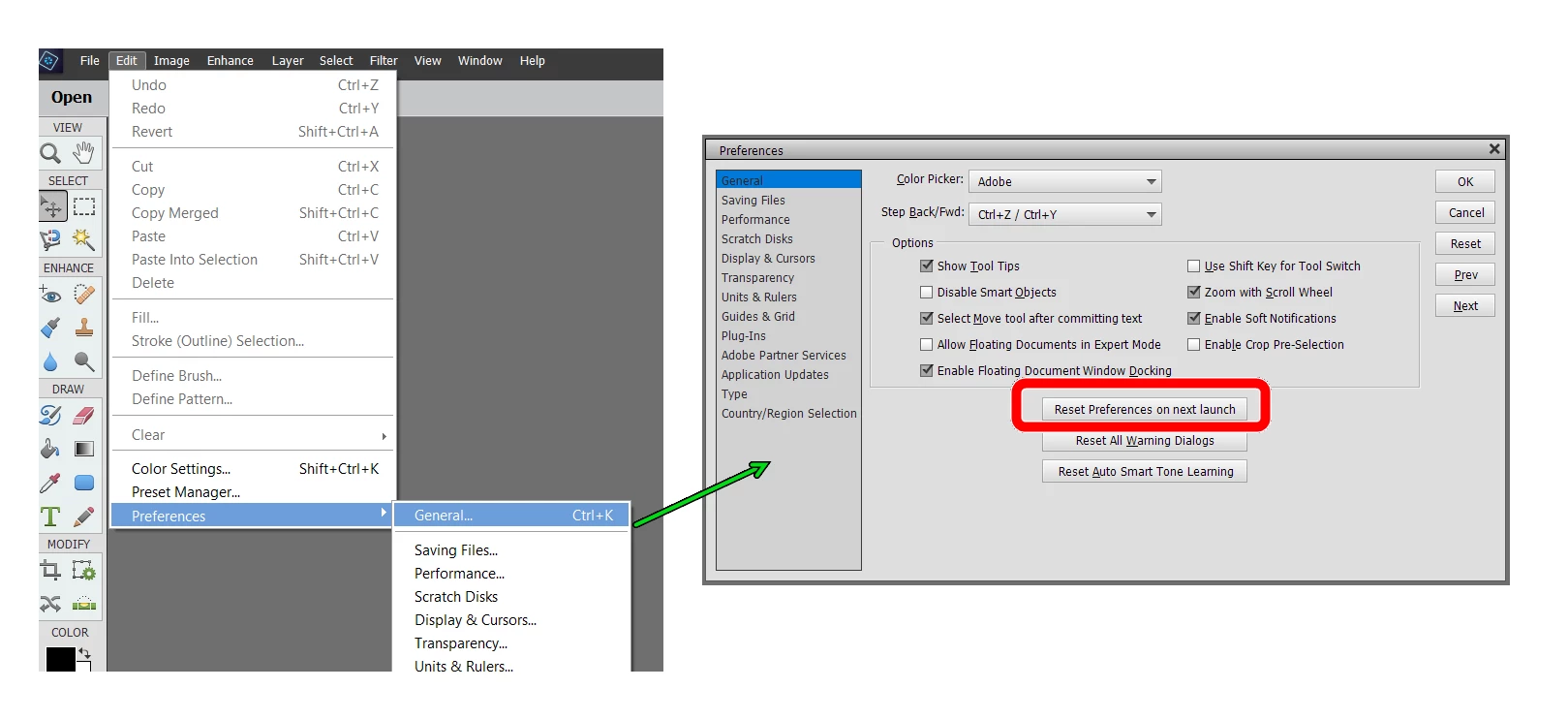
 

If that does not solve your problem, we need to know more from you.  What kind of file are you trying to edit?

Are you sure the photo you are trying to edit is in color and not in black and white?

Please post a screenshot of your photo open in another program such as Windows Photos and also a screenshot of the same photo when you open it in Elements 2021.


Also attach a sample photo to your post or tell us what is the source of the photo and the format e.g. jpeg or raw.

6 답변

Adobe Employee
April 7, 2023

In the latest version of PS screen flickers black and white when opening files :

Solución 2: Vamos a abrir Photoshop , vamos a edición o edit en el menú superior , luego presionamos  Preferencias , presionamos en la opción Vista previa de tecnología y marque "Desactivar lienzo nativo" y luego reinicie PS  
https://community.adobe.com/t5/photoshop-ecosystem-discussions/screen-flickers-black-on-and-off-when-moving-around-canvas-or-doing-anything-in-photoshop/m-p/12330350  

 https://www.stellarinfo.com/article/common-photoshop-issues-and-fixes.php#:~:text=To%20fix%20the%20issue%2C%20click,Next%2C%20restart%20Photoshop. 

Solution 1: Requirements

Solution 2: We are going to open Photoshop, we are going to edit or edit in the top menu, then we press Preferences, we press in the option Technology Preview and check "Disable native canvas" and then restart PS

Solution 3: Reset preferences

Solution 4: Downgrading to version 23 always works

Which cx wants version 24? Here I would transfer because we have not yet found another solution. If anyone has another solution that worked please add to this comment

jane-e
Community Expert
Community Expert
April 7, 2023

In the latest version of PS screen flickers black and white when opening files :

By @Lxsmarydiaz


@Lxsmarydiaz 


You replied to the Photoshop Elements forum to a solved thread from two months ago with an "answer" that is about Photoshop, not Photoshop Elements. They are separate applications and have separate forums.


Jane

Greg_S.
Community Expert
Greg_S.Community Expert답변
Community Expert
February 14, 2023

@Daniel23028816hqkt, I'm sorry but I'm having difficulty understanding what your problem is.  I have asked you some questions and you have not answered all of them.  So, if you did not understand my suggestion to reset the preferences, here is a screenshot of the menu item you need to select and the button you need to press when the dialog opens:


If that does not solve your problem, we need to know more from you.  What kind of file are you trying to edit?

Are you sure the photo you are trying to edit is in color and not in black and white?

Please post a screenshot of your photo open in another program such as Windows Photos and also a screenshot of the same photo when you open it in Elements 2021.


Also attach a sample photo to your post or tell us what is the source of the photo and the format e.g. jpeg or raw.

Participant
February 14, 2023
I followed your directions and it FIXED the problem. Thank you.

Get Outlook for Android<>
Greg_S.
Community Expert
Community Expert
February 13, 2023

@Daniel23028816hqkt, this is the Photoshop Elements forum.  Are you using Photoshop CC?  (I previously asked you what version of Elements you are using and you did not respond.)

Participant
February 13, 2023
Greg S, I am using Adobe Photoshop Elements 2021. That is all I can tell
you. I do not see any other markings. Smiljana
Greg_S.
Community Expert
Community Expert
February 11, 2023

. . . and what OS and version of Elements are you using?

Greg_S.
Community Expert
Community Expert
February 11, 2023

Has the Editor ever worked properly?  If so, try resetting the preferences file. Go to Edit>Preferences>General tab and click the Reset Preferences on next launch button.


Is the problem with every file?  What is the format of the file?  Are you talking about projects generically or are you trying to create a specific kind of project in Elements e.g. a collage or a slideshow?

Participant
February 13, 2023
I do not see that option...Thanks
Greg_S.
Community Expert
Community Expert
February 10, 2023

Go to the Image>Mode menu and make sure you are in RGB Color, not Grayscale mode.


Participant
February 11, 2023
Did that, it did not make a difference. Thank you though...
Legend
February 11, 2023

Image mode won't turn black and white photos to full colour photos.