
Participating Frequently
April 20, 2024
해결됨

Photoshop Elements Organizer 2024 - Fotoimport aus Ordnern unvollständig

  • April 20, 2024
  • 2 답변들
  • 256 조회

Hallo zusammen,

mir war aufgefallen, dass ich in einem importierten Ordner nur einen Bruchteil der Fotos sehe, die tatsächlich in dem Dateiordner abgelegt sind. Auch ein Neuimport des Ordners hat den Fehler nicht behoben. Der Fortschrittsbalken beim Import scheint die richtige Anzahl zu haben, aber er meldet dann, dass keine Elemente importiert wurden, da sie schon vorhanden sind.

Ansonsten funktioniert der Import eigentlich immer einwandfrei....

Kann mir hier jemand helfen?
이 주제는 답변이 닫혔습니다.
최고의 답변: Greg_S.

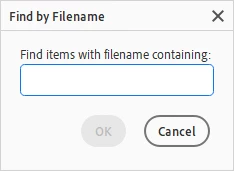
If you get a message that the file already exists in your catalog, then it almost certaintly does.  Press Ctrl+Shift+K and you can search for one of the files that you think is missing.


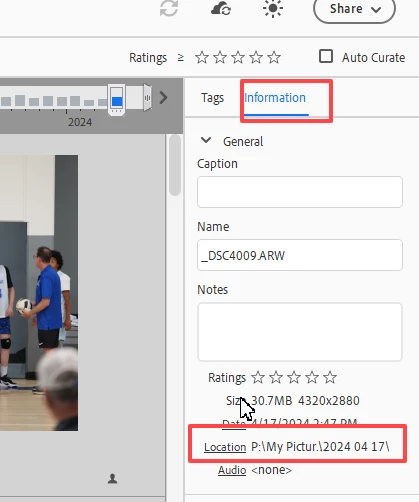
If the search finds the file, you can see which folder it is stored in by looking in the Info panel on the right side of the Organizer window:


If the file shows up in the correct folder, then perhaps it is hidden in a stack, or you have a filter applied to the catalog.  If you shoot in raw and jpeg, there is an option to stack the jpeg/raw files together when you import the files from your camera.  If this is the case, you will only see the raw files, not the jpegs.

2 답변

Tolados작성자
Participating Frequently
April 29, 2024

Hallo Greg,

vielen Dank, Sie hatten Recht, der Tipp mit der Dateisuche hat mich zu dem Ordner geführt, wo die Dateien liegen. Den Ort hatte ich ganz vergessen, vor ein paar Jahren habe ich tatsächlich anders mit den Speicherorten gearbeitet.

Und gesucht habe ich in Organizer nur über die Verzeichnisstruktur

Greg_S.
Community Expert
Greg_S.Community Expert답변
Community Expert
April 20, 2024

If you get a message that the file already exists in your catalog, then it almost certaintly does.  Press Ctrl+Shift+K and you can search for one of the files that you think is missing.


If the search finds the file, you can see which folder it is stored in by looking in the Info panel on the right side of the Organizer window:


If the file shows up in the correct folder, then perhaps it is hidden in a stack, or you have a filter applied to the catalog.  If you shoot in raw and jpeg, there is an option to stack the jpeg/raw files together when you import the files from your camera.  If this is the case, you will only see the raw files, not the jpegs.