


"Salva per il web" settare tipo file predefinito da GIF a JPG
Ciao,
sono un uovo utente del forum anche se utilizzo i prodotti adobe da diversi anni con grande soddisfazione.
Ho provato a cercare soluzione al mio quesito consultando il manuale e le FAQ ma non sono stato in grado di trovare soluzione, magari se qualcuno mi link la pagina di help o se l'argomento è già stato trattato se mi può indicare dove.
Sono un autodidatta e mi piace imparare anche sbattendoci la testa parecchie volte prima di chiedere aiuto ma questa volta proprio non ne esco.
Ho installato Photoshop Elements 10.0.0 sistema operativo Windows 10
Spiego brevemente il mio problema
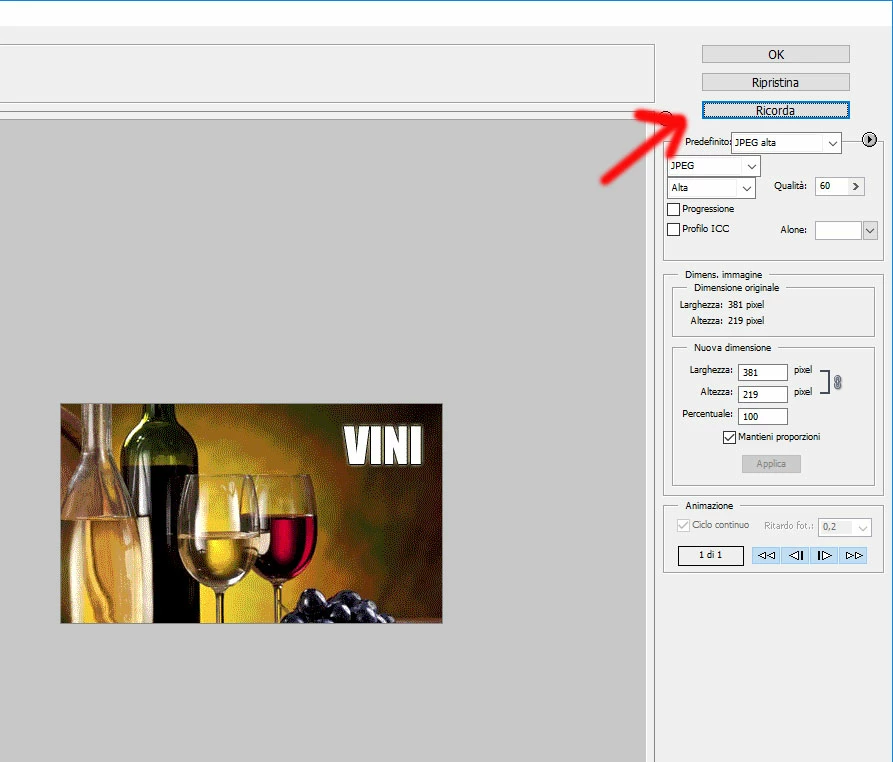
Al salvataggio di una immagine, scegliendo SALVA PER IL WEB, appare la schermata in cui si seleziona il tipo di profilo e altri settaggi Photoshop mi propone GIF ma io vorrei impostare di default JPG.
Ho notato che se premo il tasto ALT il bottone AIUTO diventa RICORDA ma non so come fargli ricordare la preferenza...
Come fare ?
Grazie
 AdChoices