


- Home
- Photoshop ecosystem
- Discussions
- 22.4 crashes every time I use it - HOW DO I REVERT...
- 22.4 crashes every time I use it - HOW DO I REVERT...

Copy link to clipboard
Copied
How do I revert to a prior version? This one is AWFUL!!! It crashes (6 times in a row now) every time I try to import pieces to put them together in a new document. It is unuseable right now. I am VERY unhappy. In 26+ years as a PS user, I have never experienced such a bad update.


 3 Correct answers


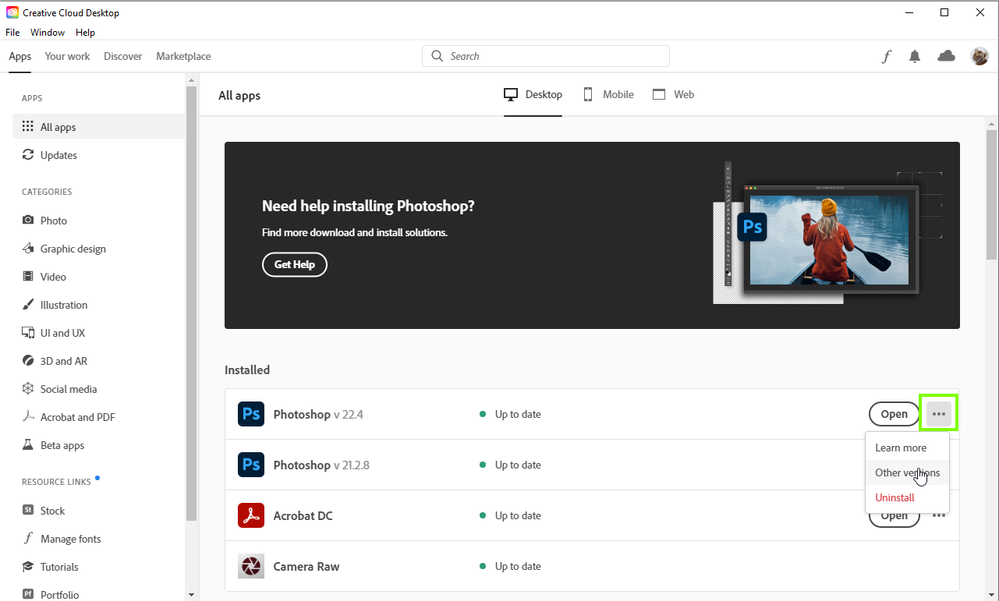
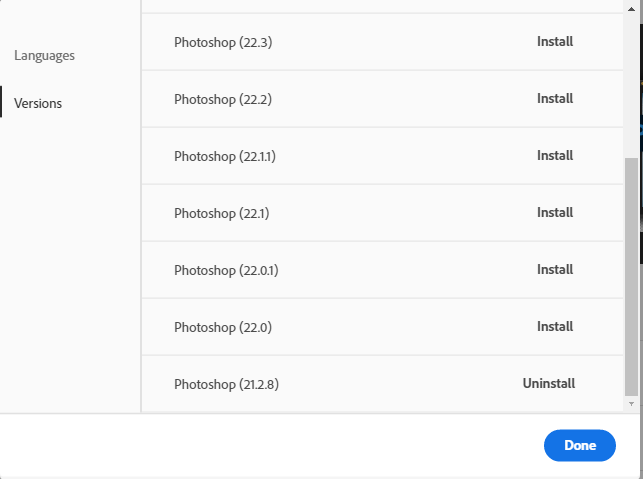
Try »Other versions«

But make sure to back-up your Presets first.

I found the answer: You can revert to a prior version through the Adobe Creative Cloud Desktop app.
Be aware, 22.4 is NOT a good update!

Hi
You can do that from the Creative Cloud app

Explore related tutorials & articles
 9
Replies
9
9
Replies
9

Copy link to clipboard
Copied
Try »Other versions«
But make sure to back-up your Presets first.
Copy link to clipboard
Copied
I found the answer: You can revert to a prior version through the Adobe Creative Cloud Desktop app.
Be aware, 22.4 is NOT a good update!

Copy link to clipboard
Copied
22.4 is completely broken and unusable

Copy link to clipboard
Copied
@jcazzie wrote:
22.4 is completely broken and unusable
Well you can try updating to the latest version and examine the bug fixes here:
Copy link to clipboard
Copied
Thanks Andrew. The problem is that a psd file with adjustment layers renders as complete noise. The same file in other versions views perfectly as it did with PS 2022 prior to the latest update.
john castronovo
Copy link to clipboard
Copied
Hi
You can do that from the Creative Cloud app

Copy link to clipboard
Copied
Same experience, though I have also experienced crashes with the previous version, only a little less frequently.

Copy link to clipboard
Copied
To revert to a prior version of Adobe Photoshop, you can use the Adobe Creative Cloud app to install an older version. Open the Creative Cloud app, go to the "Apps" tab, and click on the three dots next to Photoshop. Select "Other Versions" and you'll see a list of previous versions available for download. Choose a stable version that you were happy with and install it. If the crashing issue persists, it might be worth checking for any conflicting plugins or resetting your preferences in Photoshop (hold Ctrl+Alt+Shift while launching Photoshop to reset preferences). Additionally, make sure your system meets the latest requirements for Photoshop to avoid any compatibility issues.

Copy link to clipboard
Copied
This thread is 4 years old and it's unlikely that the owner ready your answer.
I closed this thread.


Get ready! An upgraded Adobe Community experience is coming in January.
Learn more
 AdChoices