

Known Participant
June 9, 2021
Question

Clipping Mask Disturb When Paste Layer

  • June 9, 2021
  • 3 replies
  • 1853 views

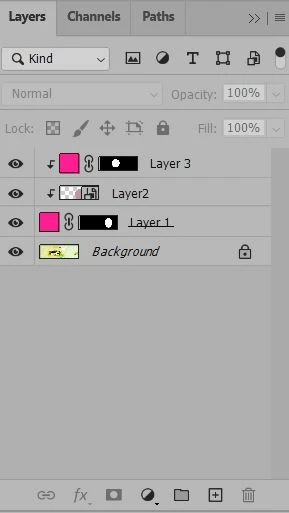
I have 2layers. Like Layer1 and Layer 2, I want to paste new layer above layer 2, But Layer 3 is automatic clipping mask, Is that possible to normal layer.....

This topic has been closed for replies.

3 replies

Stephen Marsh
Community Expert
June 9, 2021

Will the layers always have the same names?


Will the layers always have the same stacking order/position?


Layer 3 appears to be a copy/paste of layer 1? Will you always copy and paste from the clipboard? Would you drag the layer to the new layer icon to duplicate?


Are you looking for an action or script?


Any other info?


Edit: do you want to trigger/execute this manually, or do you want this to automatically happen whenever you paste a layer above an existing clipping group layer?


MXKSAuthor
Known Participant
June 9, 2021

This is script file, I want to Paste Above Clipping Layer,  Paste Layer also have clipping layer, Don't want to clipping layer


#target photoshop
//
// LayerC.jsx
//

//
// Generated Sat Jan 23 2021 23:22:57 GMT+0530
//

cTID = function(s) { return app.charIDToTypeID(s); };
sTID = function(s) { return app.stringIDToTypeID(s); };

//
//==================== LayerC ==============
//
function LayerC() {
// Make
function step1(enabled, withDialog) {
if (enabled != undefined && !enabled)
return;
var dialogMode = (withDialog ? DialogModes.ALL : DialogModes.NO);
var desc1 = new ActionDescriptor();
var ref1 = new ActionReference();
ref1.putClass(sTID("contentLayer"));
desc1.putReference(cTID('null'), ref1);
var desc2 = new ActionDescriptor();
desc2.putBoolean(cTID('Grup'), true);
var desc3 = new ActionDescriptor();
var desc4 = new ActionDescriptor();
desc4.putDouble(cTID('Rd '), 255);
desc4.putDouble(cTID('Grn '), 23.5564198717475);
desc4.putDouble(cTID('Bl '), 0);
desc3.putObject(cTID('Clr '), sTID("RGBColor"), desc4);
desc2.putObject(cTID('Type'), sTID("solidColorLayer"), desc3);
desc1.putObject(cTID('Usng'), sTID("contentLayer"), desc2);
executeAction(cTID('Mk '), desc1, dialogMode);
};

// Move
function step2(enabled, withDialog) {
if (enabled != undefined && !enabled)
return;
var dialogMode = (withDialog ? DialogModes.ALL : DialogModes.NO);
var desc1 = new ActionDescriptor();
var ref1 = new ActionReference();
ref1.putEnumerated(cTID('Lyr '), cTID('Ordn'), cTID('Trgt'));
desc1.putReference(cTID('null'), ref1);
var ref2 = new ActionReference();
ref2.putEnumerated(cTID('Lyr '), cTID('Ordn'), cTID('Frnt'));
desc1.putReference(cTID('T '), ref2);
executeAction(cTID('move'), desc1, dialogMode);
};

step1(); // Make
step2(); // Move
};


//=========================================
// LayerC.main
//=========================================
//

LayerC.main = function () {
LayerC();
};

LayerC.main();

// EOF

"LayerC.jsx"
// EOF

Stephen Marsh
Community Expert
June 9, 2021

Sadly, I have no idea what you want, I was hoping for answers to my previous questions, perhaps I'm lost in translation.


Bojan Živković11378569
Community Expert
June 9, 2021

When none of the layers is selected, Photoshop should place pasted content of top of the layers stack without to clip to layer below.


Another option that is available is to create blank new layer and to position it where you want in the layers panel. With blank layer selected paste copied pixel content which should be pasted on that blank layer as its content. Otherwise content will be pasted above blank layer without to create automatic clipping mask.

Ged_Traynor
Community Expert
June 9, 2021

Hi

You can either right click on layer 3 and select "Release Clipping Mask" or ALT + left click between layer 2 and 3 to release the clipping mask