Participating Frequently
February 14, 2018
Answered

Could I use two magic wand selections to straighten an image?

  • February 14, 2018
  • 2 replies
  • 2637 views

This is an odd query, but it relates to one I posted yesterday about trying to recognize the sprockets in a movie film frame.

If I have a vertical strip of sixteen movie film frames, which isn't perfectly straight-- what if I selected the top sprocket hole with the magic wand, and the bottom sprocket hole, and had a script which would take the coordinates of the two to straighten the image?

Thanks to anyone for whom this makes sense. I'm finding the crop-and-straighten command doesn't work.

This topic has been closed for replies.
Correct answer JJMack

Ah-- I've just seen your previous post, JJ. Thank you. I will see if I can understand that and learn from it.


The script you want may work like this one.

// Save the current preferences

var startRulerUnits = app.preferences.rulerUnits;

// Set Photoshop to use pixels

app.preferences.rulerUnits = Units.PIXELS;

Main();

// Return the app preferences

app.preferences.rulerUnits = startRulerUnits;

function Main() {

if (app.activeDocument.colorSamplers.length!=2) {

alert('two color sampler points are required');

return;

}

else {

point1 = [];

point2 = [];

for (var s=0,len=app.activeDocument.colorSamplers.length;s<len;s++) {

var colorSamplerRef = app.activeDocument.colorSamplers;

MagicWand( colorSamplerRef.position[0].value ,colorSamplerRef.position[1].value);

if (s==0) point1=TopLeft();

else point2=TopLeft();

app.activeDocument.selection.deselect();

   }

   Rwidth = point2[0]-point1[0];

   Rheight = point2[1]-point1[1];

   degrees = Math.atan(Rwidth/Rheight) * 180 / Math.PI;

   app.activeDocument.activeLayer.rotate(degrees);

}

}

function TopLeft() {

try{

TL=[];

var SB = app.activeDocument.selection.bounds;

TL[0]=SB[0].value;

TL[1]=SB[1].value;

return TL;

}

catch(e){}

}

function MagicWand(Xpoint,Ypoint) { 

// =======================================================

var idsetd = charIDToTypeID( "setd" );

    var desc121 = new ActionDescriptor();

    var idnull = charIDToTypeID( "null" );

        var ref33 = new ActionReference();

        var idChnl = charIDToTypeID( "Chnl" );

        var idfsel = charIDToTypeID( "fsel" );

        ref33.putProperty( idChnl, idfsel );

    desc121.putReference( idnull, ref33 );

    var idT = charIDToTypeID( "T   " );

        var desc122 = new ActionDescriptor();

        var idHrzn = charIDToTypeID( "Hrzn" );

        var idPxl = charIDToTypeID( "#Pxl" );

        desc122.putUnitDouble( idHrzn, idPxl, Xpoint );

        var idVrtc = charIDToTypeID( "Vrtc" );

        var idPxl = charIDToTypeID( "#Pxl" );

        desc122.putUnitDouble( idVrtc, idPxl, Ypoint );

    var idPnt = charIDToTypeID( "Pnt " );

    desc121.putObject( idT, idPnt, desc122 );

    var idTlrn = charIDToTypeID( "Tlrn" );

    desc121.putInteger( idTlrn, 20 );

    var idAntA = charIDToTypeID( "AntA" );

    desc121.putBoolean( idAntA, true );

executeAction( idsetd, desc121, DialogModes.NO );

}
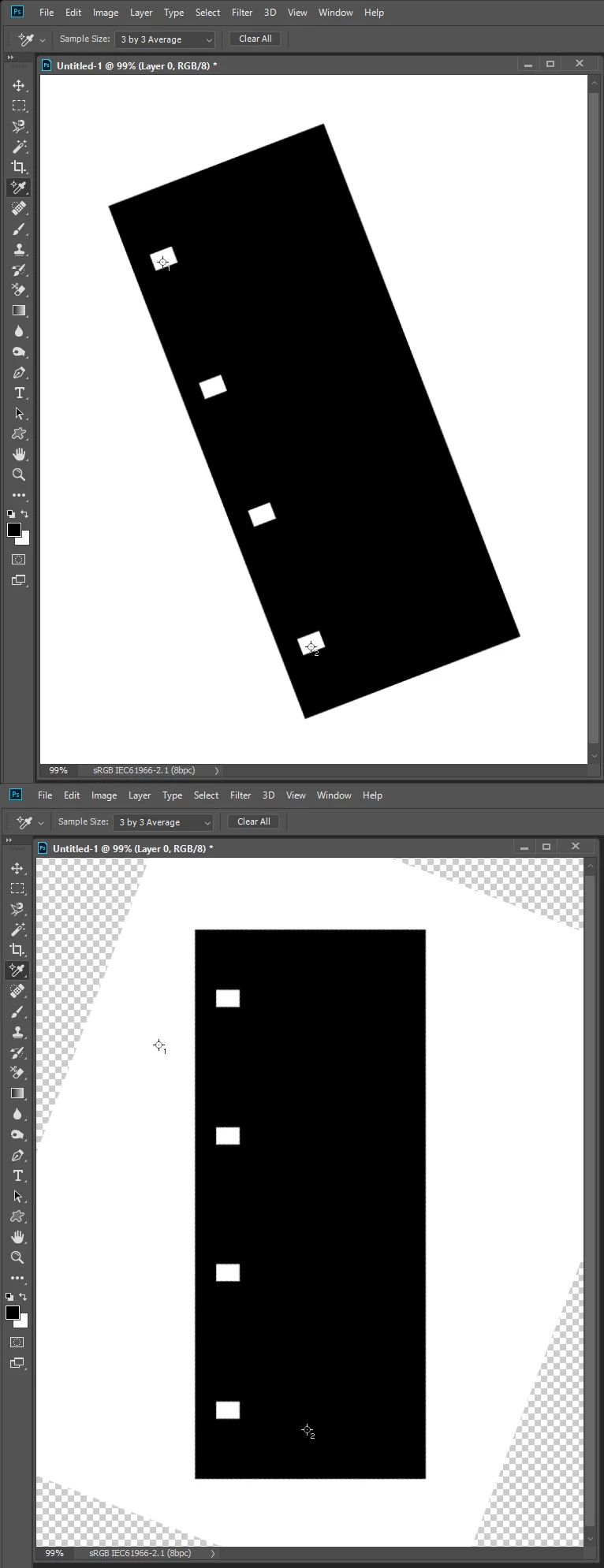
2 replies

JJMack
Community Expert
Community Expert
February 14, 2018

Please do not keep opening addition threads for the same subject. Sprocket holes may damaged.  But as chuck wrote if you do one sprocket at a time you can get the bounds of each.  Using the top left corner point of each you may be able to set a Photoshop ruler then use straighten. If that is possible I do not think it would matter what the distance between sprocket holes is any two holes could be used and Photoshop would calculate the rotation angle. Its a simple right triangle calculation. Your script could of course also do the math instead of Photoshop. However after the rotation the holes would move in an arc and now have different bounds

JJMack
Participating Frequently
February 15, 2018

My apologies for double-posting.

JJ, I'm presently using this to recognize the frame from the single sprocket:

#target photoshop

if (documents.length == 0) {

    alert("nothing opened");

} else {

    // start

    //setup

    var file = app.activeDocument;

    var selec =  file.selection;

    //run

    var bnds = selec.bounds; // get the bounds of current selection

    var // save the particular pixel values

       xLeft = bnds[0],

       yTop = bnds[1],

       xRight = bnds[2],

       yBottom = bnds[3];

    var newRect = [ [xLeft-100,yTop -305], [xLeft-100,yTop+555], [xLeft + 1400,yTop + 555], [xLeft + 1400,yTop - 305] ]; // set coords for selection, counter-clockwise

    selec.deselect;

    selec.select(newRect);

    // end

}

Now, this script is doing a pretty good job of growing the selection size from the magic wand selection. But it only handles one magic wand selection -- I've tried adding xLeft2 = bnds[4] up to 7, assuming this would encompass the second magic wand selection, but that doesn't work.

Chuck Uebele
Community Expert
Community Expert
February 15, 2018

How are you defining the the two selections for the sprocket holes, or are you? If you know the general distance between the two holes, you can select, say, the top one, then interpolate where the second might be and use AM code to do a magic wand sample in the general area of the second sprocket hole. In this way, you can save the first selection to a variable, the deselect and have your script select the second and compute the needed rotation.

Chuck Uebele
Community Expert
Community Expert
February 14, 2018

I suppose you could. You would need to select one sprocket hole, get the bounds of the selection, then deselect it and select the second hole to compare the values, then put that info into a transform routine.