Participant
July 21, 2017
Answered

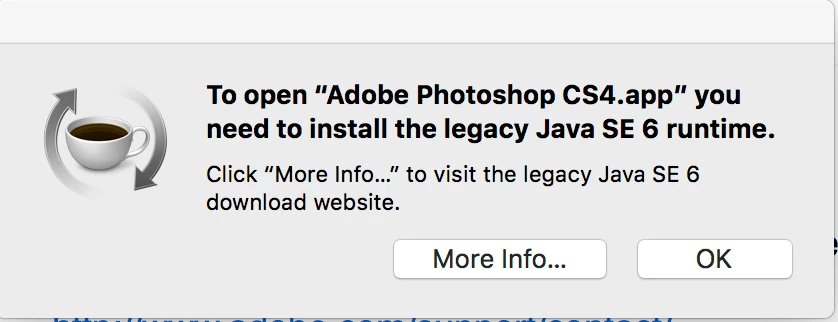
CS4 Error message/ Java SE 6 runtime

  • July 21, 2017
  • 6 replies
  • 3810 views

QUESTIONS:

1.  Where can I get the Legacy Java SE 6 runtime that is needed to open Adobe Photoshop CS4.app?

2. Is it possible to use both a new version of Java along with the legacy version of Java if I want to use both Photoshop in Creative Cloud and in CS4?

    This topic has been closed for replies.
    Correct answer kglad

    Download Java for OS X 2015-001

    6 replies

    Legend
    August 2, 2017

    Which problem? If your problem is not a particular message about Java when opening CS4, please start a new thread. If that's your problem, please say what you mean by "updated to the latest version" as that doesn't seem relevant or a useful thing to do to solve this.

    Legend
    August 2, 2017

    tthao, did you follow the instructions? All of them?

    August 2, 2017

    How did you fix this?

    Participant
    August 1, 2017

    the link goes to the right page but the download icons are missing..i mean , they are there but black and the say in text "download icon" but i can't click on anything to download the version of java (error:Java 6se needed to run photoshop CS4)


    Legend
    August 2, 2017

    On that page Download Java for OS X 2015-001  I see this:

    The blue button works fine for me.

    Participant
    October 3, 2017

    thanks, worked for me.....

    kglad
    Community Expert
    kgladCommunity ExpertCorrect answer
    Community Expert
    July 22, 2017
    tranvananhvp3
    Participant
    August 2, 2017

    Help me fix this problem, I have updated to the latest version.

    John T Smith
    Community Expert
    Community Expert
    July 22, 2017

    Since that is a Mac message, and since Adobe does not produce Java, you might ask in a Mac or Java forum