


Participant
April 12, 2020
Answered

Custom Shapes List Duplicates

  • April 12, 2020
  • 2 replies
  • 7908 views

I am using Photoshop 21.1.1. on a Mac

I was using the dropdown shapes panel for custom shapes and hit the "Restore Default Shapes" command in the panel seettings menu.

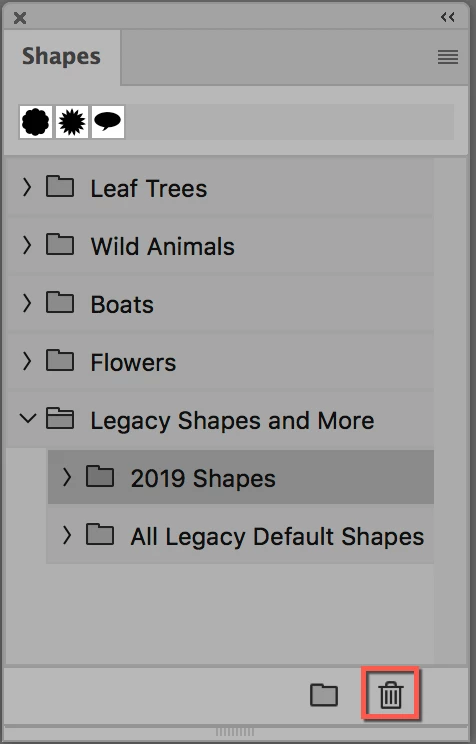
This added a duplicate list of the default shapes already in the panel, I did this a second time and now have three repeats of the the default list, see attached screenshot.

I can't find any way to delete these duplicates - the delete command remains greyed out for every action I can think of.

Is there a solution to this problem?
This topic has been closed for replies.
Correct answer jane-e

Use the Shapes panel from the Window menu (not the options bar).

~ Jane


2 replies

Participant
August 22, 2020

That was easy. Now on to the next custom shape issue.

Shangara Singh
Inspiring
November 17, 2023

My gawd...This isssue still hasn't been fixed? It was flagged years and years ago. Once a shape is selected in the Shapes panel, you CAN delete in the pop-up panel. Makes no sense.


I can also trigger this:


Not it says delete "group" though a shape is selected. When I select the menu item, I get delete shape:


As for appending, that was flagged too as a similar unexpected behaviour in the Brushes panel. Why would you want to append complete sets? Adding copies that you may want to edit, I can understand but complete sets? It should be Restore Default Brushes/Shapes, and a duplicate option added for copying in selected groups or shapes or brushes.


Shangara SINGH.
paulflong
Inspiring
November 17, 2023

Unfortunately, I don't have that option (it used to be there in previous versions). I have to use "window > shapes" and access the shapes panel to delete anything. I'm using Photoshop 2024.


jane-e
Community Expert
jane-eCommunity ExpertCorrect answer
Community Expert
April 12, 2020

Use the Shapes panel from the Window menu (not the options bar).

~ Jane


galloydAuthor
Participant
April 13, 2020

Hi Jane


Many thanks - that did it.


Regards


George

jane-e
Community Expert
Community Expert
April 13, 2020

You're welcome, George. I'm glad it's working.

 Jane