Known Participant
December 7, 2018
Answered

document Size is incorrect in the Image Size dialog box

  • December 7, 2018
  • 6 replies
  • 4468 views

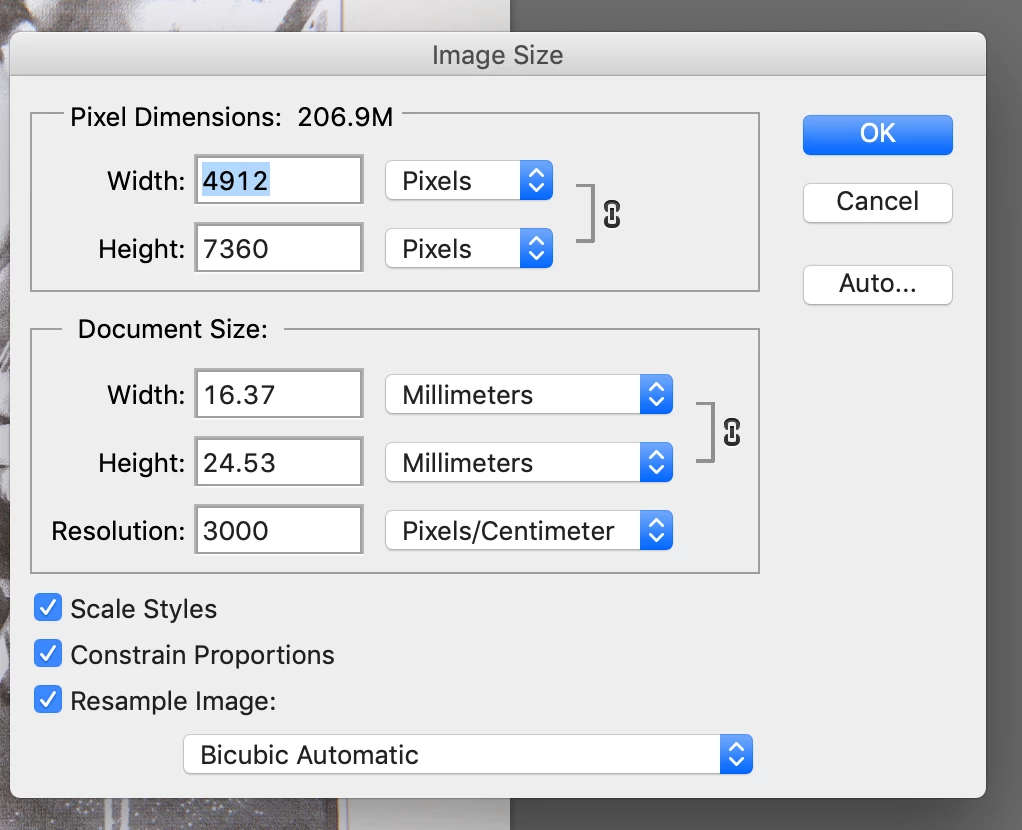
I put this question to the forum yesterday but I may have confused readers by not keeping things simple. So, simply put, the point/full stop in the width/height Document Size numbers is in the wrong place. i.e. the correct reading should be 163.7 mm but is entered as 16.37 mm. See screen grab below. How do I get the full stop to move one space to the right? Also the resolution has decided to enter itself as 3000, which is a further complication. As explained yesterday there are further ramifications which may be attributable to this issue but let's deal with the Document Size first.  I would really appreciate your help with this. Cheers, Peter

    This topic has been closed for replies.
    Correct answer JJMack

    Let try to make it easy

    Let say you have a picture the size ise  4pw wide and 6px high.  That the amount of detail you have for you image not much at all. Now let print it.   How big will it print.  That depends on the Print resolution.  So in image size we will uncheck resample for we want to print our image not a scaled version.  Print the details we have.  So set the dpi 1 make is simple 1px will print 1"x1" in size so our image will print 4"x6" we will see all our 24pixels with ease a ver soft  boxy image.    Normal print  resolution line 300 DPI I image will be printed them 4/300"x6/300" or 1/75"x1/50"   need a loop to see it,    To print an image that  is 1"x1" with 1/300x1/300size pixels you need a lot of detail 300pxx300px=90,000 for a 4"x6" print  1200x1800 px 2.16MP. 

    If you resample our original 24px up to 2.16MP and print at 300dpi you will get the  same boxy picture we start with foe we have very little details interpolation is not magic  Any time you resample interpolate change the number of pixel you have up or down in number you loose  some image quality.  Reducing the number of pixels requires you to discard details you have for your image.  Increasing the number requires you to make up details you do not have for  your image.   So the best pixels you have for you images are the pixels your camera gave you. Details captured with a good lens in focus a high quality large sensor many MP to capture fine details, good lighting and firmware.   You want to preserve these pixels you do not want to resample them without a good reason.

    6 replies

    jon boveyAuthor
    Known Participant
    December 12, 2018

    I put this problem to Capture One support and they identified the problem. The "process recipe" set up in CO to move images from CO to PS had been set to to 300.00 pixels/mm  (from the upgrade). Changing it to 300 px/inch fixed the problem.  Peter ​

    gener7
    Community Expert
    Community Expert
    December 12, 2018

    Turning off resampling and setting the 3000 to 300 p/cm got the mm print dimensions you wanted, but I did not know Capture One (Nikon product?) was where the 3000 p/cm setting was coming from. You can either specify a resolution or pick up the figure other software sets for you in the file transfer. Although you are in a country that uses the metric system, ppi is a common unit for resolution, and 118 p/cm is the equivalent of 300 ppi.

    Sometimes third party apps cause problems and it's easy to think Photoshop messed up.

    jon boveyAuthor
    Known Participant
    December 12, 2018

    Thank you gener7. As mentioned I learned something about resampling that I was unaware of that will help me in my future printing. Capture One is an editing software out of Denmark - they also make cameras under the Phase One title. Nikon used to include Capture One software with their cameras but nothing to do whatsoever with the Danish Group, who's software I highly recommend. Except, unlike LightRoom, it is not as compatible with PS. Who is messing up when more than one Company is involved is a big problem. A Quick/time clip of the procedure I used to get my file from the Finder to CO to PS  helped CO Support spot the issue. Thanks to Support Groups, who I'd be lost without, the problem is solved.  Cheers,  Peter

    Sebastian Bleak
    Community Expert
    Community Expert
    December 7, 2018

    Un-ticking the option for Resample Image should help with this.

    jon boveyAuthor
    Known Participant
    December 7, 2018

    Thank you Sebastian for taking the trouble to reply. Stephen and JJMack have also offered this approach. I googled "resampling" to get a better idea of what this about. Basically resampling will change the pixels (Web) and resampling unchecked fixes pixels but allow the image size to be changed (print). I have spent some time testing and have successfully sized my image.

    However, nobody has explained why the Document Size box reads 24.53 mm when it should read 254.3 mm. Sure, I know that shifting the decimal point one place to the right is the correct dimension which I can easily type in. It is why is PS doing this that concerns me, and I am concerned that it may have a link to another issue. Therefore I'd like to get my Image Sizing back to where it was.

    Cheers, Peter

    JJMack
    Community Expert
    JJMackCommunity ExpertCorrect answer
    Community Expert
    December 7, 2018

    Let try to make it easy

    Let say you have a picture the size ise  4pw wide and 6px high.  That the amount of detail you have for you image not much at all. Now let print it.   How big will it print.  That depends on the Print resolution.  So in image size we will uncheck resample for we want to print our image not a scaled version.  Print the details we have.  So set the dpi 1 make is simple 1px will print 1"x1" in size so our image will print 4"x6" we will see all our 24pixels with ease a ver soft  boxy image.    Normal print  resolution line 300 DPI I image will be printed them 4/300"x6/300" or 1/75"x1/50"   need a loop to see it,    To print an image that  is 1"x1" with 1/300x1/300size pixels you need a lot of detail 300pxx300px=90,000 for a 4"x6" print  1200x1800 px 2.16MP. 

    If you resample our original 24px up to 2.16MP and print at 300dpi you will get the  same boxy picture we start with foe we have very little details interpolation is not magic  Any time you resample interpolate change the number of pixel you have up or down in number you loose  some image quality.  Reducing the number of pixels requires you to discard details you have for your image.  Increasing the number requires you to make up details you do not have for  your image.   So the best pixels you have for you images are the pixels your camera gave you. Details captured with a good lens in focus a high quality large sensor many MP to capture fine details, good lighting and firmware.   You want to preserve these pixels you do not want to resample them without a good reason.

    JJMack
    Stephen Marsh
    Community Expert
    Community Expert
    December 7, 2018

    What file format?

    What version of Photoshop?

    What does other non Adobe software note for size/resolution?

    jon boveyAuthor
    Known Participant
    December 7, 2018

    psd, CS6, and my editing software (CO12) gives the same size and resolution as PS i.e 623 x 416 mm size and 7358 x 4911 pixels. No problem with sizing or centring the print if I print out of CO12. Print also centres if I print to the office Brother.

    Daniel E Lane
    Inspiring
    December 7, 2018

    3000 pixels per centimeter???? Why????? That's kind of a lot to say the least!

    jon boveyAuthor
    Known Participant
    December 7, 2018

    Indeed Daniel, and thanks for replying. If you read my reply to JJMack you will see that the Image Size dialog box has taken it upon itself to give incorrect numbers. Cheers, Peter

    JJMack
    Community Expert
    Community Expert
    December 7, 2018

    If you uncheck resample all woll be constrained.  The number of pixels wide and high will not change. If you change a value in the image print size you will see the other two values will be changed their  values will be calculated by Photoshop using simple math,   If you check Resample   Width and Height may be constrained to each other indicated by the link icon between then so the image will not distort during interpolation.  You can change the Width or Height and the other will be calculated by Photoshop.  You can also change the resolution  that is the image's  pixel density  the Print Pixel size.  Changing the Resolution will not change the number of Pixels. All that changes is the size the image pixel will be Printed with.  However 3000px/centimeter is 7620px/inch,  pixel would be 1/7620"x1/7620"  I do not know of any inkjet printer that can print pixels that small.  You will not be able to print the image correctly.   You wil have a document with a lot of pixels the you will not be able to print.

    Print Resolution is Print Pixels size.     Print resolution is a meaningless setting when is come to displays they can not change their pixel size they have a single resolution.   They can not display you images pixels the correct size unless your image has the same print resolution as your display resolution. On displays that have a different resolution you image will display a different physical size.

    The numbers in the dialog are correct.

    JJMack
    jon boveyAuthor
    Known Participant
    December 7, 2018

    Thank you JJMack and Stephen. I am not tech savvy but have used PS CS6 successfully for a number of years. Up until yesterday bringing up the Image Size dialog box gave me the exact dimensions of the image. (resolution could be adjusted). Why does the dialog box now give Document Size readings with the full stop moved one place to the left? And giving a ridiculously small document. Yes, I can resample or just change either width or height and get the image size I want and adjust resolution too. If the document is 245.3 mm on the long side then this is what should be in the Document Size box, not  24.53 mm. The 3000 res, I suspect, is because of the 24.53 mm. If I change this figure to 245.3 mm (the true size) the res automatically drops down to 300 in the dialog box.

    Furthermore, and this is where I confused things in my previous post, the image now doesn't print in the centre of the paper using  the epson 3880. This could be an entirely different issue and just a coincidence (I was hoping the answer to image sizing might fix the problem). Getting the image sized is doable. Getting the image centred is way more important for my work and will be the subject of another post.

    In summary: Why wont PS give me the correct image size?!  It is 245.3 mm NOT 24.53 mm.

    Stephen Marsh
    Community Expert
    Community Expert
    December 7, 2018

    Uncheck resample image (no pixels will be added or removed), adjust the print size as required and the effective resolution will then adjust accordingly.