


Known Participant
November 27, 2018
Question

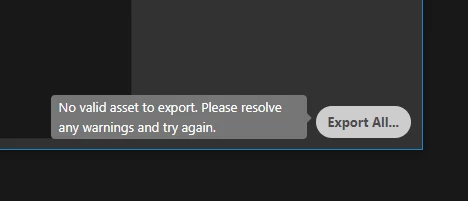
Export As not working properly (Ctrl+Alt+Shift+W)

  • November 27, 2018
  • 4 replies
  • 1764 views

I can't export an artboard like before. It takes too much time and showing the above warning.

Running on latest photoshop and windows 10
[Here is the list of all Adobe forums... https://forums.adobe.com/welcome]

[Moved from Encore to Photoshop... Mod]

This topic has been closed for replies.

4 replies

PECourtejoie
Community Expert
Community Expert
November 30, 2018

Hello, can we see your layers panel, which assets are selected?

What are the settings for export preferences?

Can you click on a warning somewhere?

See this video tutorial:https://helpx.adobe.com/photoshop/how-to/export-image-web.html

or this article on the subject: https://creativepro.com/save-and-export-photoshop-files-effectively/

Theresa J
Community Expert
Community Expert
November 28, 2018

Can you share a screen capture of the entire export as window? Is the image and size selected in the left panel of the window?

JCherianAuthor
Known Participant
November 29, 2018

Inspiring
November 27, 2018

Try resetting your preferences. I do not know of any bugs in that area.

Trough the Photoshop Dialog Box

1. Open Preference by  PC: Edit>Preferences>General (CTR+K) or Mac Photoshop>Preferences>GeneralCMD+K

2. Click on "Reset Preferences on Quit" button.

3. Choose Ok in the dialog box warning you it will reset on restart.

4. Quit Photoshop

5. Restart Photoshop

On Restart

1. Hold down PC: CTR+ALT+SHIFT or Mac: CMD+OPT+SHIFT when you restart Photoshop

2. A dialog box will come up to ask if you would like to reset preference. Choose "Yes".

(If you do not see the dialog box you held down the modifiers prior to launching the  application or to late. To get around this issue you can hold the modifiers prior to launching the application from the creative cloud application.)

JCherianAuthor
Known Participant
November 28, 2018

Yeah I tried that...but no result... The thing is it will come but I have to wait 2 or 3 minutes...Still then this error shows

Inspiring
November 28, 2018

Have you updated Photoshop. I noted they have just come out with a 20.0.1 which is supposed to fix issues they have found in the new release.

Also try clearing the cache: Click the edit>Purge> All (there are a few options for clearing the cache)

I should ask, what version of Photoshop are you running and if you are running an older version make sure it is updated too.

I think this might have been a problem in an earlier version but I am not aware of the issue in the current version. Also let us know if you are running Adobe on a Mac or PC. More information is usually better when trying to figure out why something is not working.

Stan Jones
Community Expert
Community Expert
November 27, 2018

You are in the Encore (DVD authoring) forum. Here is Photoshop:

Photoshop