New Participant
April 26, 2020
Answered

F key for actions not working

  • April 26, 2020
  • 1 reply
  • 5016 views

I'm trying to get my F keys assigned to actions working. When I go to the panel to assign or change them everytime I hit any F key it does not populate in the dialog box...instead it adjusts my volume on my laptop. Any ideas?

Thanks!
This topic has been closed for replies.
Correct answer jane-e


Hi Jeff,

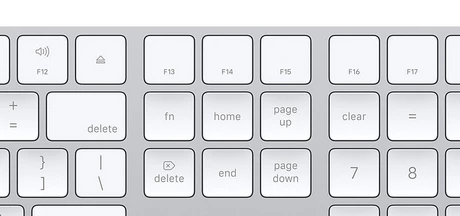
The Fn may be in the lower left, as it is on my laptop and iPad. On a standard Mac keyboard it is at the top in the right third.


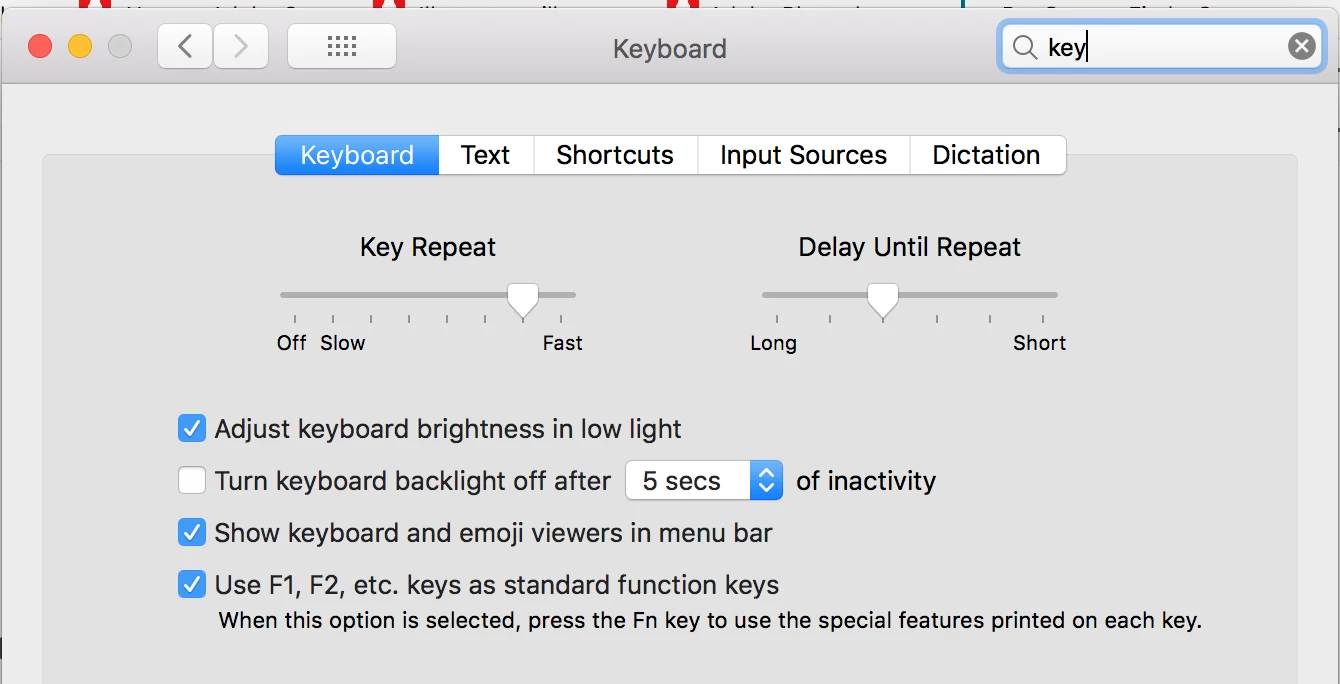
If you are on a Mac, you can set the Function keys to use F1, F2, F3 and then press Fn for brightness, sound, etc., in Apple menu > Preferences > Keyboard > Keyboard. I don't know where this is if you are on Windows.


~ Jane

1 reply

Chuck Uebele
Community Expert
April 26, 2020

Many computer's F keys are dual function and you have to press the fn key (usually) on the bottom left of the keyboard) for the function keys to work.

New Participant
April 27, 2020

Thanks!I'll try it


jane-e
jane-eCorrect answer
Community Expert
April 27, 2020


Hi Jeff,

The Fn may be in the lower left, as it is on my laptop and iPad. On a standard Mac keyboard it is at the top in the right third.


If you are on a Mac, you can set the Function keys to use F1, F2, F3 and then press Fn for brightness, sound, etc., in Apple menu > Preferences > Keyboard > Keyboard. I don't know where this is if you are on Windows.


~ Jane