


Known Participant
March 16, 2018
Answered

Finding the chalk brushes?

  • March 16, 2018
  • 2 replies
  • 44128 views

So ever since the massive change to the brush panel a little while ago, I really struggle to find all of the brushes that I used to use. I remember using a chalk brush that I liked a lot. I downloaded Kyle's megapack to see if it was in there, but I still cannot find it. Does anyone know where those chalk brushes might be now? Thanks!

    This topic has been closed for replies.
    Correct answer Jeff Arola

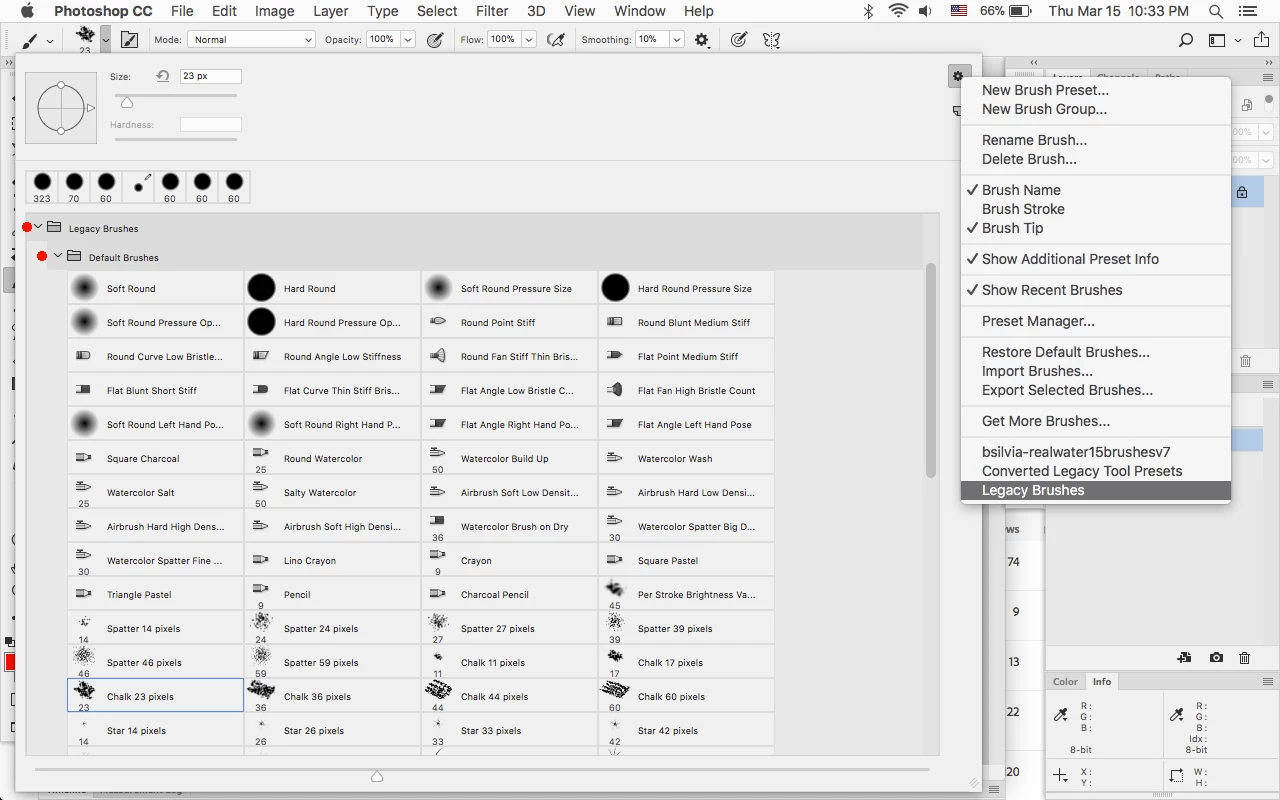
    Load the Legacy Brushes and there are Chalk Brushes in the Default Brushes set.

    2 replies

    Theresa J
    Community Expert
    Community Expert
    March 16, 2018

    Yeah it’s weird. All of the natural media bristle tip, and erodible tip brushes are missing from the new default set of brushes in CC 2018. You have to load the Legacy Brushes like Jeff Arola​ shows to get them back. They even removed the erodible brush tip lesson from the Classroom in a Book chapter on painting. I just discovered that this week when prepping to teach my class. I wonder if anyone here has a clue why Adobe decided to remove these brushes from the default instal.

    Adobe Employee
    March 16, 2018

    With the Adobe acquisition of Kyle Webster's full brush library last year all subscribers have access to download any of these at their discretion (over 1600 brush presets in total). By default we install a small set, but maintained access to the Legacy brushes and given easy accessibility to the Kyle Webster brushes. This provides a more streamlined default experience right out of the box. The old defaults contain dozens of brushes that only differ by size. Most of them were also very seldom used or loaded, so we decided to clean up the default experience a bit. The feedback we've received is that most painters and illustrators prefer the more lifelike KW brushes, but the old brushes are still there if they are part of your workflow.

    NOTE: When loading the Legacy brushes, they are loaded into your brushes panel. Scroll to the bottom of the panel to see them once loaded. If desired, you can always drag them up to the top of your list for quicker access.

    Jeff Arola
    Community Expert
    Community Expert
    March 16, 2018

    One thing i find strange about the revamped brush folders is when one selects Restore Default Brushes, it just adds the sets to the already loaded sets, so you might already have some the default sets loaded and now there are double listings.

    I was expecting that Restore Default Brushes would replace the existing sets (folders) of the same name something like in previous photoshop versions when one selected Reset Brushes.

    Jeff Arola
    Community Expert
    Jeff ArolaCommunity ExpertCorrect answer
    Community Expert
    March 16, 2018

    Load the Legacy Brushes and there are Chalk Brushes in the Default Brushes set.

    Participating Frequently
    January 29, 2022

    Thank you soo much! I desperately needed the chalk brush and couldn't find the desired one in the new version of brsuhg collections. I still love the new upgrades but I really needed this!

    Trevor.Dennis
    Community Expert
    Community Expert
    January 30, 2022

    A trick a lot of people seem to miss is using the search feature

    Use the Brush right click panel and click on the little cog icon.

    Check to enable Show Search Bar if not already enabled.

    Then start typing the required sear parameter, and the associated presets will come up

    Note: This only works for brush groups in the main window of the Brush panel

    If you use these brushes a lot, think about creating a new group and dragging your favourite presets to that group.  They appear to be moved (removed from the original group) but will still be there in the original group the next time you load it to the main panel.